1
-- User Manual --
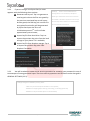
Delete: Tap it to delete the selected file from the Sycret Card; and
Detail: Tap it to show more details of the selected file in a popup window.
3.1.6
For multiple decryptions, long tap either of the encrypted files to show check boxes beside
the same; next, check a plurality or all of the encrypted files, tap Decrypt, and then optionally tap
Photos, Video, Documents, All Files, or the preset cloud storage to decrypt the selected file(s) and put
the decrypted file(s) back into the local storage of your phone or to upload the same to the preset
cloud storage.
Cloud Storages
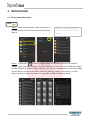
Step 1: Select and tap either of the cloud storages in the home page of the App to enter the
selected cloud storage encryption page.
Step 2: Tap the icon
to explore file(s) in the selected cloud storage. If you have made any
encryption or decryption, the folder “Encrypt” or “Decrypt” will appear here.
Page 7
www.kingmax.com