1
-- User Manual --
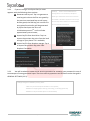
Step 3: Check either, a plurality, or all of the items,
tap Encrypt, and then optionally tap Photos, Videos,
Documents, All Files, or the preset cloud storage*(5)
(e.g. Dropbox) to immediately encrypt the selected
item(s) and then save the same into the Sycret Card
or upload the same to the selected cloud storage.
3.1.1
Tap the plus icon
3.1.2
Tap the camera icon
to take a photo or
immediately. The encrypted photo or video can be
optionally saved into the Sycret Card or either selected
cloud storage*(6).
please log in your account of the selected cloud
storage. You will be asked to allow the Sycret
Cloud app to access all of files and folders of your
account of the selected cloud storage.
*Note(6):
Additional charges for data transfer
service may be incurred, e.g. uploading and
downloading files, as they depend on your data
plan.
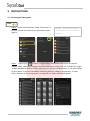
Tap the sorting icon
to make a popup menu appear, and then select and tap:
A to Z to list the available files in alphabetic order;
Z to A to list the available files in reverse alphabetic order;
Oldest First to list the available files in chronological order;
Latest First to list the available files in reverse chronological order.
3.1.4
Tap the icon
(with details).
3.1.5
Before accessing any cloud storage,
to create a new folder after inputting a new folder name.
record a video via your camera and then to encrypt it
3.1.3
*Note(5):
or
to show the image or video files in thumbnail view or list view
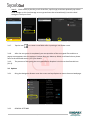
After the encryption is completed, each of the encrypted files will be shown with a small
red lock icon
appearing at the lower right side of its thumbnail. You can tap either of the
encrypted files and then a popup menu appears with the following options:
Preview: Tap it to view the selected image or video file in a popup small window;
Rename: Tap it to give the selected file another name;
Decrypt: Tap it to decrypt the selected file and put it back to the local storage of your
phone or to the preset cloud storage;
Page 6
www.kingmax.com