1
Table of Contents
Introduction............................................................................................5
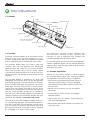
1.1 Anatomy..........................................................................................5
1.2 Overview.........................................................................................5
1.3 Example applications.......................................................................5
2. Getting Started...................................................................................6
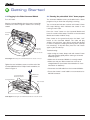
2.1 Plugging in the Command Module.....................................................6
2.2 Running the preinstalled “drive” demo program.................................6
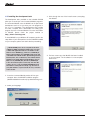
2.3 Installing the development tools.......................................................7
2.4 Installing the USB serial port............................................................8
3. Your First Project................................................................................10
3.1 Developing for the Command Module................................................10
3.2 Setting up a new project...................................................................10
3.3 Compiling your project......................................................................11
3.4 Downloading your project over the USB link.......................................12
3.5 Testing the “input” example program.................................................13
3.6 Creating your own project.................................................................14
4. Software Reference.............................................................................15
4.1 Declaring and using variables and registers on the ATMega168..........15
4.2 I/O Pin Basics.................................................................................15
4.3 The Command Module’s connectors.................................................15
4.4 The Digital I/O control registers........................................................16
4.5 DDRx: Setting the direction of a pin...................................................16
4.6 PORTx: Setting pullups on an input pin..............................................16
4.7 PORTx: Setting the state of an output pin..........................................16
4.8 PINx: Reading the state of an input or output pin...............................16
4.9 Using bitwise operators to selectively change bit values.....................17
iRobot Command Module Owner’s Manual