1
1
Introduction
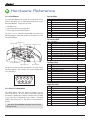
1.1 Anatomy
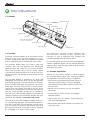
LED 1
LED 2
Hold Down Screws
Power LED
Power Switch
Top Left ePort
USB Indicator
USB
Soft Button
Reset
iRobot Create Connector
(under the Command Module)
Top Center ePort
Cargo Bay ePort
1.2 Overview
The iRobot Command Module works with iRobot Create,
giving you a way to write your own programs in C or C++
to control Create and to add custom hardware to expand
Create’s capabilities without tethering the robot to a PC.
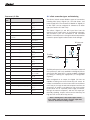
The Command Module plugs into Create’s Cargo Bay
Connector, and it has four expansion ports that provide
additional inputs and outputs for your custom hardware.
Three of the connectors are on the top surface, spaced
to provide easy attachment points for an array of sensors,
and one connector is on the back for easy access from the
cargo bay.
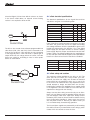
The Command Module is powered by an Atmel AVR
ATMega168 microcontroller which can be reprogrammed
by downloading programs from your Windows XP computer
with the included USB cable. Your programs can use the
iRobot Open Interface serial protocol to control Create’s
motors, lights, and speaker, and read its sensors. At the
same time, the microcontroller can directly interface with
your own custom hardware through its I/O connections.
Start with one of the example programs and expand and
change it to add your own functionality. Updates and more
information are available at www.irobot.com/create.
This manual assumes intermediate knowledge of the C or
C++ programming languages, including bitwise operators.
If you don’t know either of these languages, pick up a book
on C from a library or bookstore. You can also find a lot of
good reference materials and tutorials online by searching
for “C language” in an internet search engine.
iRobot Command Module Owner’s Manual
Top Right ePort
The manual also assumes a basic familiarity with
microcontrollers, including I/O pins, registers, and
interrupts, as well as experience with compilers and
interactive development environments (IDEs).
For more information on how to use the Command Module’s
software capabilities, please see the Software Reference
chapter and the Open Interface reference guide found at
www.irobot.com/create.
1.3 Example applications
Whether you are a hacker, educator, or robotics hobbyist,
the Command Module opens many exciting possibilities.
The applications are limited only by your imagination:
• T each robotics and programming at high schools or
universities. iRobot Create is a robust, affordable
robotic platform that enables students to each have
their own robot.
•A
dd new sensors and carry out your own robotics
experiments.
•C
reate a low-cost swarm of robots to investigate
collective behavior.
•H
ave fun with robot “art” exhibits, song and dances or
other entertaining behaviors.
•A
dd a camera and internet connection to create a low
cost sentry robot.