1
III FRONT PANEL OPERATION
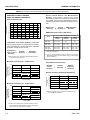
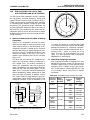
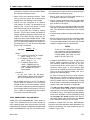
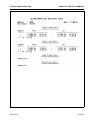
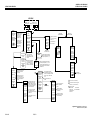
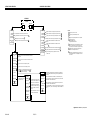
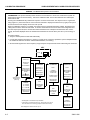
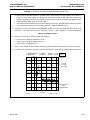
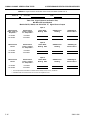
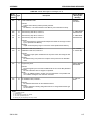
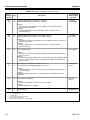
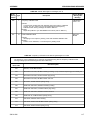
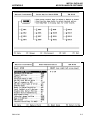
CURSOR KEY GROUP MENUS
KEY GROUP
CURSOR
ON/OFF
RELATIVE
CURSOR
CURSOR
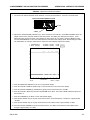
1: XX.XXdB
2: XX.XXdB
1: XX.XXdB
2: XX.XXdB
Amplitude readout at main cursor position for Trace 1.
Amplitude readout at main cursor position for Trace 2.
XX.XXXXGHz
(XX.XXXXGHz)
1
XX.XXXXGHz
(XX.XXXXGHz)
Frequency at main cursor position. 7
PRESS SELECT
FOR
CURSOR MENU
RELATIVE( )
Frequency of alternate sweep at main cursor position. 2
1: XX.XXdB
2: XX.XXdB
XX.XXXXGHz
(XX.XXXXGHz)
CHANNEL 1 3
MOVE CURSOR
TO
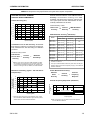
Amplitude readout at active (main) cursor position for Trace 1.
Amplitude readout at active (main) cursor position for Trace 2. 1
Frequency readout at active (main) cursor position for Trace 1. 7
Frequency readout at active (main) cursor position for Trace 2. 1
NOTES:
1 Displayed only if Trace 2 is used.
2 Displayed only if Alternate Sweep is used.
3 Display channel presently selected for cursor operation.
Amplitude difference between main and relative cursors for
Trace 1.
4 L signifies LEFT search
R signifies RIGHT search
BW signifies Bandwidth search
Amplitude difference between main and relative cursors for
Trace 2.
1
5 "dB" signifies search to absolute dB value. "dBr" signifies
search to value relative to current active cursor value
(setup menu) or to trace maximum value (Options menu)
Frequency difference between main and relative cursors. 7
EXCHANGE
REF CURSOR
Frequency difference between cursors for Alternate sweep.
CURSOR MENU
Select to interchange frequency positions of main and
relative cursors.
2
6 Subsequent use of the "dB" search function from the
Options menu will modify this selection.
7 All frequency information displayed by these menus is in
MHz for Models 5407/09/11. It is displayed in GHz for all
other models.
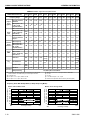
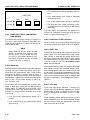
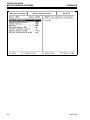
Moves the cursor to the maximum value of the measurement
trace data.
MAXIMUM
MINIMUM
NEXT MKR
Moves the cursor to the minimum value of the measurement
trace data.
Moves the cursor to the next frequency marker.
ACTIVE MKR
Moves the cursor to the active frequency marker.
dB SEARCH 4
X.XX dBr L
Initiates the cursor search function defined by the Setup
menu 6 . The search value (absolute or relative 5 ) is
indicated along with the search type.
CHANNEL 1 3
SETUP
OPTIONS
SET CHAN 2
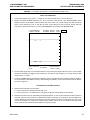
Changes Cursor operation
to opposite channel.
SEARCH FOR:USE
THEN
PRESS SELECT
SEARCH VALUE
XX.XX dB
CURSOR
OPTIONS
CHANNEL 1 3
Initiates a search that places active
cursor on maximum peak value and
relative cursor on minimum value.
REPEAT SRCH
EACH SWEEP
Initiates search to value relative to
maximum trace value. Search type
and search value as set in Setup
Menu.
Repeats the selected cursor search
for each measurement sweep.
Enter the amplitude value for selected cursor search function (in dB).
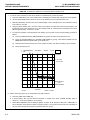
Sets up a dB search to the left of the present main cursor position. Value
searched for is the dB SEARCH value.
LEFT
RIGHT
MIN-MAX
0.00 dBr L
FROM MAX
SEARCH TYPE
"RELATIVE" will be displayed here if using Relative cursor (SEARCH
TYPE= Relative). Will be blank if using active cursor (SEARCH TYPE=
absolute).
BANDWIDTH
MAIN MENU
Sets up a dB search to right of the present main cursor position. Value
searched for is the dB SEARCH value.
Sets up a bandwidth cursor search. Set cursor within search range before
initiating search . (The two cursors will diverge to indicate bandwidth - see
text.)
USE
THEN
PRESS SELECT
MAIN MENU
USE
THEN
PRESS SELECT
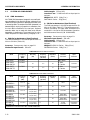
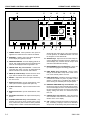
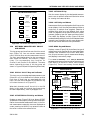
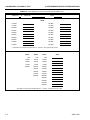
Figure 3-22. CURSOR Key Group Menus
54XXA OM
3-31/3-32