1
© Theme Zoom, 2007
Article level, it is important to include only those synonyms that have a tightly focused
theme.
Screen and Column Definitions
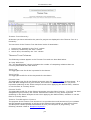
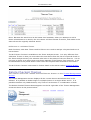
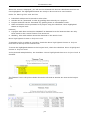
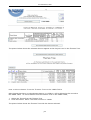
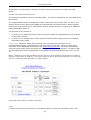
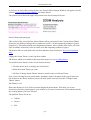
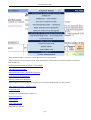
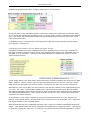
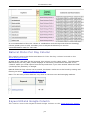
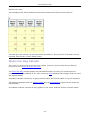
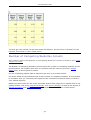
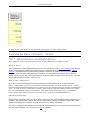
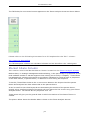
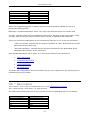
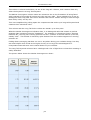
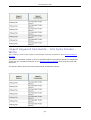
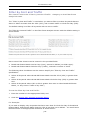
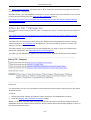
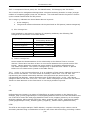
The Synonym Verification Screen is shown below. The colum n definitions are described below
the picture.
The original Parent Theme is displayed in black at the top of the sc reen and is in bold. The
Search Engine Proven Synonyms (SEPS) are listed below the Parent Them e. When multiple
themes are drilled into at once, each Parent Theme is black and bold, and all of its SEPS are
listed immediately below it.
The purpose of this screen is:
1.
2.
To allow you to select the Parent Them e synonyms which are appropriate for the analysis
of this Parent Theme.
To allow you to indicate which of the selected Parent Them e synonyms are for Keyword
Generation Only (KGO).
Important: Please be aware that selecting over six synonyms per theme is not
recommended because it can generate very large lists of keywords, which can take quite
some time to be displayed/refreshed on the Zoom Analysis Screen. We have noticed that
everyone ignores this advice and drills into more than six synonyms anyway. Be aware that
you will experience some sluggishness in refreshing the Zoom Analysis Screen when you do
so.
Note: Please do not use the Back key to return if the synonym verification screen is
taking a long time to display. This will cause an error with the program, you will get
an error message and will have to begin again.
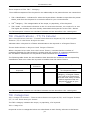
Synonym Verification Screen Columns:
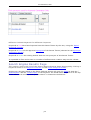
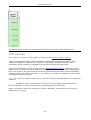
"Use"
To select a synonym as "relevant" to your Parent Theme, check the c heckbox in the "Use"
p29