1
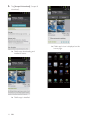
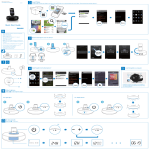
Select your desired song through Songbird
app from your portable device, and tap .
Install Songbird on your computer
1
2
3
Go to www.philips.com/songbird.
Download the latest Songbird application.
Follow on-screen instructions to install
Songbird on your computer.
Sync music from PC to Android
powered device
Note
( Make sure that both your computer and Android
powered device are installed with Songbird app.
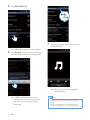
1
Connect your Android powered device to
the computer with a USB cable.
» A prompt window appears.
2
Select [Managing device using Philips
Songbird] (Managing device using Philips
Songbird).
» You now can enjoy your music through
the device.
» The Songbird user interface is
displayed.
3
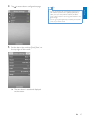
Select [Auto Sync Music] (Auto Sync
Music) and [Sync all music and playlists]
(Sync all music and playlists).
EN
21
Engl i s h
7