1
ENG
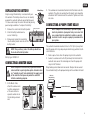
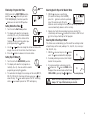
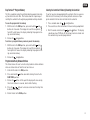
Seasonal Adjustment
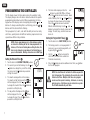
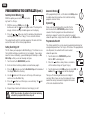
Manually Run All Stations
Seasonal Adjust is used to make global run time changes without
re-programming the entire controller. To use the seasonal adjustment
feature:
1. Turn dial to MANUAL – ALL STATIONS
position.
1. Turn the dial to the SEASONAL
ADJUSTMENT position.
SEASONAL ADJUSTMENT
2. The display will now show a flashing number
followed by a %, as well as the bar graph which
always remains on the display. Press the
or
button to adjust the percentage of the seasonal adjustment. Each
bar on the graph represents 10%. This feature can adjust the controller from 10% to 150% of the original program.
To view the adjusted run times, simply turn the dial to the RUN TIMES
position, the displayed run time will be updated accordingly as the
seasonal adjustment is made.
NOTE: The controller should always be initially
programmed in the 100% position.
ALL
MANUAL-ALL STATIONS
2. Select program A, B, or C by pressing the
ALL
button.
3. Station run time will flash in the display. Use the
or
button
to select the amount of time for a station to water if different from
the run time displayed.
4. Use the
button to move to the next station.
5. Repeat steps 3 and 4 to customize each station.
6. Press the button until you reach the station at which you would
like watering to begin.
Turn the dial clockwise to the RUN position (the controller will water
the entire program beginning with the station number last left in the
display, then return to the automatic mode with no change in the
previously set program).
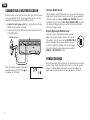
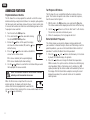
One Touch Manual Start and Advance
You can also activate all stations to water without using the dial.
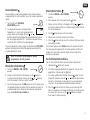
Manually Run a Single Station
1. Hold down the
1
1. Turn dial to MANUAL – ONE STATION
position.
MANUAL-ONE STATION
1
2. Station run time will flash in the display. Use the button to
move to the desired station. You may use the
or
button to
select the amount of time for a station to water.
3. Turn the dial clockwise to the RUN position to run the station (only
the designated station will water, then the controller will return to
automatic mode with no change to the previously set program).
Also see One Touch Start and Advance.
button for 2 seconds.
2. This feature automatically defaults to program A. You can select
program B or C by pressing the
button.
3. The station number will be flashing. Press the button to scroll
through the stations and use the
or
button to adjust station
run times. (If no buttons are pressed for a few seconds during
step 2 or 3, the controller will automatically begin watering).
4. Press the button scroll to the station you wish to begin with.
After a 2 second pause, the program will begin. At any time during
the manual cycle, you can use the or buttons to navigate
from station to station manually.
10