1
CURRENT TIME/DAY
ENG
PROGRAMMING THE CONTROLLER
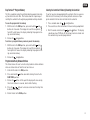
The XC display shows the time and day when the controller is idle.
The display changes when the dial is rotated to indicate the specific
programming information to enter. When programming, the flashing portion of the display can be changed by pressing the
or
buttons. To change something that is not flashing, press the or
buttons until the desired field is flashing.
Three programs A, B, and C, each with the ability to have four daily
start times, permit plants with different watering requirements to be
separated on different day schedules.
NOTE: A basic programming rule is that whatever symbol
or character is flashing will be the item programmed. For
instance, if the hour is flashing when setting the time, the
hour can be changed or programmed. For illustration purposes in this manual, flashing characters are in GRAY type.
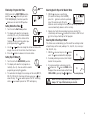
Setting the Date and Time
1. Turn the dial to the CURRENT TIME/DAY position.
2. The current year will be flashing. Use the
or
buttons to change the year. After setting
the year, press the button to proceed to
setting the month.
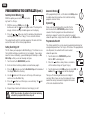
3. The month and day will be in the display.
The month will be flashing and the
icon
will be displayed. Use the
or
buttons
to change the month. Press the
button to
proceed to setting the day.
4. The day will be flashing and the
icon
will be displayed. Use the
or
buttons
to change the day. Press the button to
proceed to setting the time.
7
CURRENT TIME/DAY
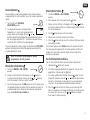
5. The time will be displayed. Use the
and
buttons to select AM, PM, or 24 hour.
Press the button to move to hours. Hours
will be flashing. Use the
and
buttons
to change the hour shown on the display.
Press the button to move to minute.
Minutes will be flashing. Use the
and
buttons to change the minutes shown on the
display. The date, day, and time have now
been set.
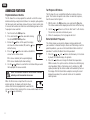
Setting the Program Start Time(s)
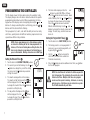
1. Turn the dial to the START TIMES position.
2. The factory preset is set on program A. If
necessary, you can select program B, or C
by pressing the
button.
START TIMES
3. Use the
or
button to change the
start time. (The start times advance in
15 minute increments).
4. Press the
button to add an additional start time, or
for the next program.
button
NOTE: One start time will activate all stations sequentially in that program. This eliminates the need to enter each
station’s start time. Multiple start times in a program
can be used for separate morning, afternoon, or evening
watering cycles. Start times may be entered in any order.
The XC will automatically sort them.