1
ENG
Test Program of All Stations
ADVANCED FEATURES
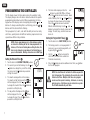
Programmable Sensor Override
The XC allows the user to program the controller so that the sensor
disables watering on only desired stations. For example, patio gardens
that have pots under overhangs and roofs may not receive water when
it rains and will continue to need to be watered during periods of rain.
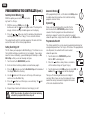
To program sensor override:
1. Turn the dial to the RUN position.
RUN
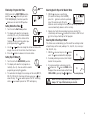
The XC allows the user a simplified method for running a test program. This feature will operate each station in numerical sequence,
from the lowest to the highest.
1. With the dial in the RUN position, press and hold the
button.
The station number will be displayed and the time will be flashing.
2. Use the
or
buttons to set the run time from 1 to 15 minutes.
The run time needs to be entered only once.
2. Press and hold the
button down while turning
the dial to START TIMES position.
3. After a 2 second pause, the test program will start.
3. Release the
button. At this point, the display
will show the station number, ON, and the
icon,
will be flashing.
This feature allows you to quickly diagnose wiring problems with
your controller. Instead of having to check each field wiring circuit for
potential problems, you can use the Hunter Quick Check circuit test
procedure. To initiate the Quick Check test procedure:
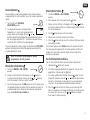
4. Press the
or
button to enable or disable the
sensor for the station shown.
ON = Sensor enabled (will suspend irrigation)
OFF = Sensor disabled (will allow watering)
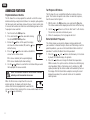
Hunter Quick Check™ Diagnostics
Sensor Enable
1. Press the , ,
, and
buttons simultaneously. In the standby mode, the LCD will display all segments.
Sensor Disabled
5. Use the or buttons to scroll to the next station that you would
like to program the sensor override.
NOTE: The controller default is for the sensor to disable
watering on all zones when rain occurs.
When the XC receives an input from the sensor to
disable watering, the display will indicate those
stations that have been programmed to override the
sensor. A station that is running in the sensor override mode will flash
the
and icons alternately.
11
2. Press the
button once to begin the Quick Check procedure.
Within seconds, the system searches all stations for detecting any
circuit problems. When a field wiring short is detected, an ERR
symbol preceded by the station number will momentarily flash on
the display. After the Quick Check completes running the circuit
diagnostic procedure, the controller returns to the automatic
watering mode.