1
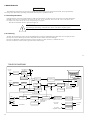
6.MAINTENANCE
WARNING
The followin g instructions are for use by qualified per sonnel only. To avoid electrical s hock, do not perform any
servicing ot her t han i n the operating ins truc tions unless you are qualifie d to do so .
6.1 Fuse Replacement
If t he fuse bl ows, the power lam p indicators will not li ght a nd the os cillo scop e wi ll not operate. The fuse should not
normall y o pen unless a proble m has devel oped i n the u nit. Try to d etermi ne and correc t the cause o f the blown fuse.
The rep1ac e only w ith a f use of the co rrect rating an d type (see pa ge 9)
The fuse is l ocated on the rear panel (see fig.4-2) .
!
WARNING For continued fire protection. Replace fuse onl y with 250V fuse of the
Specified type and rat ing, and disconnect power cord before replaci ng fuse.
6.2 Cleaning
To clean the osci llosc ope, use a soft clot h da mpened in a solution of mild dete rgent and water. D o not spray cl eaner
direct ly on to the oscilloscope because it may le ak into th e cabinet and cause dam age .
Do not use chemi cals cont aining benzin e, benzene, toluene, xylene, acet one, or si milar sol vent s.
Do not use abrasi ve cleaners on any port ion o f the oscilloscope .
33
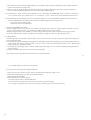
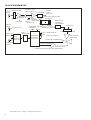
7.BLOCK DIAGRAM
CH1 SIGNAL
OUTPUT
CH 1(X )
INPUT
CH 1 ATT
CH1
PREAMP
CH1
TRIG(X-AXIS)
PICKUP AMP
CH2(Y)
INPUT
CH2 ATT
VERT
SIGNAL
CH 2
PREA MP
VERTICAL
MODE SW ITCH
VERTIC AL
O UTPUT A MP
SWITCHING
LOGIC
Z-AXIS
AMP
CRT CIRCUIT
Z-AXIS
INPUT
TRIG
CH2
TRI G PICKUP AMP SIGNAL
TRIG SWITCH
- H. V.
H. V. SUPPLY
X-A XIS SIGNAL
CH 1
CH2
TRIGGER INPUT
AMP
TRIGGER
GENERATO R
EXT
LINE
AUTO CIRCUIT
LINE TRIG
( A) SWEEP
GENERATOR
FREE RUN
SIGNAL
HORIZON TAL
SWITCHI NG
TO EACH
BLOCK
2Vp-p/1KHz
SQUARE- WAVE
34
HORIZONTAL
OUTPU T AMP
AC LINE
P OWE R S UP P LY
50/60 Hz
CALIBRATOR