1
3.1.2
Main Menu – Options
Comm – Activate the Comm Properties dialog to change the serial communication parameters between the
host and the board. These parameters are used only for serial communication with a running FPGA
application. For programming the FPGA and SPI, a low level driver is used to communicate with the PSoC,
independent of the serial values set. For indirect programming of the BPI, AvProg automatically downloads a
special server platform to the FPGA, which communicates at 115200, again independent of the values set in
the Comm Properties dialog.
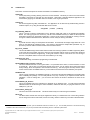
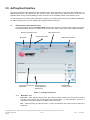
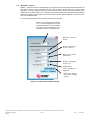
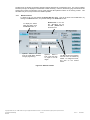
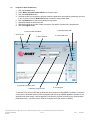
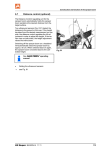
The Comm Properties dialog and its control functions are shown below.
Select a Comm Port from the dropdown
list. If the board is plugged in, the first
port shown will be the one connected to
the board. Only ports registered on the
host will be shown in the dropdown list.
Baud rate in bits per
second
Number of data bits
to use. Use 8 or 7.
Parity can be None,
Odd or Even.
Number of Stop Bits
can be 1 or 2.
Hardware flow
control. Only None is
supported.
Return all values to
their default settings
(shown)
Figure 18 - Communication Properties Dialog
Copyright © 2006 Avnet, Inc. AVNET and the AV logo are registered trademarks of Avnet, Inc. All other brands are property of their respective owners.
Avnet Electronics Marketing
Released
21 of 42
Rev 1.2
03/21/2009