1
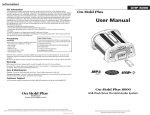
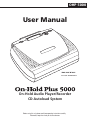
OHP 5000 User Manual
Set-up
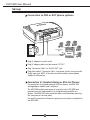
Connection to PBX or KEY phone systems
ON
OFF
12V DC
TRIGGER
AUX IN
AUDIO OUT
VOLUME
POWER
music-on-hold
input
PBX or Key
System
1
Plug AC adapter into wall outlet.
2
Plug AC adapter cable into jack marked "DC12V".
3
Plug "Connector Cable" to "AUDIO OUT" jack.
4
Plug other end of "Connector Cable" into phone system's music-on-hold
(moh) input jack. NOTE: If the jack cannot be located, contact phone
vendor for information.
Connection to Standard Analog or KSU-less Phones
For connection to standard analog or KSU-less phones, an MOH 500i
analog adapter module card is required.
The MOH 500i module card connects internally to the OHP 5000 and
provides music-on-hold capability to standard analog and KSU-less
phones. The MOH 500i interconnection cables are accessed by removing
the steel plate on the rear panel.
For specific connection information, please see instructions included with
the MOH 500i.
2