1
N.B. Plugging in a TRAM the wrong way round may result in the destruction of the TRAM or the motherboard.
The IMS B008 has some components mounted on the top (as opposed to the
underside) of the board in the positions occupied by some TRAM slots (slots
8 and 9). When plugging a TRAM into these positions, it will be necessary
to fit ”stand-off” strips to the TRAM pins. These are 8-way pin strips which
plug into the IMS B008, and raise the TRAM above the motherboard. These
”stand-off” strips are supplied fitted to INMOS TRAMs.
4.4
Installing an IMS B008 (with a single TRAM fitted)
The following procedure should be followed:
1. Remove the TRAM that is to run the TDS from its protective packaging, observing the appropriate handling precautions.
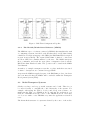
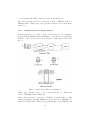
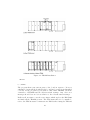
2. Plug this TRAM into slot 0 of the IMS B008. Ensure that the pin
1 indicator on this TRAM lines up with the triangle on TRAM slot
0 of the IMS B008. Note that the 16 pins on the TRAM that carry
the signals should plug into the required slot. Thus, for example, a
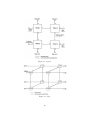
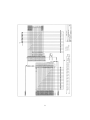
size 4 TRAM to plug into slot 0 will occupy slots 0, 4, 7 and 3 (see
Fig. 11a); a size 2 TRAM to plug into slot 1 will occupy slots 1 and 5
(see Fig. 11b).
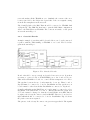
3. Insert link jumper plugs on top of this TRAM in all the slots that do
not carry any signals. This is to ensure continuity of the pipeline. A
jumper is required at one end of each empty slot only, with its marker
band lining up with the triangle on the motherboard. This is also
illustrated by Fig. 11. If TRAMs are to be stacked on top of each
other, the link jumpers have to be removed from the slots which are
to be used for stacking.
4. Fill the other slots on the IMS B008 with TRAMs as required. They
need not be filled in numerical order so long as the pipe is maintained
using pipe jumpers.
5. Fit link jumper plugs (supplied) into the slots on the motherboard
that are not being used. This stops the pipeline from being broken.
This is illustrated in Fig. 11c, in which the empty slots (8 and 9) have
been ”jumped out” to complete the pipeline.
6. Remove the cover of the IBM PC.
7. Choose the expansion slot into which the IMS B008 is to be inserted.
Do not use the slot nearest the edge in a PC-AT, because it does not
26