Transcript
Introduction:
Wireless Lighting Control
ZDS-110NA
Dimming Switch Module
USER MANUAL
Thank you for choosing ZDS-110NA Z-Wave control product.
Our Z-Wave enabled product allows user to remotely control
lighting, home appliance, and make home control easy at low
installation / maintenance cost. You may begin with a few ZWave enabled devices or build up a complete home automation
system with our products.
The ZDS-110NA Dimming Switch Module is a Z-Wave enabled
device and fully compatible with any Z-Wave enabled network. It
allows remote Dimming or On/Off control of specified lamps;
Each module is designed to act as a repeater, which will retransmit the RF signal to ensure that the signal is received by its
intended destination by routing the signal around obstacle and
radio dead spots.
Key Features:
-
Glossary
Inclusion
Add a Z-Wave device to the network.
Exclusion
Delete a Z-Wave device from the network.
Scene
A collection of Z-Wave devices configured
to turn to a specific level, setting, mode, or
perform an operation. Scenes are usually
activated by a controller, timed event, or
specific conditions.
Association
Associations are used to set up one node
to automatically contact another node
when the first is triggered. For example
you can set up a door sensor (primary
node) to turn on the light (secondary node)
when the door has been opened.
-
Configurations:
A
B
C
D
E
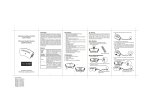
3. Plug the Dimming Switch Module into a wall AC outlet.
Basic Operation
The connected light can be turned ON in two ways:
1. Manual control with the push button on the ZDS-110NA.
2. Z-Wave remote controller.
Push button
4. Turn the light On/Off by pressing the button.
(This is a toggle switch - Press the button to turn the light On
if it is in Off stage and vice versa)
5. Adjust the brightness level by pressing and holding the
button. Release the button when the desired level is attained.
(This is also a toggle function Press and hold the button to
dim-up the light and press and hold the button again to dimdown the light)
Z-Wave remote controller
Manual ON/OFF/DIM function
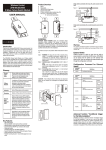
ON/OFF/DIMMER/PROG Push button
Always on outlet
Z-Wave controlled outlet
AC plug
Selective switch (On/Off or Dimming Model)
1. Switch to DIMMER mode.
A
6. In the SWITCH mode, turn the light On/Off by pressing the
button.
(This is a toggle switch - Press the button to turn the light On
if it is in Off stage and vice versa)
SWITCH
Devices, lights and nodes are all terms to
describe an individual Z-Wave device.
These are all interchangeable when
setting up your Z-Wave network.
Warning
The incandescent light plugged into the Z-Wave controlled outlet
on this module must not exceed 330 watts. DO NOT connect
fluorescent light. Plugging a non-resistive load such as
fluorescent light or a device with a motor into the Z-Wave
controlled outlet may result in damage to the ZDS-110NA
Dimming Switch Module and will void the warranty.
DIMMER
Device/
Light/
Node
!
Selective slide switch for DIMMER/SWITCH mode.
High output power in SWITCH mode.
High output power in DIMMER mode.
One Z-wave controlled AC outlet for standard incandescent
lighting.
One Always-ON pass-through AC outlet.
Remote ON/OFF and Brightness control via the Z-Wave
controller.
Manual ON/OFF and Brightness control with the front panel
push button.
Fine appearance designed.
Space efficient design.
Does not block the lower outlet when plugged into the upper
outlet of a duplex wall receptacle.
(This assumes that the duplex receptacle is mounted with the
ground pin down.)
Plugs and cords for connected devices route to the side
allowing close placement of furniture.
Grounded 3-wire power connection for safety.
Over temperature protection.
2. Plug the lamp into the Dimming Switch Module outlet which
is labelled with "Z-Wave".
Ensure that the loading does not exceed 330 Watts.
C
B
Z-Wave Certified
Wireless Lighting Control
D
E
1
Lower than 330 Watts Incandescent
or 500 Watts Resistive Load
Lower than 330 Watts Incandescent
or Resistive Load
2
3
4
68x128mm
Z-Wave Remote Control
Include or exclude the Dimming Switch Module from the existing
Z-Wave home control network with your primary controller.
- Refer to your primary controller instructions to process the
inclusion / exclusion setup procedure.
- When prompted by your primary controller, tap the button.
- The primary controller should indicate that the action was
successful. If the controller indicates the action was
unsuccessful, please repeat the procedure.
- Once the Dimming Switch Module is part of the network, the
same basic procedure is used to add the Dimming Switch
Module to groups or scenes. Refer to the primary controller's
instructions for details.
TECHNICAL SPECIFICATIONS
Rating input:
Input frequency:
RF frequency:
Max. range:
Restoring Factory Defaults
All Configuration Parameters can be restored to their factory
default settings by using your primary controller to reset the
device. (delete from the network)
60Hz
908.42MHz (ZDS-110NA)
up to 25m (line of sight between the Wireless
Controller and the closest Z-Wave receiver
module.)
Double outlets:
Z-Wave controllable
"Always On" pass through
Selectable switch:
DIMMER(Dimming/ON/OFF) or
SWITCH(ON/OFF) mode
Max. output power of
Z-Wave controlled:
DIMMER:
Max Incandescent load 330W 2.75A
SWITCH:
a. Max Incandescent Load 330W 2.75A
b. Max Resistive Load 500W 4.16A
All On/All Off functions
Depending upon your primary controller, the Dimming Switch
Module can be set to respond to ALL ON and ALL OFF
commands up to four different ways. Some controllers may not
be able to change the response from its default setting. Please
refer to your controller's instructions for information on whether or
not it supports the configuration function and if so, how to change
this settings.
The four possible responses are:
- It will respond to ALL ON and the ALL OFF commands
(default).
- It will not respond to ALL ON and ALL OFF commands.
- It will respond to the ALL OFF command but will not respond
to the ALL ON command.
- It will respond to the ALL ON command but will not respond to
the ALL OFF command.
120Vac
Max. power of "Always On"
pass through outlet:
Resistive load 1200W
Max. power in total for both
Z-Wave Outlet and Always
on Pass through outlet:
Resistive load 1400W
Connect ability:
DIMMER:
Can only be connected to incandescent lamp,
Resistive load.
SWITCH:
Can be connected to incandescent lamp,
Resistive load.
Over Temperature protection:
Detected internal temperature, and cut off
output once OTP triggered.
(Remark: Under over loading or temperature
situation, it will fail to start up).
EMC:
Safety:
Meet FCC15 Class C and RSS 210 issue 8.
Meet standard UL244A edition third revision
2010-3-4 and CSA C22.2 No.14 11th with
revision date 2010-2-1 and UL1310 fifth date
2005-05-03.
126X68X40mm
180g
Dimension (L x W x H):
Weight:
Storage:
Operation Temperature:
Relative Humidity:
Environment:
o
-10~60 C
0~40oC
5~95%
Indoor use only
Certifications
IC information
UL Listed:
This power unit is intended to be correctly orientated in a vertical
or floor mount position.
FCC Information
FCC ID : ZGID9190A01
This device complies with Part 15 of the FCC Rules.
Operation is subject to the following two conditions:
(1) this device may not cause harmful interference, and
(2) this device must accept any interference received, including
interference that may cause undesired operation.
Warning: Changes or modifications to this unit not expressly
approved by the party responsible for compliance could void the
user authority to operate the equipment.
NOTE: This equipment has been tested and found to comply
with the limits for a Class B digital device, pursuant to Part 15 of
the FCC Rules. These limits are designed to provide reasonable
protection against harmful interference in a residential installation.
This equipment generates, uses and can radiate radio frequency
energy and, if not installed and used in accordance with the
instructions, may cause harmful interference to radio
communications.
However, there is no guarantee that interference will not occur in
a particular installation. If this equipment does cause harmful
interference to radio or television reception, which can be
determined by turning the equipment off and on, the user is
encouraged to try to correct the interference by one or more of
the following measures:
- Reorient or relocate the receiving antenna.
- Increase the separation between the equipment and receiver.
- Connect the equipment into an outlet on a circuit different
from that to which the receiver is connected.
- Consult the dealer or an experienced radio/TV technician for
help.
IC : 9548A-D9190A01
This device complies with Industry Canada licence-exempt RSS
standard(s). Operation is subject to the following two conditions:
(1) this device may not cause interference, and
(2) this device must accept any interference, including
interference that may cause undesired operation of the
device.
This device complies with RSS-310 of Industry Canada.
Operation is subject to the condition that this device does not
cause harmful interference.
There is no user serviceable parts in the
Dimming Switch Module.
To avoid the risk of electric shock, the input prong comes with a
round grounding plug. The switch module can only be plugged in to
the power inlet with the grounding plug. Please contact a qualified
electrician to replace the power inlet if it has no grounding inlet. Do
not change the plug of Dimming switch module in any way.
RISK OF FIRE
RISK OF ELECTRICAL SHOCK
RISK OF BURNS
DID NOT QUALIFY FOR INSTRUMENT OF MEDICAL AND LIFE
SUPPORT EQUIPMENT
Z-Wave Dimming Switch Module never got qualified certificate to
supply power for medical instrument or any life support equipment.
This Dimming Switch Module is complied with the Z-Wave standard
of open site, line of sight transmission distances of up to 25m. Actual
RF performance of Dimming Switch Module in a home was affected
by the number of barrier/construction between the remote controller
and the destination unit, in meanwhile, relies on the number of ZWave enabled devices installed in the control network.
WARRANTY
ONE-YEAR LIMITED WARRANTY: Remotec warrants this product to
be free from defects in materials and workmanship under normal use
and service for a period of one year from the original date of
purchase from the distributor or dealer.
REMOTEC shall not be liable for:
- Damages caused by defective devices for indirect, incidental,
special, consequential or punitive damages, including, inter alia,
loss of profits, savings, data, loss of benefits, claims by third
parties and any property damage or personal injuries arising from
or related to the use of the device.
- Service trips to provide instruction on product use.
- Shipping costs for replacement products.
This warranty is limited to the repair or replacement of this product
only, if the purchase date cannot be substantiated, the warranty
period will begin on the date of manufacture as indicated on this
product. All warranty claims must be made to Remotec appointed
distributors or dealers during the applicable warranty period. This
warranty gives you specific legal right and you may also have other
rights which vary in each country. Please contact Customer Service
at:
Remotec Technology Limited
E-mail: [email protected]
http://www.remotec.com.hk
Specifications subject to change without notice due to continuing product improvement
5
68x128mm
6
F820-8011-0000
7
8
9