1
3. Select chapter what
you need
(1)When playing disc, you can press up/down chapter on the touch screen or panel for
selection, and you can also use remote control to select chapters.
Note: according to multi chapters DVD disc, its will not be effective by using remote
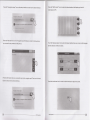
Press MENU button to enter user setting main menu, then select DVD setup by up/down
button and do details setting.
Note: on DVD menu, menu up/down button is for up or down moving option, left/right
button is for left or right moving option, confirm button is for confirmation effective. Press
MENU button to exit DVD setup at any time.
control flgure buttons for selection.
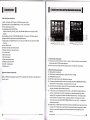
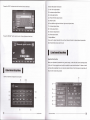
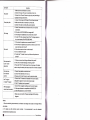
1).System Setup
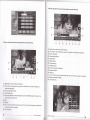
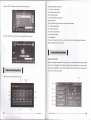
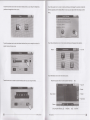
(2)Press GOTO button on remote control then below menu will be displayed.
Press "Set up" key to enter the system setup menu.
To setup the TV system, Video output, Display mode, pin, Level, Default as below menu.
Then press left/right button to move cursor, you can select title/chapter/play time, and
then press figures to enter your target position, then press confirm button to play the
relevant chapter.
4, Forward/rearward
Press forward/rearward button on touch screen, press once its will forward/rearward by
x2lx4/x8/x16x20 speed, long press forward/rearward button on remote control can also
operate the above function.
5. Repeat playing
When disc playing, press AMS button on the remote control, the original chapter will be
repeat played, press again all of chapters will be repeat played. Then press again to cancel
repeat playing.
6. Random playing
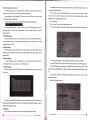
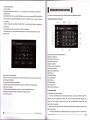
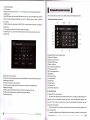
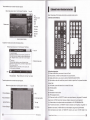
You can setup the Display, Sound, Language, System etc. Operations as below:
(1). Use LEFT/RIGHT key to select function in Menu Function List, the ltem list appears.
When disc playing, press LOC (RDM) button on the remote control, the unit will be on
random playing status, press again to cancel random playing.
7. Program playing
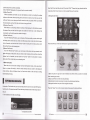
When disc playing, press ST (PROG) button on remote control, the panel will display
(2). Use UP/DOWN key to select item, press ENTER key to enter the value list of the
item.Then Press UP/DOWN key to select the wanted value and press ENTER back to item
Iist.
below menu.
(3). After setup, select Exit Setup Menu among items, or press pLAy key to exit the
system setup menu.
System setup menu as below:
Then you can input whatever chapter you like by the relevant number, the direction key
oan be adlueted up/down/left/right. When you programmed your favorite songs, press PLAY
button to pley eongs one by one.
t.
DVD
rrtup
On DVD mode, you can special setup DVD, the setting method as following.
tfr
DVD Player Operation
DVD Player Operation
ffi