1
Atlas User Guide
4. Operation
4.1.2
Securing and adjusting the depth of the sacral support
Securing the sacral support
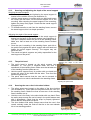
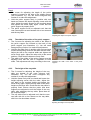
• The clamp for loosening and tightening the sacral support is
located on the middle column (see illustration 3).
• Hold the sacral support in position with one hand and loosen
the clamp with the other. Lift the sacral support out of the
mounting. After returning the sacral support to the mounting,
tighten the clamp firmly again. Check that the sacral support
is properly fixed.
• To facilitate transfer to and from the standing frame, remove
the sacral support; this is a simple operation.
Illustration 3:
Fastening the sacral support.
Adjusting the depth of the sacral support
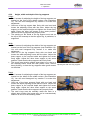
• The handle for adjusting the depth of the sacral support is
located on the back of the sacral support (see illustration 4).
This part is adjusted when the user is in the standing frame.
Make sure that at least two of the standing frame’s brakes
are on.
• Once the user is standing in the standing frame, push his or
her pelvis firmly against the pelvic support with one hand and
tighten the sacral support securely. The support may not
pinch the user.
• The sacral and pelvic supports are jointly responsible for the
total support of the pelvis.
4.1.3
The pelvic band
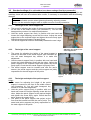
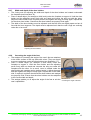
• The pelvic band is located on the pelvic support (see
illustration 5). This part is adjusted when the user is
transferred to the standing frame. Make sure that at least two
of the standing frame’s brakes are on.
• Hold the pelvic support firmly in position with one hand and
loosen the velcro on the band with the other. Then feed the
band through the slot.
• The pelvic band ensures that the user can be secured in
position when he or she is transferred to the standing frame.
Illustration 4:
Adjusting the depth of the sacral
support.
Illustration 5:
Adjusting the pelvic band.
4.1.4
Securing the user’s feet in the shoe holders
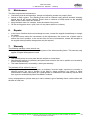
• The safety straps are located on the sides of the shoe holders
(see illustration 6). These parts are adjusted when the user is in
the standing frame. Make sure that at least two of the standing
frame’s brakes are on.
• Hold the user’s foot firmly in the shoe holder with one hand. Place
the safety strap across the user’s instep in the quick fastener and
click it downwards. Check that the strap is properly tightened.
Ensure that the strap does not pinch.
• The shoe holders with safety straps ensure that the user’s feet
remain vertically under the trunk so that he or she can maintain
his or her standing position.
Illustration 6:
Adjusting the safety straps.
No part of this User Guide may be reproduced, stored in a retrieval system, or published, in any form or by any means, electronic,
mechanical, photocopying, recording or otherwise, without the prior written permission of Atlas Revalidatie Techniek BV.
© 2007 Atlas Revalidatie Techniek B.V.
8