1
3. Using the EndoFLIP® System, Normal Mode
This section describes how to use the EndoFLIP® System, including:
•
Inflating the balloon
•
Using EndoFLIP® System tools
•
Deflating the balloon
•
When the procedure is complete
•
Alarms
For BaroStat Mode, see the BaroStat chapter.
3.1 Inflating the balloon
Inflating the balloon allows the EndoFLIP® System to visualize and measure
the area of interest for clinical evaluation. You can inflate the balloon in either
of two ways:
•
Use INFLATE/DEFLATE and STOP to inflate the balloon to a particular
volume or pressure (up to the balloon volume and pressure alarm limits
at the inflate rate set in the configuration menu).
•
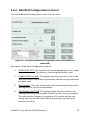
Use the configuration menu (CONFIGURE BALLOON INFLATE) to select the
rate of balloon inflation, and to set the balloon volume at which the unit
will automatically stop inflation, after pressing INFLATE on the main
screen.
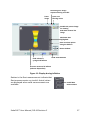
To begin inflation, touch INFLATE at the main screen and the syringe driver
starts to advance the syringe plunger and inflate the balloon. The screen
shows a graphic representation of the measurement area and syringe and
balloon inflation status (Figure 11).
To stop inflation at any time, touch STOP. Once stopped, you can touch
INFLATE to resume inflation or DEFLATE to empty the balloon catheter.
16
EndoFLIP® User Manual, DD-41 Revision C