1
GR8BIT knowledge base article #KB0009
•
•
•
•
•
•
Ensure that CPU board’s SJ1 “SYSCLK” SMD jumper is soldered in
(supplying GR8BUS clock to the CPU board), and SJ7 “CPUCLK” SMD
jumper is not soldered in (not supplying GR8BUS clock to the CPU chip);
Remove CPU board’s R2 resistor, and set it aside to solder as R8 later;
Ensure CPU board’s SMD jumper SJ4 “GTC” is not soldered (as gate C of
IC1 will be used in the braking circuit;
Solder CPU board’s clock generation circuit: socket for IC1, C1, C2, R1,
and XTAL1;
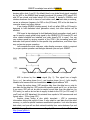
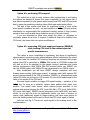
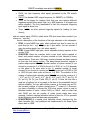
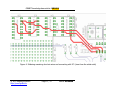
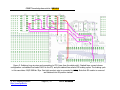
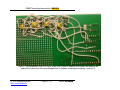
Solder sockets for IC3, IC4, IC5 and IC6, RN5 and R8, and connect them
as shown on fig. 3, fig. 4 and fig. 5. Please
pay attention to the dashed wires, which
show maximal (in terms of length of braking
period of time) configuration. You can choose
different settings according to the circuit
diagram on fig. 2;
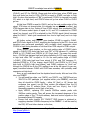
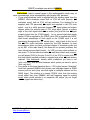
Solder decoupling capacitors in point-to-point
manner (fig. 7). Ensure their pins do not
short-circuit and any pins/wires in the circuit.
Now your GR8BIT has two clock systems running simultaneously – CLKLO,
which is generated by the VDP, and has default frequency of 3.58MHz, and
CLKHI, which runs according to the crystal you installed as XTAL1 of the CPU
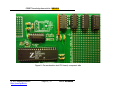
board. See fig. 6 and fig. 7 for the images of our test CPU board.
© 2012 Eugeny Brychkov
http://www.gr8bit.ru
Page 9 / 17
Status: Released