1
Table of contents
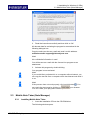
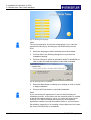
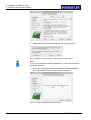
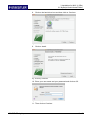
Table of contents
1 Overview ........................................................................................................................................... 5 1.1 Key features............................................................................................................................. 5 1.2 Package content ...................................................................................................................... 5 1.3 Notes on safety ........................................................................................................................ 6 1.4 System requirements ............................................................................................................... 6 1.5 The STAEDTLER digital pen ................................................................................................... 7 1.5.1 Inserting / replacing a refill ......................................................................................... 7 1.5.2 Inserting / replacing the pen battery .......................................................................... 8 1.6 The receiver ............................................................................................................................. 9 1.6.1 Description of receiver ............................................................................................... 9 1.6.2 Resetting the device ................................................................................................ 10 1.6.3 LCD display ............................................................................................................. 11 1.6.4 Charging the battery ................................................................................................ 11 1.6.5 Attaching the receiver to the paper .......................................................................... 11 1.6.6 Range of the receiver .............................................................................................. 13 1.6.7 Connection to the computer ..................................................................................... 13 2 Installation for Windows (2 CDs) ..................................................................................................... 14 2.1 System requirements ............................................................................................................. 14 2.2 MyScript Studio Notes Edition ............................................................................................... 14 2.2.1 Installation of MyScript Studio Notes Edition and My Script Ink Retriever ............... 14 2.2.2 Activating MyScript Studio Notes Edition ................................................................. 17 2.3 Mobile Note Taker (Note Manager) ....................................................................................... 18 2.3.1 Installing Mobile Note Taker .................................................................................... 18 3 Installation for MAC (2 CDs) ........................................................................................................... 20 3.1 MyScript Studio Notes Edition ............................................................................................... 20 3.1.1 Installation of MyScript Studio Notes Edition and My Script Ink Retriever ............... 20 3.1.2 Activating MyScript Studio Notes Edition ................................................................. 24 3.2 Note Taker (Note Manager) ................................................................................................... 25 3.2.1 Installing Note Taker ................................................................................................ 25 4 Creating notes................................................................................................................................. 28 4.1 Offline mode .......................................................................................................................... 28 4.2 Online mode .......................................................................................................................... 29 4.2.1 Functions of the STAEDTLER digital pens .............................................................. 29 4.2.2 Using the STAEDTLER digital pen in Windows Vista Ink applications .................... 31 4.3 Uploading notes onto the computer ....................................................................................... 32 1 / 97
STAEDTLER digital pen
1 Overview
1.1 Key features
4.3.1 Uploading notes with MyScript Studio Notes Edition ............................................... 33 4.3.2 Uploading notes with Mobile Note Taker ................................................................. 33 5 Editing notes with MyScript Studio Notes Edition............................................................................ 34 5.1 Configuring the upload settings.............................................................................................. 34 5.1.1 "About" tab ............................................................................................................... 34 5.1.2 "Retrieval settings" tab ............................................................................................. 35 5.2 Preferences ............................................................................................................................ 36 5.2.1 "General" tab ............................................................................................................ 36 5.2.2 "Languages" tab ....................................................................................................... 37 5.2.3 "Notes" tab ............................................................................................................... 37 5.3 User interface ......................................................................................................................... 38 5.3.1 Window .................................................................................................................... 38 5.3.2 Shortcuts .................................................................................................................. 39 5.4 Managing notes ..................................................................................................................... 40 5.4.1 Importing notes ........................................................................................................ 41 5.4.2 Opening a note......................................................................................................... 41 5.4.3 Navigation within a note ........................................................................................... 42 5.4.4 Exporting notes ........................................................................................................ 42 5.4.5 Printing notes ........................................................................................................... 43 5.4.6 Managing tags.......................................................................................................... 43 5.4.7 Searching through notes .......................................................................................... 46 5.4.8 Modifying the size of a note page ............................................................................ 48 5.4.9 Deleting notes .......................................................................................................... 49 5.4.10 Changing the standard language ............................................................................. 49 5.5 Editing handwritten text .......................................................................................................... 50 5.5.1 Selecting the ink ....................................................................................................... 50 5.5.2 Adding / erasing ink.................................................................................................. 51 5.5.3 Copying / cutting / pasting ink .................................................................................. 51 5.5.4 Splitting ink ............................................................................................................... 51 5.5.5 Changing ink line spacing ........................................................................................ 53 5.5.6 Changing ink size / ink color .................................................................................... 53 5.5.7 Highlighting ink ......................................................................................................... 54 5.6 Converting notes .................................................................................................................... 54 5.6.1 Settings .................................................................................................................... 54 5.6.2 Converting text only notes........................................................................................ 55 5.6.3 Notes with shapes or drawings ................................................................................ 56 STAEDTLER digital pen
2 / 97
Table of contents
5.6.4 Converting tables ..................................................................................................... 58 5.6.5 Areas for special contents ....................................................................................... 59 5.6.6 Excluding areas ....................................................................................................... 60 5.7 Editing converted notes ......................................................................................................... 61 5.7.1 Text only note .......................................................................................................... 61 5.7.2 Text with graphic ...................................................................................................... 62 5.7.3 Copying and selecting text ....................................................................................... 62 5.7.4 Replacing a shape ................................................................................................... 63 5.8 Exporting converted notes ..................................................................................................... 63 5.8.1 Exporting into the standard text editing program ..................................................... 63 5.8.2 In an e-mail application ............................................................................................ 63 5.8.3 Into a text editor ....................................................................................................... 64 5.8.4 In a Word file ............................................................................................................ 65 5.8.5 As an image ............................................................................................................. 65 5.9 Personal recognition profiles ................................................................................................. 65 5.9.1 Creating a recognition profile ................................................................................... 65 5.9.2 Managing recognition profiles .................................................................................. 70 5.9.3 Exporting / importing recognition profiles ................................................................. 70 5.10 Dictionary ............................................................................................................................... 71 5.10.1 Adding words ........................................................................................................... 71 5.10.2 Editing / deleting entries .......................................................................................... 71 5.10.3 Importing / exporting the personal dictionary ........................................................... 72 5.10.4 Managing automatic replacements .......................................................................... 73 6 Editing the notes with Mobile Note Taker (Note Manager) ............................................................. 76 6.1 Defining preferences.............................................................................................................. 76 6.1.1 Access to preferences: ............................................................................................ 76 6.1.2 "General" tab ........................................................................................................... 76 6.1.3 "Mobile" tab .............................................................................................................. 77 6.1.4 "Print" tab ................................................................................................................. 77 6.1.5 "Paper holder" tab .................................................................................................... 78 6.2 Toolbox .................................................................................................................................. 78 6.3 Uploading notes onto the PC ................................................................................................. 79 6.4 Editing notes .......................................................................................................................... 81 6.5 Printing notes ......................................................................................................................... 82 3 / 97
6.5.1 Printing a note from a file ......................................................................................... 83 6.5.2 Printing an opened note ........................................................................................... 83 STAEDTLER digital pen
1 Overview
1.1 Key features
6.6 Storing notes .......................................................................................................................... 83 6.7 Renaming notes ..................................................................................................................... 83 6.8 Moving notes .......................................................................................................................... 84 6.9 Finding notes ......................................................................................................................... 84 6.10 Exporting notes ...................................................................................................................... 84 6.10.1 Exporting as JPEG ................................................................................................... 84 6.10.2 Exporting in a file format .......................................................................................... 85 6.11 Importing data formats ........................................................................................................... 86 6.12 Sending / receiving notes ....................................................................................................... 87 6.12.1 Via e-mail ................................................................................................................. 87 6.12.2 Sending via the local network .................................................................................. 87 6.12.3 Receiving via the local network ................................................................................ 88 6.13 Adding notes in other applications ......................................................................................... 88 6.14 Creating sticky notes .............................................................................................................. 89 6.15 Creating paper holder notes................................................................................................... 90 6.16 Selecting pen styles ............................................................................................................... 91 6.17 Managing folders.................................................................................................................... 92 6.17.1 Creating new folders ................................................................................................ 92 6.17.2 Renaming folders ..................................................................................................... 92 6.17.3 Deleting folders ........................................................................................................ 92 6.18 Reminder function .................................................................................................................. 93 6.18.1 Setting a reminder .................................................................................................... 93 6.19 Backing up and restoring the note database.......................................................................... 94 6.19.1 Backing up the database.......................................................................................... 94 6.19.2 Restoring the database ............................................................................................ 94 7 Troubleshooting............................................................................................................................... 96 7.1 Overview ................................................................................................................................ 96 8 Information regarding disposal ........................................................................................................ 97 8.1 For EC countries .................................................................................................................... 97 8.2 For non-EC countries ............................................................................................................. 97 STAEDTLER digital pen
4 / 97
1 Overview
1.1 Key features
1 Overview
Thank you for choosing to purchase this efficient, quality product!
The STAEDTLER digital pen allows all handwritten notes and
drawings on regular paper to be recorded and stored in the internal
Flash memory. This proves particularly practical whenever there is no
computer immediately at hand and you would like to retain
spontaneous thoughts or important matters. Recorded notes can then
be uploaded onto the computer via USB connection.
Comprising of a writing implement and a receiver, the STAEDTLER
digital pencombines ultrasonic and infrared technologies with
sophisticated algorithms. This provides a precise tracking and
positioning system which traces movement of the pen tip on any
surface and converts it into a vector image of the user's handwriting.
The digital pen transfers this vector image to the receiver for storage.
Note!
Please refer to the user manual for more detailed information
regarding all practical functions of the device!
1.1
Key features
• Record handwritten notes and drawings, even when no computer
is immediately at hand.
• Store handwritten notes in the integrated Flash memory.
• Upload the recorded handwritten notes onto a computer via USB
connection.
• Functions as a digital pen to write directly into Windows and Office
2007.
• Selectable mouse indicator function.
• No installation required for Digital Ink Features in Vista and Office
2007.
• No special paper necessary.
1.2
Package content
• Digital pen
• 2 SR41 button batteries
• 3 ballpoint pen refills in D-format
• Stylus refill
• Tweezers
• Receiver
• USB cable
• Metal box
• 2 CDs (Mobile Note Taker/ MyScript Studio Notes Edition)
• User manual (in various languages)
5 / 97
STAEDTLER digital pen
1 Overview
1.3 Notes on safety
1.3
Notes on safety
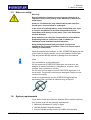
Warning!
Risk of explosion if batteries are not inserted correctly! It is
imperative that correct polarity of the batteries is observed to
avoid injury!
Under no circumstances may batteries be thrown onto fires,
forced open, short circuited or recharged!
In the event of a leaking battery, avoid contact with skin, eyes
or mucous membranes at all costs. Rinse affected areas
immediately with plenty of clean water. Then seek immediate
medical attention.
Store batteries in a safe place inaccessible to small children.
Swallowing batteries could prove fatal. If a battery is
swallowed, seek immediate medical attention!
Keep packaging material and parts small enough to be
swallowed out of reach of children. There is a serious risk of
choking or suffocation!
Once the batteries have drained, or if the STAEDTLER digital pen will
not be used for lengthy periods, remove the batteries from the pen.
This will prevent damage caused by leakage from the batteries.
Note!
Only use batteries of equivalent type!
Do not expose the STAEDTLER digital pen, the receiver or the
batteries to intense fluctuations in temperature, moisture, direct
sunlight, dusty conditions or shocks.
Do not carry out any repairs on the STAEDTLER digital pen or its
accessories. The product could become damaged if repairs are not
carried out correctly.
Under no circumstances may the STAEDTLER digital pen be
dismantled! This could lead to malfunctioning of the pen!
Fig. 1 Do not dismantle the pen!
1.4
System requirements
To be able to install and utilise the Software CDs included in delivery,
your system must fulfil the following requirements:
• Microsoft ® Windows XP (Sp3) or higher
• 100 MB available fixed-disk storage
• At least 128 MB working memory (512 MB recommended)
STAEDTLER digital pen
6 / 97
1 Overview
1.5 The STAEDTLER digital pen
• Minimum display screen resolution (1024 x 768 pixels)
• 32 bit colour quality
• Free USB port
1.5
The STAEDTLER digital pen
1.5.1
Inserting / replacing a refill
Tweezers are recommended for removal of the refill!
Note!
Only D-format ballpoint pen refills (length 67 mm - diameter 2.35 mm)
are suitable for the STAEDTLER digital pen!
Note!
The ballpoint pen refills are delivered with a protective gel plug fitted
to the tip. If this is still present, it must be removed prior to insertion of
the refill.
Removing a refill with the tweezers
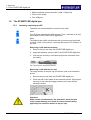
1.
Remove the pen cap from the STAEDTLER digital pen.
2.
Apply the tweezers onto the refill of the STAEDTLER digital pen.
3.
Grip the pen securely in one hand and pull the refill slowly from
the casing.
Fig. 2 Removing the refill with the tweezers
Removing a refill with the pen cap
The upper section of the pen cap can also be used as an extraction
device.
1.
Remove the pen cap from the STAEDTLER digital pen.
2.
Place the refill in the middle of the extraction device. Grip the pen
securely in one hand and apply pressure to the pen with the
extraction device.
Fig. 3 Extraction device
Attention!
Under certain circumstances, the electronics inside the pen
could sustain damage as a result of excess pressure being
applied by the extraction device of the pen cap.
7 / 97
STAEDTLER digital pen
1 Overview
1.5 The STAEDTLER digital pen
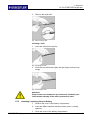
3.
Remove the used refill.
Fig. 4 Removing the refill
Inserting a refill
1.
Insert the refill into the pen tip.
Fig. 5 Inserting the refill
2.
Push the new refill down lightly with the fingers so that it sits
snugly.
Fig. 6 Inserting the refill
Attention!
Under certain circumstances, the electronics inside the pen
could sustain damage if the refill is pushed too hard!
1.5.2
Inserting / replacing the pen battery
STAEDTLER digital pen
1.
Remove the cover of the battery compartment.
2.
Insert two SR41 batteries with the positive poles (+) facing
upwards.
3.
Close the cover of the battery compartment.
8 / 97
1 Overview
O
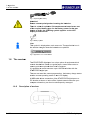
1.6
6 The receivver
Fig. 7 Replacing th
the battery
Atte
ention!
Ens
sure correc
ct polarity when
w
inserrting the baatteries.
The
ere is a risk
k of explos
sion if the replacemen
r
nt batteries
s are not
of the
t require d battery ty
ype. As the
e battery p ower for th
he pen
beg
gins to draiin, the follo
owing symbol appearrs on the LCD
display of the
e receiver:
Fig. 8 Battery sym
mbol
Notte!
This
s symbol is displayed for
f each new note. Thee application
n icon in
the taskbar cha
anges when
n the batterries are repllaced.
Fig. 9 Application icon in the tas
skbar
1.6
The receive
er
The
e STAEDTL
LER digital pen
p is a unique piece oof equipmen
nt which
reco
ords handw
written notes
s on regularr paper, storres these notes to
mem
mory and th
hen uploads
s them onto
o a computeer.
It is possible to
o record and
d store up to
o 100 DIN A
A4 sides with the
STA
AEDTLER d
digital pen.
The
e user can rread the currrent page number,
n
thee battery charge statuss
and
d the curren
nt operating mode on th
he LCD dispplay.
A USB
U
cable a
allows conne
ection of the
e STAEDTLLER digital pen to a
PC whether at home or in
n the office. Upload storred notes onto
o
your
mputer wherre they can then be subsequently managed.
com
1.6.1
1
9 / 97
Description of receiver
r
ST
TAEDTLER
R digital pen
n
1 Overvie
ew
1.6 The receivver
Fig.
F 10 Receivver
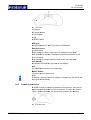
1 USB port
2 Function b
button
3 LCD displlay
4 Clip
5 RESET bu
utton
USB
U
port
Allows
A
conn
nection to th
he PC by wa
ay of a USB
B cable.
Function
F
b utton
In
I offline mo
ode:
Press
P
brieflyy to create a new note or to switchh to a new page.
p
Hold
H
presse
ed for appro
ox. 5 second
ds to switchh the device
e on or off.
In
I online mo
ode:
Press
P
brieflyy to switch between mouse modee and note mode.
m
LCD
L
displa
ay
All
A relevant information
n is provided
d on the dissplay.
Clip
C
For
F attachin
ng the receiv
ver onto the
e paper.
RESET
R
buttton
Initiates a re
eset of the receiver
r
Note!
N
Following
F
a period of in
nactivity of approx.
a
60 m
minutes, the device wiill
shut
s
down a
automaticallly.
1..6.2
Res
setting the
e device
A RESET b utton is loca
ated on the back of thee receiver. This
T
can be
e
applied
a
whe
enever the device
d
fails to respond . To reset th
he receiver,
insert a sha
arp impleme
ent into the opening
o
circcled in the drawing.
d
Fig.
F 11 RESET
T button
STAEDTLE
ER digital pen
p
10 / 97
1 Overview
O
1.6
6 The receivver
1.6.3
3
LCD display
d
The
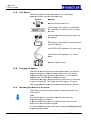
e following ssymbols are
e represente
ed on the LLCD display,
dep
pending on tthe respecttive operatin
ng state.
Symbo
ol
Meaning
M
Receiver
R
is connected
c
tto PC.
The
T memory
y of the receeiver is at le
east 90%
fu
ull. Transferr your notess to the PC or delete
th
he data.
The
T pen battteries are ruunning low and must
be
b replaced..
The
T battery in the receivver is running low and
should be ch
harged.
The
T STAEDTLER digitaal pen is in note mode.
The
T STAEDTLER digitaal pen is in mouse
mode.
m
Number
N
of stored
s
notess.
1.6.4
4
Charg
ging the ba
attery
The
e receiver fe
eatures an internal
i
rech
hargeable bbattery. No external
batttery is nece
essary. Whe
en the battery begins too run low, simply
rech
harge the b
battery by co
onnecting th
he receiver to your activated
com
mputer with the USB ca
able include
ed in deliverry.
The
e batteries w
will begin ch
harging as soon
s
as thee device is connected
c
to your
y
function
ning PC. Th
he charge time totals aapprox. 3.5 hours.
Fullly charged b
batteries ha
ave an operrational life oof approx. 15
1 hours.
1.6.5
5
Attach
hing the re
eceiver to the paperr
The
e following i llustrations demonstrate the attacchment posiition for
you
ur receiver.
Notte!
Forr optimum re
esults, it is recommend
r
ded that thee device be
pos
sitioned cen
ntrally at the
e top!
In Windows
W
Vis
ista and higher, the cen
ntral positioon at the top
p has
bee
en pre-set a
and cannot be
b changed
d.
It is recommen
nded that yo
our receiverr be attacheed centrally
y at the top
p
to attain
a
optimu
um results:
11 / 97
ST
TAEDTLER
R digital pen
n
1 Overview
1.6 The receiver
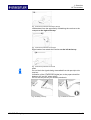
Fig. 12 Receiver positioned centrally at the top
Left-handers have the opportunity of attaching the receiver to the
notepad on the right at the top:
Fig. 13 Receiver positioned on the right
Right-handers can attach the receiver on the left at the top.
Fig. 14 Receiver positioned on the left
Note!
Do not block the signals being transmitted from the pen tip to the
receiver.
Inclination of the STAEDTLER digital pen to the paper should be
between 45° and 90° when writing.
Do not hold the pen as you would a paintbrush.
Fig. 15 Writing correctly
STAEDTLER digital pen
Fig. 16 Receiver obscured
12 / 97
1 Overview
1.6 The receiver
Fig. 17 Receiver obscured
1.6.6
Fig. 18 Incorrect grip
Range of the receiver
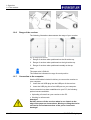
The following illustrations demonstrate the range of your receiver.
Fig. 19 Range of the receiver
1.
Range of receiver when positioned on the left at the top.
2.
Range of receiver when positioned on the right at the top.
3.
Range of receiver when positioned centrally at the top.
Note!
The paper size is DIN-A4.
The dotted line indicates the range for each position.
1.6.7
Connection to the computer
Use the USB cable included in delivery to connect the receiver to
your computer.
1.
Insert the mini USB plug into the USB port of the receiver.
2.
Insert the USB plug into a free USB port on your computer.
Once connection has been established to your PC, the following
options become available:
• Uploading of notes from your receiver to the PC
• Working in online mode
Attention!
Do NOT move or tilt the receiver when in use. Attach to the
edge of the paper as shown above. Moving or tilting the device
can lead to inconsistent strokes of the pen or inaccurate
drawings!
13 / 97
STAEDTLER digital pen
2 Installation for Windows (2 CDs)
2.1 System requirements
2 Installation for Windows (2 CDs)
2.1
System requirements
See chapter 1.4 System requirements
2.2
MyScript Studio Notes Edition
2.2.1
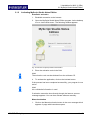
Installation of MyScript Studio Notes Edition and My Script Ink
Retriever
1.
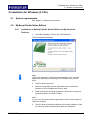
Insert the installation CD into the CD-ROM drive.
The following window opens:
Fig. 20 Installation assistant for MyScript Studio Notes Edition
Note!
The set-up application should start automatically. If not, start the
application manually by activating the CD-ROM directly via the
drive.
2.
Click on Next to proceed.
3.
Select the language from the pull-down menu in which the
software is to be installed and click on Next.
4.
Read through the licensing agreement. Select the I accept the
agreement option and click on Next.
Note!
If you do not accept the license agreement, it will not be possible to
install the software.
5.
STAEDTLER digital pen
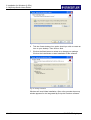
Click on Next to install the software in the folder indicated. Click
on Search to select an alternative folder for installation.
14 / 97
2 Installation for Windows (2 CDs)
2.2 MyScript Studio Notes Edition
Fig. 21 Defining the folder for installation
6.
Tick the Create desktop icon option should you wish to create an
icon on your desktop. Then click on Next.
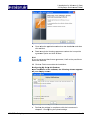
7.
Click on the Back button to review or to change your settings.
Click on the Install button to start installation of the software.
Fig. 22 Starting installation
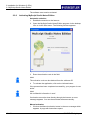
Windows will now initiate installation. After a few seconds the set-up
window appears for the integrated My Script Ink Retriever software:
15 / 97
STAEDTLER digital pen
2 Installatiion for Wind
dows (2 CD
Ds)
2.2 MyScrript Studio Notes
N
Editio
on
Fig.
F 23 Set-up
p Assistant for My Script Ink Retriever
8.
8
Close a
all active ap
pplications other
o
than thhe installatio
on and then
n
click on
n Next.
9.
9
Read th
hrough the licensing ag
greement. S
Select the I accept the
agreem
ment option and click on
n Next.
Note!
N
If
I you do no
ot accept the
e license ag
greement, itt will not be possible to
o
install
i
the so
oftware.
10.
1 Click on
n Finish to conclude
c
the installatioon.
Configuring
C
g My Scrip
pt Ink Retrie
ever
Upon
U
insta
allation of the softwarre, the follo
owing wind
dow appearrs
on
o your dis
splay scree
en:
Fig.
F 24 Dialogu
ue box followiing installation
n
1.
1
STAEDTLE
ER digital p
pen
Perform
m the setting
gs in compliance with tthe instructiions in
chapterr 5.1 Config
guring the upload settinngs.
16 / 97
2 Installation for Windows (2 CDs)
2.2 MyScript Studio Notes Edition
The software must now be activated.
2.2.2
Activating MyScript Studio Notes Edition
Automatic activation
1.
Establish connection to the Internet.
2.
Open the MyScript Studio Notes Edition program via the desktop
icon or via the Start menu. The following window appears:
Fig. 25 Activation of MyScript Studio Notes Edition
3.
Enter the activation code in the field.
Note!
The activation code can be obtained from the software CD.
4.
To activate the application, click on the Activate button.
If the process has been completed successfully, your program is now
active.
Note!
No confidential information is sent!
If activation cannot be done directly through the Internet, an error
message appears. You can then activate software manually.
Manual activation
1.
17 / 97
Click on the Manual activation button in the error message which
appears. A page with instructions opens.
STAEDTLER digital pen
2 Installation for Windows (2 CDs)
2.3 Mobile Note Taker (Note Manager)
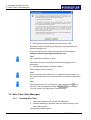
Fig. 26 Requesting the registration file
2.
Read the instructions carefully and then click on OK.
All relevant data for activating the program is summarised in the
following dialogue box.
Copy the entire text into an e-mail and send it to this address:
[email protected].
Note!
No confidential information is sent!
You will be sent an e-mail with the license.licvo program as an
attachment.
3.
Activate this program by double clicking.
Your program is now activated.
Note!
If you would like to activate this on a computer without Internet, you
can copy the text file from a computer which has Internet and send it
to us.
Note!
If the process does not work properly, click on this button
. You
can reach the start page by clicking on
your browser.
You can create your query here in the help forum.
2.3
Mobile Note Taker (Note Manager)
2.3.1
Installing Mobile Note Taker
1.
Insert the installation CD into the CD-ROM drive.
The following window opens:
STAEDTLER digital pen
18 / 97
2 Installation for Windows (2 CDs)
2.3 Mobile Note Taker (Note Manager)
Fig. 27 Selecting the language
Note!
The set-up application should start automatically. If not, start the
application manually by activating the CD-ROM directly via the
drive.
2.
Select the language in which software should be installed.
3.
Click on Next in the following dialogue box to perform the
installation settings.
4.
Click on Change to select an alternative folder for installation or
click on Next to install the software in the folder indicated.
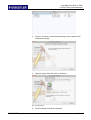
Fig. 28 Selecting folder for installation
5.
Select the Back button to change your settings or click on Install
to begin installation.
6.
Click on the Finish button to conclude installation.
Note!
If you are starting the application for the first time following the
installation process, a new folder with the name My Notes is created
in the My Documents directory. All of your notes are stored in this
directory. If no My Documents directory exists, the installation
application creates a new My Documents folder on your hard drive.
De-installing, upgrading or re-installing of the software will not cause
the notes in this directory to be deleted.
19 / 97
STAEDTLER digital pen
3 Installation for MAC (2 CDs)
3.1 MyScript Studio Notes Edition
3 Installation for MAC (2 CDs)
3.1
MyScript Studio Notes Edition
3.1.1
Installation of MyScript Studio Notes Edition and My Script Ink
Retriever
1.
Insert the installation CD into the CD-ROM drive.
2.
Unpack the MyScriptStudioNotesEdition-1.2.1-en_EN-OEMInstaller.zip file by double clicking.
3.
The MyScriptStudioNotesEdition-Installer folder and the
corresponding MyScriptStudioNotesEdition.mpkg installation file
can be obtained under Downloads. Open these files by double
clicking.
The following window appears:
Fig. 29 Note on safety
4.
Click on Continue. The installation assistant opens.
Fig. 30 Installation assistant for MyScript Studio Notes Edition
Note!
The set-up application does not start automatically. Start the
application manually by activating the CD-Rom directly via the drive.
5.
STAEDTLER digital pen
Click repeatedly on Continue.
20 / 97
3 Installation for MAC (2 CDs)
3.1 MyScript Studio Notes Edition
Fig. 31 Software Licence Agreement for MyScript Studio Notes Edition
6.
Read through the license agreement and click on Accept.
Fig. 32 Software Licence Agreement for MyScript Studio Notes Edition
Note!
If you do not accept the license agreement, it will not be possible to
install the software.
7.
Select the language in which the software should be installed
from the pull-down menu. Then click on Continue.
Fig. 33 Language for MyScript Studio Notes Edition
21 / 97
STAEDTLER digital pen
3 Installation for MAC (2 CDs)
3.1 MyScript Studio Notes Edition
8.
Click on the hard drive icon and then click on Continue.
Fig. 34 Defining the installation location
9.
Click on Install.
Fig. 35 Starting installation
10. Enter your user name and your password and click on OK.
Fig. 36 Security question
11. Then click on Continue.
STAEDTLER digital pen
22 / 97
3 Installation for MAC (2 CDs)
3.1 MyScript Studio Notes Edition
Fig. 37 Installation package scripts
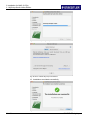
Fig. 38 Driver software My Script Ink Retriever
12. Installation concluded successfully
Fig. 39 Installation concluded
23 / 97
STAEDTLER digital pen
3 Installation for MAC (2 CDs)
3.1 MyScript Studio Notes Edition
3.1.2
Activating MyScript Studio Notes Edition
Automatic activation
1.
Establish connection to the Internet.
2.
Open the MyScript Studio Notes Edition program via the desktop
icon or via the Start menu. The following window appears:
Fig. 40 Activation of MyScript Studio Notes Edition
3.
Enter the activation code in the field.
Note!
The activation code can be obtained from the software CD.
4.
To activate the application, click on the Activate button.
If the process has been completed successfully, your program is now
active.
Note!
No confidential information is sent!
If activation cannot be done directly through the Internet, an error
message appears. You can then activate software manually.
Manual activation
1.
STAEDTLER digital pen
Click on the Manual activation button in the error message which
appears. A page with instructions opens.
24 / 97
3 Installation for MAC (2 CDs)
3.2 Note Taker (Note Manager)
Fig. 41 Requesting the registration file
2.
Read the instructions carefully and then click on OK.
All relevant data for activating the program is summarised in the
following dialogue box.
Copy the entire text into an e-mail and send it to this address:
[email protected].
Note!
No confidential information is sent!
You will be sent an e-mail with the license.licvo program as an
attachment.
3.
Activate this program by double clicking.
Your program is now activated.
Note!
If you would like to activate this on a computer without Internet, you
can copy the text file from a computer which has Internet and send it
to us.
Note!
If the process does not work properly, click on this button
. You
can reach the start page by clicking on
your browser.
You can create your query here in the help forum.
3.2 Note Taker (Note Manager)
3.2.1
Installing Note Taker
1.
Insert the installation CD into the CD-ROM drive.
2.
Initiate installation of the Note Taker by double clicking on the
Note Taker.pkg file.
The following window opens:
25 / 97
STAEDTLER digital pen
3 Installation for MAC (2 CDs)
3.2 Note Taker (Note Manager)
Fig. 42 Directory
3.
Click on Continue in the following dialogue box to perform the
installation settings.
Fig. 43 Installation
4.
Select a target drive and click on Continue.
Fig. 44 Target drive
5.
STAEDTLER digital pen
Click on Install to install the software.
26 / 97
3 Installation for MAC (2 CDs)
3.2 Note Taker (Note Manager)
Fig. 45 Installation
6.
It is possible following installation to change the destination path
by clicking on Change location for installation… and then
specifying the new destination path.
Fig. 46 Destination path
Note!
De-installing, upgrading or re-installing of the software will not cause
the notes in this directory to be deleted.
27 / 97
STAEDTLER digital pen
4 Creating notes
4.1 Offline mode
4 Creating notes
The STAEDTLER digital pen offers two operating modes to create
handwritten notes and sketches. The offline mode and the online
mode.
Note!
Before commencing operation with the STAEDTLER digital pen,
ensure that the pen is equipped with a refill and batteries.
The mouse button on the pen casing does NOT have to be pressed
during the writing process. This is only required for mouse functions.
For optimum, flawless operation, we recommend using a smooth
and sturdy underlay!
4.1
Offline mode
The offline mode allows you to record and store important notes in
meetings, conferences or lectures.
1.
Hold the function button on the receiver pressed for approx. 5
seconds to switch on the device.
2.
Open the clip on the back and attach the receiver to the paper.
Note!
If working with operating system Windows Vista or higher, attach the
receiver centrally at the top. Selection of the attachment function is
not supported here!
3.
Take the digital pen and commence writing.
Fig. 47 Writing in offline mode
Note!
Grip the pen in such a way that the signals transmitted from the pen
tip to the receiver do not become blocked.
4.
Once you have finished writing your note, press the function
button briefly to store the current page and / or to begin a new
page. Following storage, the display screen of the receiver
indicates that the number of pages has increased by one.
All notes are stored in the receiver. These notes can be uploaded
onto your PC for viewing, for editing or for sending via e-mail (see
chap. 4.3 Uploading notes onto the computer).
STAEDTLER digital pen
28 / 97
4 Creating notes
4.2 Online mode
4.2
Online mode
In online mode, it is possible to upload notes onto your PC from the
receiver, write notes or to create sketches using the digital pen.
Moreover, the STAEDTLER digital pen can be used as a mouse in
online mode. Special functions which can only be used in online
mode are also available. These functions are described in detail in
the following sections.
Before connecting the device to your PC, ensure that the software
included in delivery (MyScript Studio Notes Edition and Mobile Note
Taker) is installed. Launch this software.
Note!
Installation of the software included in delivery "Mobile Note Taker"
is a minimum requirement for implementation of the Online function.
Fig. 48 Writing in online mode
Note!
We highly recommend placing the STAEDTLER digital pen in the
position represented when not in use to prevent any disturbance
with the mouse.
Fig. 49 STAEDTLER digital pen when not in use
If the pen remains inactive, the receiver shuts down automatically
after approx. 60 minutes. Your note, however, will be stored.
Push the button on the receiver to quit power saving mode.
Attention!
Do not connect more than one receiver at any given time. The
devices could interfere with one another.
4.2.1
Functions of the STAEDTLER digital pens
The digital pen supports a note mode and a mouse mode.
The standard mode can be set in 2 different ways:
• With initial start of the Mobile Note Taker application or
29 / 97
STAEDTLER digital pen
4 Creating notes
4.2 Online mode
• via the Mobile Note Taker Configuration menu ("set digital note
mode").
When in use, it is possible to alternate the respective mode between
different types:
• Press the function button briefly on the receiver.
• Right-click on the Mobile Note Taker taskbar icon.
• Tap on the virtual area with your pen.
Fig. 50 Virtual area
Note!
Following each mode change, a speech bubble with information
regarding the current mode appears and the affiliated LED lights up.
MAC information
Changeover between the different modes results automatically for the
MAC. The mouse mode becomes active as soon as the cursor is
drawn over a menu. If writing is initiated over a "free" field on the
desktop, an ink well window displaying the text is opened
automatically. This text is converted automatically and inserted into
an active text field of an application document (e.g. Indesign).
Note mode
Note mode allows the entry of sketches and notes to be observed
simultaneously on the display screen.
As soon as you write or sketch something with your digital pen, a
virtual note sheet appears on your display screen.
Fig. 51 Note window
This note sheet replicates anything which is written on actual paper
attached to the receiver. The note window toolbar allows you to
execute various basic functions such as storage, editing, sending via
e-mail or the copying of notes.
Once the notes have been stored, they can be subsequently edited in
the Note Manager.
STAEDTLER digital pen
30 / 97
4 Creating notes
4.2 Online mode
Note!
Ensure that the line of sight between pen and receiver does not
become blocked during the writing process. The digital pen will not
function correctly if the line of sight is not clear.
Mouse mode
In mouse mode, the STAEDTLER digital pen behaves like a regular
mouse.
To initiate the cursor function, press the button on the side of the
STAEDTLER digital pen or tap lightly on the paper with the pen. The
pen will now function as a cursor for approx. 30 seconds.
Note!
Mouse mode starts as soon as the mouse button on the pen is
pressed briefly. It is not necessary to press the button for an extended
period of time!
Move the pen across the paper to move the cursor.
• To click on an object, point the cursor at the respective icon and
tap on the paper with the pen or press the button on the side of the
pen.
• To double-click, point the cursor at the target object and tap twice
on the paper with the pen or press the button on the side of the
pen twice.
• To perform a right-click, point the cursor at the object and hold the
pen tip pressed on the paper. Alternatively, press the button on the
side of the pen for approx. 2 seconds. A special "Right-click
cursor" appears.
Fig. 52 Right-click cursor
Lift the pen tip from the paper. The regular "Right-click menu"
appears and the desired function can be selected.
4.2.2
Using the STAEDTLER digital pen in Windows Vista Ink applications
The STAEDTLER digital pen allows the utilisation of Windows Vista
Ink applications such as Journal or Short notes, for example, or to
add Ink-notes in Office 2007 applications.
31 / 97
STAEDTLER digital pen
4 Creating notes
4.3 Uploading notes onto the computer
Note!
The receiver of the STAEDTLER digital pen must be connected to
the PC in order to be able to execute these functions.
Using the STAEDTLER digital pen in Journal
1.
Select the mouse mode.
2.
Start up Windows Journal.
3.
Begin writing on the paper while at the same time observing the
display screen.
4.
Various functions such as Highlight text with Lasso or
Recognition can be utilised here. Furthermore, you also have the
opportunity to delete or highlight text etc.
Using the STAEDTLER digital pen in MS Word 2007
1.
Open a Microsoft Word 2007 document.
2.
Click on Start freehand input in the Check menu.
3.
Select the red pen from the writing instrument toolbar. Various
ink options now become available to you. It is possible for
example to write or to provide pieces with comments.
4.
Click on the blue pen on the yellow note in the writing implement
toolbar (ink comment). A speech bubble opens on the right-hand
side which can be used for your handwritten comments.
Using the Tablet PC entry field in Office applications (available
for Windows Vista and higher)
A tablet PC entry field is featured in every Office application on the
left-hand pane of the display screen. Only the edge is visible.
1.
Tap on the edge of the tablet PC entry field. It now appears fully
on the display screen.
2.
Write some sentences or individual letters. Your handwriting is
recognised automatically: word for word or letter for letter.
Note!
In the event that the mouse ceases to respond, tap the pen once on
the paper. This will awaken the program from sleep mode.
4.3
Uploading notes onto the computer
Your notes can be uploaded from the receiver onto the PC in online
mode using the software. Ensure beforehand that the software is
installed and that your receiver is connected to the USB port of your
PC with the affiliated USB cable.
The following symbol appears on the LCD of your receiver throughout
the USB connection.
STAEDTLER digital pen
32 / 97
4 Creating notes
4.3 Uploading notes onto the computer
Fig. 53 USB connection
4.3.1
Uploading notes with MyScript Studio Notes Edition
See chapter 5.1 Configuring the upload settings
4.3.2
Uploading notes with Mobile Note Taker
See chapter 6.3 Uploading notes onto the PC
33 / 97
STAEDTLER digital pen
5 Editing notes with MyScript Studio Notes Edition
5.1 Configuring the upload settings
5 Editing notes with MyScript Studio Notes Edition
MyScript Studio Notes Edition is a fully-digital note suite which allows
you complete freedom as regards your handwritten notes.
Additionally, Mobile Note Taker can be used to export your notes to
the MyScript Studio Notes Edition character recognition engine.
This software allows you to:
• View, manage and highlight your notes,
• Search text in your original note files,
• Convert your handwriting, shapes and tables in digital text with
outstanding accuracy,
• Edit converted digital text directly in the program window,
• Send the final results to Microsoft Word or other text editing
programs in a text file or to your standard e-mail application.
5.1
Configuring the upload settings
The ink retrieval settings are displayed the first time the MyScript
Studio Notes Edition application is activated and then each time
Windows is started. The latter only applies, however, if the Do not
show this page on next start-up option remains deactivated.
If the program window for configuring the note import is not opened
automatically, you have the option of opening it manually.
1.
Open the menu of the My Script Ink Retriever by right-clicking on
the toolbar icon
2.
5.1.1
.
Select the Configure option.
"About" tab
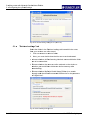
Click on the link Checking the list for compatible devices in the About
tab in dialogue box My Script Ink Retriever to obtain a list of
supported devices.
Select the Do not display this page upon next start-up option if the
dialogue box should not be opened upon next start-up of the MyScript
Studio Notes Edition software.
STAEDTLER digital pen
34 / 97
5 Editing
E
note
es with MyS
Script Studio
o Notes Edittion
5.1
1 Configurin
ng the uploa
ad settings
Fig. 54 Ink retrieva
al settings dia
alogue box (Ab
bout tab)
5.1.2
2
"Retrie
eval settin
ngs" tab
Sele
ect the folde
er in the Re
etrieval settiings tab intoo which the notes
from
m your rece
eiver are to be
b stored.
1.
Click on B
Browse to se
elect a folde
er.
2.
Next, you must decide how the files are to bbe downloaded.
• Choose
C
whe
ether all file
es featuring identical naames within
n the folder
are
a to be ovverwritten.
• Choose
C
whe
ether the no
otes are to be
b retained on the dev
vice or
whether
w
you
u would like
e to delete th
he device m
memory afte
er
downloading
d
g.
• Choose
C
whe
ether MySc
cript Studio Notes Editioon is to sea
arch
through
t
and
d check eac
ch connecte
ed USB devvice for the presence
p
of
o "digital in ks".
Fig. 55 Retrieval ssettings dialog
gue box
35
5 / 97
ST
TAEDTLER
R digital pen
n
5 Editing notes with MyScript Studio Notes Edition
5.2 Preferences
Note!
If this option is activated, all new USB devices are searched. This
process can take some considerable time when searching devices
featuring greater capacities.
We recommend that the Start automatically on start-up of Windows
option remains activated in order that file monitoring can be initiated
without intervention.
5.2
Preferences
It is possible to define preferences which will influence standard
application characteristics for certain elements.
To open the Preferences dialogue box, click on the
5.2.1
button.
"General" tab
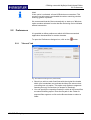
Fig. 56 Preferences dialogue box (General tab)
• Should you wish to retain fixed lines with the original line breaks
within your handwritten text, activate the Keep line returns when
converting text only option. This option only applies to segments
featuring text only conversions (no shapes or drawings).
• You can specify the respective location in which all converted files
are stored following export. Enter the file path in the Folder for
exported files segment or click on the Browse button to select a
folder.
STAEDTLER digital pen
36 / 97
5 Editing notes with MyScript Studio Notes Edition
5.2 Preferences
5.2.2
"Languages" tab
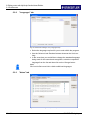
Fig. 57 Preferences dialogue box (Languages tab)
• Select the language required for you to work within the program.
• Use the Select all and Deselect buttons wherever the list is too
long.
• In the event that you would like to change the standard language
being used for the search and recognition, select the respective
language from the list and then click on the Change button.
Note!
Click on the Get more link to obtain additional languages.
5.2.3
"Notes" tab
Fig. 58 Preferences dialogue box (Notes tab)
37 / 97
STAEDTLER digital pen
5 Ed
diting notes with MyScrript Studio Notes
N
Editio
on
5.3 User
U
interfacce
For
F the note
e managem
ment function
ns, your MyyScript Stud
dio Notes
Edition
E
insp
pects certain
n folders and automaticcally inserts
s new notess
displayed
d
in
n these defin
ned note folders.
• Click on the Add button to select a folder i n which any
y handwritte
en
nts are to be
e stored.
documen
• To tempo
orarily halt inspection
i
of
o a folder, iit can simply be
deactivatted. To rem
move the fold
der permannently from the
t list, clickk
on the fo
older and se
elect the Remove buttoon.
• Select th
he Look in sub-folders
s
option
o
to inccorporate th
he content of
o
b-folders intto your defined note foolders.
other sub
• Select th
he Search in
n existing in
ndexes onlyy option if yo
ou have
e amount off newly handdwritten notes on yourr
recently ffiled a large
disk but w
would now like to search through previously existing
documen
nts only.
Note!
N
During
D
this ssearch, new
w documents which woould normallly be
included
i
forr a regular search
s
are ignored.
i
Inddexing, whic
ch could
potentially
p
ta
take some considerable
c
e time, conttinues running in the
background
b
d: this option
n is practica
al in cases w
where you do
d not have
e
the
t time to w
wait for the indexing off new notess.
• Once all changes ha
ave been made,
m
click oon OK to co
onfirm your
changes .
5.3
U
User inte
erface
5..3.1
Win
ndow
Fig.
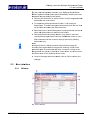
F 59 User in
nterface
STAEDTLE
ER digital pen
p
38 / 97
5 Editing notes with MyScript Studio Notes Edition
5.3 User interface
General:
In MyScript Studio Notes Edition, a tab window view is used. The
start page, notes, search results, etc. are each displayed in a tab (8).
Functions for general actions and opening of the preferences are
provided in the standard toolbar (1).
Functions, conversion settings and actions can be selected in the
menu bar (2).
The search panel (3) is located at the top right. You can enter key
words for your search here.
Start page tab:
In the Start page tab, you can change document sorting and grouping
by pushing the button (4).
The content of your "All my notes" or "All my searches" folder is
displayed in the main window (5).
Your notes are sorted according to tabs in the left-hand pane (6). In
addition, you will find the executed search processes there.
You can select the most important basic functions in the toolbar (7).
5.3.2
Shortcuts
Here you will find a list with the main action which you can do and
their corresponding shortcuts. These are mainly used on the start
page.
For the note management view:
Windows
39 / 97
MAC
Create new document
Ctrl - N
N
Open document on the disk
Ctrl - O
O
Store current document
Ctrl - S
S
Close current document
Ctrl - F4
F4
Undo last action
Ctrl - Z
Z
Re-establish previously undone action
Ctrl - Y
Copy selection of notes
Ctrl - C
C
Cut selection of notes
Ctrl - X
X
Paste selection of notes
Ctrl - V
V
Delete selection
Del
Insert bold print to text
Ctrl - B
Z
Reset
button
B
STAEDTLER digital pen
5 Editing notes with MyScript Studio Notes Edition
5.4 Managing notes
Insert italic face to text
Ctrl - I
I
Insert underlining to text
Ctrl - U
U
Print ink document
Ctrl - P
P
Zoom in
Ctrl - +
+
Zoom out
Ctrl - -
-
Go to beginning of document
Ctrl - Pos1
Go to end of document
Ctrl - End
Go to next page
PAGE
DOWN
PAGE
DOWN
Go to previous page
PAGE UP
PAGE UP
For document navigation:
5.4
Managing notes
If you have created notes with your STAEDTLER digital pen, you
must first load these notes from the receiver onto your computer (see
chapter 4.3 Uploading notes onto the computer).
As soon as the note data is loaded on your computer, it is
automatically displayed on the start page of the handwriting
recognition program.
Fig. 60 Notes on the start page
All notes which you have added to the program are located on the
start page. You can visualise, select and manage your notes there.
Note!
If a note is displayed as a large red cross, it is no longer saved on
your storage medium.
Most actions for notes can also be executed via the right-click menu:
STAEDTLER digital pen
40 / 97
5 Editing notes with MyScript Studio Notes Edition
5.4 Managing notes
Fig. 61 Right-click menu
5.4.1
Importing notes
1.
Connect the receiver to your computer.
The My Script Ink Retriever window opens.
2.
In the Device settings tab, click on Download to import your notes
into the folder you have determined and thereby into MyScript
Studio Notes Edition.
Note!
Define the upload settings as described in 5.1 Configuring the
upload settings.
MyScript Studio Notes Edition contains a system that regularly
checks certain folders for new notes. New notes filed in these
folders are displayed automatically in the MyScript Studio Notes
Edition. They are then located in the "Non-tagged notes" tag.
5.4.2
Opening a note
Should you wish to open an existing file with handwritten notes:
• Double-click on a document in the homepage or right-click on the
document and select Open.
Note!
It is also possible to use the Ctrl - O shortcut key.
When you would like to create a new note:
• Right-click on the list with the documents and select New
document on the start page.
A new file is displayed in the list:
• Double-click on this file to open it.
41 / 97
STAEDTLER digital pen
5 Editing notes with MyScript Studio Notes Edition
5.4 Managing notes
Note!
It is also possible to use the Ctrl - N shortcut key.
5.4.3
Navigation within a note
If your document contains several pages, it is possible to navigate
from page to page.
• Go to first page: click on the
- Pos1.
button or use the shortcut key Ctrl
• Go to last page: click on the
- End.
button or use the shortcut key Ctrl
• Browse forwards: click on
use the PAGE DOWN key.
• Browse backwards: click on
5.4.4
as many times as is necessary or
or use the PAGE UP key.
Exporting notes
MyScript Studio Notes Edition can export your handwritten notes into
various programs.
Attaching the note to an e-mail
1.
Click on the
document.
button or select File > Export > Export
2.
On the left side of the export menu, click on the
button.
Fig.62 Export menu
The entire ink file is now forwarded as an attachment in a new e-mail
to your standard e-mail client.
All note pages are converted into a JPG image file and attached to
the message:
STAEDTLER digital pen
42 / 97
5 Editing notes with MyScript Studio Notes Edition
5.4 Managing notes
Exporting as an image file
1.
Click on the
document.
button or select File > Export > Export
2.
On the left side of the export menu, click on the
3.
In the dialogue box displayed afterwards, select the file type,
storage location and file name and click >Save.
button.
Export into a word file
5.4.5
5.4.6
1.
Click on the
document.
button or select File > Export > Export
2.
On the left side of the export menu, click on the
button.
Printing notes
1.
Click on the
button to print an open or tagged note.
Alternatively, select File > Print > Document.
2.
Click on the left
button in the print menu.
Managing tags
As soon as your notes are in MyScript Studio Notes Edition, you can
manage them using tags. A tag can be a date, a subject, a motive,
the name of a person or company or whatever else you like.
A note can have several tags and appears under every assigned tag.
This makes it simple to manage your notes.
Displaying notes in accordance with tags
• If you want to display all your notes, tagged and untagged, click on
All my notes on the start page.
• To display notes assigned a specific tag, click on the name of the
corresponding tag in the homepage.
43 / 97
STAEDTLER digital pen
5 Editing notes with MyScript Studio Notes Edition
5.4 Managing notes
Fig. 63 Displaying notes in accordance with tags
Tagging a document
There are three ways to tag a document:
• Pull the document out of the central list on the start page to the
desired tag.
• Click on the
button to open the Manage tags dialogue box.
Here you can assign the tag(s).
• Right-click on the document and select Manage tags. You can
assign the desired tag(s) in the Manage tags dialogue box which
appears.
Fig. 64 Managing tags dialogue box
STAEDTLER digital pen
44 / 97
5 Editing notes with MyScript Studio Notes Edition
5.4 Managing notes
Removing a tag
Note!
Removing the tag will not delete the file itself! Only the tag will be
removed from this document.
There are three ways to remove a tag from a document:
• Right-click on the open document and select Delete current tag.
• Open the Manage tags dialogue box by clicking on the
button.
Deactivate the tags which should no longer be displayed on this
note.
• Right-click on the document and select Manage tags. You can
deactivate the desired tag(s) in the Manage tags dialogue box.
Note!
In the
view, coloured symbols indicate which tags have been
added to each document. If several tags use the same colour, only
one symbol is displayed with this colour.
Creating a tag
45 / 97
1.
To create a new tag in your list, click on the
button on the
start page. It is also possible to right-click on the pane and then
select the Create tag option.
2.
The newly-created tag has a standard name and is not assigned
to a colour. Right-click on the tag to change their colour, to
rename them or to perform other actions:
STAEDTLER digital pen
5 Ed
diting notes with MyScrript Studio Notes
N
Editio
on
5.4 Ma
anaging note
es
Fig.
F 65 Manag
ging right-click
k menu tag
Deleting
D
a ttag
• Should yyou wish to delete one or more taggs, select th
he respectivve
tag(s) an
nd click on the start pag
ge on the
button. Itt is also
possible to right-clic
ck on the pa
ane and the n select the
e Create tag
g
option.
Note!
N
Deleting
D
the
e tag will no
ot delete the
e file itself! O
Only the tag
g will be
removed
r
fro
om this docu
ument.
5..4.7
Sea
arching through nottes
1.
1 Enter thhe search ittem in the search field
. If more than one
word is entered, th
he system will
w search foor all notes containing
e of the respective worrds. To searrch for a specific
any one
expresssion, enter the
t text in quotation
q
maarks.
2.
2
You mu
ust specify the
t location where the search is to
o be
underta
aken:
• In All no
otes: Enter your
y
search
h term(s) annd confirm the entry
directly b
by clicking on
o
STAEDTLE
ER digital pen
p
.
46 / 97
5 Editing notes with MyScript Studio Notes Edition
5.4 Managing notes
• In notes that were written at a specific time: Open the search
option window by clicking on
Date border.
and select an option inside the
• In specific Tags: Open the search option window by clicking on
and select the tag(s) inside the Periphery border.
Fig. 66 Selecting search options
A search can be terminated by clicking on the
edge of the window.
button in the lower
The search results are arranged in a special view according to
relevance:
Fig. 67 Search results
Executed search processes can be found on the start page under All
my searches.
47 / 97
STAEDTLER digital pen
5 Ed
diting notes with MyScrript Studio Notes
N
Editio
on
5.4 Ma
anaging note
es
Fig.68
F
Execute
ed search pro
ocesses
Note!
N
Search
S
proccesses may
y only be ca
arried out in the respec
ctive
standard
s
lan
nguage!
MyScript
M
Sttudio Notes Edition indexes all youur documen
nts
automatical
a
lly. If a searrch is initiate
ed and som
me documen
nts have nott
yet
y been ad
dopted into the
t directorry (indexed)), this will be
e
implemente
i
ed during the
e search. This
T
will slow
w down the search.
Should
S
you not wish to
o wait for conclusion off the search, select the
Search
S
in exxisting inde
exes only op
ption (Preferrences dialo
ogue box,
Notes
N
tab). With this op
ption active, only thosee notes whic
ch are
already
a
bein
ng displayed are includ
ded in the seearch.
5..4.8
Mod
difying the
e size of a note pag
ge
The
T size of a note can be adapted
d in differen t ways:
• Click on the
the docu ment.
buttton in the control
c
paneel to enlarge
e the size off
• Click on the
the docu ment.
c
paneel to reduce the size off
buttton in the control
• You can adjust the size
s
or width of the winndow via the
e
a
you
u can choosse from the pre-set size
es.
function button. In addition,
STAEDTLE
ER digital pen
p
48 / 97
5 Editing notes with MyScript Studio Notes Edition
5.4 Managing notes
Fig. 69 Selecting the size of a note
5.4.9
Deleting notes
It is possible to delete a note document in a folder on your computer
directly in the program window.
• Right-click on the document in the document management window
and select the Delete files from disk option. You can also tag the
document to be deleted and click on the
button.
• You must confirm the delete procedure. The document is deleted
and deposited into the recycle bin.
Note!
If a note is displayed as a large red cross, it is no longer saved on
your storage medium. If you don't want the document to continue to
be displayed on your start page, right-click on it and select Exclude
from my notes.
5.4.10 Changing the standard language
Upon installation of your MyScript Studio Notes Edition application,
select a standard language for note recognition and for search. This
language is identical to the language of the user interface. If required,
the language can be changed in the preferences for search and
recognition.
Note!
MyScript Studio Notes Edition indicates all documents automatically
in order that they may be searched more quickly. The program also
indicates all documents which you have imported manually. If the
standard language is changed, all of your notes will be indexed
again in the new language (this may take considerable time).
The standard language is changed as follows:
49 / 97
1.
To open the Preferences dialogue box, click on the
2.
Click on the Restore tab.
3.
Select the new standard language in the list of working
languages.
button.
STAEDTLER digital pen
5 Ed
diting notes with MyScrript Studio Notes
N
Editio
on
5.5 Editing han
ndwritten te
ext
4.
4
Click on
n the Chang
ge button to
o confirm th e selection.
Fig.
F 70 Modifyying standard language
l
Note!
N
If
I the standa
ard languag
ge you have
e installed iss the only option
o
available
a
to you, additio
onal langua
ages can bee downloade
ed at
http://www.v
h
visionobjectts.com/en/w
webstore/geet-more-lang
guagesstudio-ne-w
s
win-11 throug
gh the "Gett more..." linnk.
5.5
E
Editing handwritt
h
ten text
Note!
N
"Ink"
"
relatess to your no
otes in their handwrittenn form.
It is possible
e to store th
he modificattions in a doocument by
y clicking on
n
the
t
funcction button
n at any time
e.
You
Y can dissplay the do
ocument you
u are workinng on in fulll screen
mode.
m
To do
o this, click on the
button.
Note!
N
Should
S
you not wish to
o work in the
e original noote, right-cliick on the
document
d
a
and select Save
S
as. Enter a file naame and con
nfirm with
Save.
S
MySccript Studio Notes Editiion creates a copy of your
y
note file
e
and
a files it in
n the curren
nt directory.
5..5.1
Sele
ecting the
e ink
• If you wo
ould like to choose
c
a re
ectangle op
ption, activa
ate the
ffunction and
d drag the cursor
c
arounnd the area
a which you
would likke to select while keeping the rightt mouse buttton pressed
down.
STAEDTLE
ER digital pen
p
50 / 97
5 Editing
E
note
es with MyS
Script Studio
o Notes Edittion
5.5
5 Editing ha
andwritten te
ext
• If you would
d like to cho
oose an irre
egular optio
on, e.g. for an
individual w
word or a sm
mall symbol, activate th e
function
and
a drag the
e cursor aro
ound the arrea which yoou would lik
ke to select
while
w
keepin
ng the right mouse button pressedd down.
• Use
U Ctrl - A to select Total
T
ink on the page
As soon
s
the inkk is selected, you can copy, cut, ddelete, and move it or
cha
ange its sha
ape.
5.5.2
2
Adding / erasing
g ink
Cha
anges you m
make to you
ur handwriting are tran sferred to your
y
note
file. You will be
e prompted to save the
ese changess.
To see
s the cha
anges in the
e converted note, you m
must run the
e
con
nversion aga
ain.
Add
ding ink
• Activate
A
the
e
objects.
o
function and insert the aadditional te
ext or
• Click
C
on the
e arrow on the
or
o colour of the ink.
button to chhange the thickness
t
Era
asing ink
function
• To
T delete a segment off your notes
s, activate t he
and
a drag the
e cursor ov
ver the ink which
w
you w
would like to erase.
• Click
C
on the
e arrow on the
of
o the rubbe
er.
button to chhange the thickness
t
Notte!
To delete
d
a larrge part of th
he ink, sele
ect it with thee correspon
nding tool
(see
e 5.5.1 Sele
ecting the in
nk ) and pre
ess the Del button.
5.5.3
3
Copying / cuttin
ng / pastin
ng ink
1.
Select the required in
nk using the
2.
elected ink:
Edit the se
C
the se
election with
h Ctrl - C (or with
• Copy
orr
functions.
).
• Cut
C the sele
ection with Ctrl
C - X or with
w
• Paste
P
the co
opied or cut ink into a document
d
w
with Ctrl - V or with
. Drag the in
nk into its new position.
5.5.4
4
Splitting ink
If tw
wo texts are
e written ove
er one another within a note, it is likely
l
that
you
u have forgo
otten to crea
ate a new page. This ccan be rectiffied in
MyS
Script Studiio Notes Ed
dition using a special spplitting func
ction.
51 / 97
ST
TAEDTLER
R digital pen
n
5 Editing notes with MyScript Studio Notes Edition
5.5 Editing handwritten text
1.
Open the document which contains the superimposed ink.
2.
Click in the Ink editing menu and select the Selection acc. to date
function.
Fig.71 Ink editing – Selection acc. to date
A slider is now displayed under the document.
Note!
This slider selects the handwritten text in accordance with the time it
was written rather than its spatial position.
3.
Drag one slider to position the beginning of the selection. Drag
the other slider to position the end of the selection. The colour of
the selected ink changes.
Fig. 72 Selecting the text
4.
STAEDTLER digital pen
Click on the
button to distribute ink.
52 / 97
5 Editing notes with MyScript Studio Notes Edition
5.5 Editing handwritten text
Note!
The selection is copied into a new document (this document should
then be saved.) The original document is not changed. This
procedure may be repeated should you wish to split further
segments of the handwritten text.
5.
5.5.5
To close the slider, activate any one of the other function buttons.
Changing ink line spacing
1.
To change the line spacing, click on the spacer item in the Ink
editing menu.
Fig.73 Ink editing - spacer
2.
Indicate the point at which you would like to change the spacing
and drag the cursor upwards to reduce the spacing or
downwards to increase the spacing.
Drag downwards to
increase the
spacing.
Drag upwards to
reduce the
spacing.
3.
5.5.6
53 / 97
To close the function, activate any one of the other function
buttons.
Changing ink size / ink color
1.
Click on the
button above the handwritten document to
initiate editing of the ink.
2.
Click on the
3.
Edit your ink:
button.
STAEDTLER digital pen
5 Editing notes with MyScript Studio Notes Edition
5.6 Converting notes
• To change the color of your ink, open a color selection with the
button and click on the new color.
• To change thickness of your ink, click on the corresponding button
in the
4.
5.5.7
Click on the
function to increase or reduce thickness of the ink.
button to exit the ink editing mode.
Highlighting ink
1.
To highlight some notes with colour, activate the
and drag the cursor over the ink you wish to highlight.
2.
Click on the arrow on the
or colour of the ink.
function
button to change the thickness
Note!
This colour is indicated in the conversion results.
5.6
Converting notes
5.6.1
Settings
Global conversion settings
1.
To open the Global conversion settings dialogue box, click on
Conversion> Conversion settings.
Fig. 74 Global conversion settings dialogue box
STAEDTLER digital pen
2.
To select the element being converted, select the option in the
Content type section.
3.
Select the language from the language list in which your notes
are to be written.
54 / 97
5 Editing notes with MyScript Studio Notes Edition
5.6 Converting notes
Note!
The languages in this list are the languages which you have
selected in the Preferences dialogue box in the Languages tab.
4.
Select the handwriting style used in your document:
• Print: letter-for-letter font can be converted. Prerequisite for this is
that each letter is finished before the new letter begins.
• Block capitals: your entire document is written exclusively in block
capitals.
• Handwriting: every other style including italics
Note!
If you are unsure, we recommend that you activate natural
handwriting.
5.
Confirm your settings by clicking on OK.
Note!
When you deactivate the "Ask before converting the side band or
conversion settings" option, the dialogue box (that automatically
opens by default) is no longer display during every conversion.
5.6.2
Converting text only notes
1.
Ensure when converting notes which contain text only that only
the Text option has been selected in the Content type section in
the Global conversion settings dialogue box:
Fig. 75 Text only content type
2.
Click on
.
This dialogue box is opened as standard.
55 / 97
STAEDTLER digital pen
5 Editing notes with MyScript Studio Notes Edition
5.6 Converting notes
Fig. 76 Converting the dialogue box
3.
Choose whether all pages of a document, only the current page
or a group of pages (enter the start page and the end page in the
boxes) are to be converted.
4.
Should you wish to change the global conversion settings, click
on the Change button to open the respective dialogue box.
5.
Click on OK to start the conversion.
The results appear in Rich Text format and can be edited directly in
your application prior to saving or exporting.
Note!
Press
5.6.3
to cancel the conversion.
Notes with shapes or drawings
1.
Ensure when converting notes with shapes or drawings that the
Shape and/or freeform drawing options have been selected in the
Global settings dialogue box in the Content type section.
Fig.77 Shapes / Drawings concept type
Note!
The Shape and freeform drawing options can be combined with the
Text option wherever necessary.
2.
Click on
.
This dialogue box is opened as standard.
STAEDTLER digital pen
56 / 97
5 Editing notes with MyScript Studio Notes Edition
5.6 Converting notes
Fig. 78 Converting the dialogue box
3.
Choose whether all pages of a document, only the current page
or a group of pages (enter the start page and the end page in the
boxes) are to be converted.
4.
Should you wish to modify the global conversion settings, click on
the Change button to open the respective dialogue box.
5.
Click on OK or press the Enter key to start the conversion.
The results contain all shapes or drawings within the notes: it is
possible to change the type of shape as required.
57 / 97
STAEDTLER digital pen
5 Editing notes with MyScript Studio Notes Edition
5.6 Converting notes
For optimum results, shapes are drawn as follows
NOT GOOD
GOOD
Draw the lines of the shapes as
evenly as possible: avoid "shaky"
lines
When drawing closed shapes,
ensure that the end points meet
one another as precisely as
possible
It is possible to draw open
polygons, however, they must
consist of only four lines
For optimum results, lines and arrows must be drawn as follows
NOT GOOD
Straight lines must be drawn as
straight as possible; avoid hooks
or curves
GOOD
Lines featuring several curves are
not converted as shapes
Many types of arrows can be
converted as shapes, however, not
all
Respect the size of the arrow tips
– they should not be drawn too
large in relation to the length of the
shaft
Always finish drawing one shape before beginning with the next.
Note!
The fewer lines used when drawing shapes, the more accurate the
shape conversion.
5.6.4
Converting tables
It is possible with this application to convert tables which you have
drawn in your document, as well as their content, as long as the
conversion settings have been defined correctly.
1.
To convert text which includes tables, go into the conversion
settings and select text and shape as the content type.
2.
Convert your text as usual with the
is a combination of graphics and text.
button. The result
Draw the tables carefully to achieve optimum conversion accuracy. If
the table is not drawn correctly, you will end up with scrambled lines
or an endless number of table cells rather than a clean table.
STAEDTLER digital pen
58 / 97
5 Editing
E
note
es with MyS
Script Studio
o Notes Edittion
5.6
6 Converting notes
NOT GO
OOD
GOOD
Alw
ways draw a complete table,
t
including an ou
uter border: do not
simply draw lin
nes between
n the
con
ntents.
Ens
sure that the
e table is drrawn with
horizontal and vertical line
es. If the
tablle is drawn skewed, the
con
nversion willl be flawed.
The
e same num
mber of lines
s and
colu
umns must be drawn
thro
oughout the
e entire table
e. Do not
draw
w stray cell s within the
e table.
5.6.5
5
Areas for specia
al contentts
Add
ding areas
An area for spe
ecial conten
nts is a partt of the docuument defin
ned by you
for which
w
you ccan assign another con
nversion moode and/or another
lang
guage. You
u can therefo
ore also exc
clude a part
rt of the content from
the conversion
n process.
1.
Click on th
he
functtion button for
f activatioon.
Notte!
This
s function iss not available in ink ed
diting modee.
2.
Use the m
mouse to dra
ag a border around thee area which
h is to
contain the
e special co
ontent. The Special conntent area settings
s
dialogue b
box opens.
Fig. 79 Special co
ontent area settings dialogue
e box
59
9 / 97
3.
Select the Special contents area
a settings di alogue box
x.
4.
Following selection, click
c
on OK or press thee Enter key
y.
ST
TAEDTLER
R digital pen
n
5 Editing notes with MyScript Studio Notes Edition
5.6 Converting notes
Note!
These settings can also be performed subsequently. Double click on
the area or open the selection menu by right-clicking on the area.
Click on the Change selection of area settings option.
Editing / deleting areas
As soon as you have created an area, you can execute the following
actions:
To edit special content in an area, click on it.
• Move area: Click on the area and move over the note with the
mouse pressed down
• Change size: Pull on the red handles to change the size.
• Edit settings: Click on the
button to open the settings.
• Only convert the area: To exclusively convert the content, click on
the
button.
• Delete area: Click on the
button to delete the area. The area
content thereby remains intact.
5.6.6
Excluding areas
This method allows exclusion of a particular section from conversion.
1.
Click on the
function button for activation.
Note!
This function is not available in ink editing mode.
2.
Use the mouse to drag a border around the area which you
would like to exclude from conversion. The Special content area
settings dialogue box opens.
Fig. 80 Special content area settings dialogue box
STAEDTLER digital pen
60 / 97
5 Editing notes with MyScript Studio Notes Edition
5.7 Editing converted notes
3.
Deactivate all options under Content type in the displayed
Settings dialogue box:
Fig. 81 Content type dialogue box
4.
Confirm with OK.
This section will now be ignored during the conversion.
5.7
Editing converted notes
5.7.1
Text only note
The text content can be edited using the keyboard as if it were a
regular text editing program. Deleting and adding text, shifting text
around, cutting, copying or pasting. This type of editing applies for
text which was converted with these settings:
Fig. 82 Content type dialogue box
Alternatively, it is possible to select the respective text, open the text
editing functions with
and apply these functions:
• Bold print
• Italics
• Underlined text
• Align paragraphs (left align
justified
, right align
, centred
)
• Text in lists with bullet points
.
You can also change the size of the text with the
61 / 97
or
button.
STAEDTLER digital pen
5 Editing notes with MyScript Studio Notes Edition
5.7 Editing converted notes
If exporting the edited text to Word, the formatting in the document is
retained.
5.7.2
Text with graphic
This type of editing applies to text which was converted using these
settings: text and shape and/or freeform drawing:
Fig. 83 Content type dialogue box
5.7.3
1.
If the
button is not active, activate by clicking.
2.
Click on the line of text which you would like to edit.
3.
Edit the text as desired and then press the Enter key or click on
OK
Copying and selecting text
Selected text can be copied into the clipboard in order that it may be
used again elsewhere. Please note that the shapes cannot be copied
using this method. This applies for text which is converted using this
setting:
Fig. 84 Content type dialogue box
1.
Click on the
function button for activation.
Note!
The indicator arrow is represented in the form of a standard white
arrow.
2.
Pull the arrow over the text lines that you want to select or click in
the text to select a single work or line.
3.
If you would like to copy all results for the current page, use the
Ctrl - A shortcut key to select.
4.
Should you wish to copy the selection into the clipboard, use the
Ctrl - C shortcut key or the
STAEDTLER digital pen
function in the standard toolbar.
62 / 97
5 Editing notes with MyScript Studio Notes Edition
5.8 Exporting converted notes
5.
5.7.4
This copy can then be added into any other program.
Replacing a shape
Geometric forms can be replaced with another shape selected from a
predefined list.
1.
Click on the
function button.
2.
Double-click on the shape which you would like to replace.
3.
Select a shape with which you would like to replace the existing
shape from the opened list of shapes.
Fig. 85 Selecting a shape
Note!
A number is featured alongside each shape. This number
represents the degree of certainty from MyScript Studio Notes
Edition that the respective shape matches the original shape drawn
by you.
5.8
Exporting converted notes
5.8.1
Exporting into the standard text editing program
1.
Click on the
function button.
2.
Finally, in the export options that are displayed on the conversion
results, click on the
button.
Your text is now opened in Rich Text format in the standard text
editing program.
Should your document include shapes or drawings, these will also be
exported in Rich Text format. The text is displayed in individual text
fields.
If exporting text only, use Text Only format. A new page is also
created in the text editing program for each page of your document.
5.8.2
In an e-mail application
If you want to send your conversion result in a message generated by
your standard e-mail program, take the following steps:
63 / 97
STAEDTLER digital pen
5 Editing notes with MyScript Studio Notes Edition
5.8 Exporting converted notes
1.
Click on the
function.
2.
In the export options, click on the
results that are displayed.
button on the conversion
Your text is exported directly to your e-mail messages in Text Only
format
Fig. 86 Export text in e-mail
Note!
In this format, no shapes or drawings may be included in the text.
5.8.3
Into a text editor
To send your converted text to a Notepad (or your standard editing
program for simple text), process as follows:
1.
Click on the
function.
2.
In the export options, click on the
results that are displayed.
button on the conversion
Your text is copied into the standard editing program for simple text in
Text Only format with the original file name.
STAEDTLER digital pen
64 / 97
5 Editing notes with MyScript Studio Notes Edition
5.9 Personal recognition profiles
Fig. 87 Export text in text editor
5.8.4
5.8.5
5.9
In a Word file
1.
Click on the
document.
button or select File > Export > Export
2.
In the export options, click on the
results that are displayed.
1.
Click on the
2.
In the export options, click on the
results that are displayed.
3.
Open the File type drop-down list in the displayed dialogue box
and select an image format.
4.
Select a file destination path and file name, then click Save.
button on the conversion
As an image
function.
button on the conversion
Personal recognition profiles
My Script Trainer allows you to create your own personal recognition
profile. First write a sample text in the training program using your
STAEDTLER digital pen. This sample will be used by the program to
create your own personal recognition profile.
5.9.1
65 / 97
Creating a recognition profile
1.
To open the Global conversion settings click on the
button and click on Change.
2.
Click on the
button
STAEDTLER digital pen
5 Editing notes with MyScript Studio Notes Edition
5.9 Personal recognition profiles
The Recognition profiles dialogue box opens.
3.
Click on the Create new profile button in the following dialogue
box. The window for My Script Trainer opens.
Fig. 88 dialogue box My Script Trainer
4.
Click on Next to create a recognition profile file.
5.
Assign the recognition program a name and a language. Then
click on Next.
Fig. 89 Selecting name and language
6.
STAEDTLER digital pen
Read through the instructions for creating an example text
meticulously, if necessary print out the instructions. Click on Next
to display the example text.
66 / 97
5 Editing notes with MyScript Studio Notes Edition
5.9 Personal recognition profiles
Fig. 90 Creating an example text
7.
Copy the example text into the following two dialogue windows
and click on Next as soon as copying is complete.
Fig. 91 Example text 1
Fig. 92 Example text 2
67 / 97
STAEDTLER digital pen
5 Editing notes with MyScript Studio Notes Edition
5.9 Personal recognition profiles
8.
Upload the stored example text from the disk to the PC using My
Script Ink Retriever (see 4.3.1 Uploading notes with MyScript
Studio Notes Edition).
Note!
If the example text is uploaded using Mobile Note Taker, it cannot
be read by My Script Trainer!
9.
The window for uploading the stored example text opens. Select
the pages on which the example text is printed and click on
Open.
Fig. 93 Uploading the example text
10. In the event that you have selected the wrong pages, modify your
selection here. Click on Next to confirm the pages.
Fig. 94 Confirming selection
11. My Script Trainer now uploads your handwriting sample.
STAEDTLER digital pen
68 / 97
5 Editing notes with MyScript Studio Notes Edition
5.9 Personal recognition profiles
12. You must now check the recommended conversion of your
handwriting sample and modify as required. Please follow the
instructions in the My Script Trainer. Once you are happy with
your handwriting sample, click on Next.
Fig. 95 Modifying the handwriting sample
Note!
At least 80% of valid examples are required in order that a profile
can be created successfully. With less than 80% of valid examples,
check whether the training units are complete. You can return to the
previous dialogue box to create new handwriting samples or to add
new pages.
13. My Script Trainer now creates your own personal recognition
profile.
Fig. 96 A recognition profile is created
14. Finally, you will obtain your own recognition profile which is
stored onto your computer as follows.
• ...\Application data\Vision Objects\MyScript Trainer\profiles (XP)
69 / 97
STAEDTLER digital pen
5 Editing notes with MyScript Studio Notes Edition
5.10 Dictionary
• ...\Application data\Roaming\Vision Objects\MyScript
Trainer\profiles (VISTA, WIN7)
Fig. 97 Recognition profile created successfully
5.9.2
Managing recognition profiles
1.
To open the Global conversion settings click on the
button and click on Change.
2.
Click on the
button
The Recognition profiles dialogue box opens.
5.9.3
3.
Should you wish to activate another profile, click on the
language. Then click on the profile in the list and click on the
Select button.
4.
Clicking on the Check button will open the training sample so that
you can verify whether validation has been carried out correctly.
5.
Clicking on the Boost button will create another profile level.
Additional samples or special symbols are announced for the
learning process. This applies for Asian languages ONLY.
6.
To delete an undesired profile, select the respective profile and
click on Delete.
Exporting / importing recognition profiles
• Exporting: click on the Export button. Select a name and the
destination path for the profile and click on the Save button.
• Importing: click on the Import profile button. Navigate to the profile
file, click on the file and then click on Open.
STAEDTLER digital pen
70 / 97
5 Editing notes with MyScript Studio Notes Edition
5.10 Dictionary
5.10 Dictionary
5.10.1 Adding words
Should it be determined that the program is experiencing problems
recognising some frequently used words or terms, add them into your
personal dictionary. These words can be individual names, terms or
abbreviations. This process will allow the program to correctly identify
these words much more easily.
1.
Click on the
button and then the Dictionary tab to add a word
to your personal dictionary.
2.
In the Dictionary tab, click on Lexicon.
An insertion point is displayed in the main text field:
Fig. 98 Preferences dialogue box (Dictionary tab)
3.
Enter the new word and click on the
Enter key to confirm the word.
button, or press the
4.
Add as many new words as you like using this method.
5.
Click on OK to confirm the new entry or entries.
6.
If you do not wish to confirm the modifications, click on the
Cancel button.
5.10.2 Editing / deleting entries
Editing dictionary entries
1.
If you would like to change a dictionary entry, click on
2.
Click on the Dictionary entry.
3.
Select the word which you would like to edit from the Lexicon tab,
and click on the
71 / 97
.
button.
STAEDTLER digital pen
5 Editing notes with MyScript Studio Notes Edition
5.10 Dictionary
Note!
The selected word is displayed in the text field with a flashing
insertion point.
Fig. 99 Preferences dialogue box (Dictionary tab)
4.
Perform the required modifications and click on
you do not wish to save the modifications, click on
5.
to confirm. If
to cancel.
Once finished, click on OK to confirm and to close the dialogue
box.
Deleting dictionary entries
1.
Click on
.
2.
Then click on the Dictionary entry.
3.
Select the entry which you would like to delete from the entry list
beneath the Lexicon tab.
4.
Click on the
5.
Click on OK to conclude the process.
button.
5.10.3 Importing / exporting the personal dictionary
Importing the dictionary
1.
Click on
.
2.
Click on the Dictionary entry.
3.
Click on the Import button in the Personal dictionary dialogue
box.
Note!
It is also possible to import your own text files in UTF-8 format.
STAEDTLER digital pen
4.
Navigate to the profile file and select it.
5.
Click on Open or double-click on the file name.
72 / 97
5 Editing notes with MyScript Studio Notes Edition
5.10 Dictionary
Exporting the dictionary
1.
Click on
.
2.
Click on the Dictionary entry.
3.
Click on the Export button in the dialogue box.
4.
Select a location into which the dictionary should be stored. Enter
a file name.
Note!
The dictionary, including all words and automatic replacements, is
stored as a text file. The standard file destination path for the export
/ import of dictionaries is: My files/MyScript Documents/export.
5.
Click on the Save button as confirmation.
5.10.4 Managing automatic replacements
Your application manages replacements automatically: if
abbreviations, initials or acronyms are used in your notes, these can
be replaced automatically by a complete name or term during
conversion.
Adding an automatic replacement
1.
For access to the automatic replacements, click on the
button and then click on the Auto replacements tab.
2.
Add an automatic replacement:
Fig. 100 Text fields for automatic replacement
73 / 97
3.
Enter the shortened form or abbreviation (e.g. "MPI") which is to
be replaced by another text into the left-hand side of the text
field.
4.
Then enter the long form (e.g. Max Planck Institute) which
replaces the original text in all positions where it is located in the
right-hand side of the text field.
STAEDTLER digital pen
5 Editing notes with MyScript Studio Notes Edition
5.10 Dictionary
Fig. 101 Preferences dialogue box (Dictionary tab - automatic replacement)
5.
Click on
dictionary.
to add your automatic replacement into the
6.
Once finished, click on OK to close the dialogue box.
Modifying an automatic replacement
1.
To modify an automatic replacement, select the entry which you
would like to modify and click on the
button.
The selected entry can be displayed in the text fields and may be
edited.
2.
Perform the required modifications and click on
to confirm. If
you do not wish to save the modifications, the process can be
terminated by clicking on
3.
.
Click on OK to close the dialogue box.
Fig. 102 Preferences dialogue box (Dictionary tab - automatic replacement)
STAEDTLER digital pen
74 / 97
5 Editing notes with MyScript Studio Notes Edition
5.10 Dictionary
Deleting an automatic replacement
75 / 97
1.
To delete an automatic replacement, click on the entry which you
would like to remove from the list.
2.
Click on the
3.
Once finished, click on OK to close the dialogue box.
button.
STAEDTLER digital pen
6 Editing the notes with Mobile Note Taker (Note Manager)
6.1 Defining preferences
6 Editing the notes with Mobile Note Taker (Note Manager)
The Note Manager allows you to store, display, search, copy and
export notes.
It is set in Windows Explorer format so that you can search through
your files in the left-hand section and observe them in the right-hand
section.
Fig. 103 Note Manager
6.1
Defining preferences
Define the standard preferences such as note colour, automatic
storage characteristics, print preferences etc. in the preference
dialogue window.
The dialogue window is divided into four registration cards, each
controlling a different aspect of the system: general, printing and ink.
6.1.1
Access to preferences:
Open the Configuration menu in the Note Manager and select the
Preferences option.
6.1.2
"General" tab
• The time interval (in minutes) can be determined in the Auto-save
note in entry field once the system has already stored your notes.
Note!
This Auto-save activates a restore function automatically which
restores your data in the version in which it was last stored in the
event of a system shutdown or power failure.
• Tick the Load when Windows starts checkbox to open Mobile Note
Taker automatically each time the computer is switched on.
• Tick the Save sticky notes on exit checkbox to store all newly
created memos automatically. The stored memos appear as soon
as the PC is switched on next time or when the Mobile Note Taker
is restarted.
STAEDTLER digital pen
76 / 97
6 Editing the notes with Mobile Note Taker (Note Manager)
6.1 Defining preferences
Fig. 104 Preferences dialogue boxes (General tab)
6.1.3
"Mobile" tab
An automatic upload can be set in the Mobile tab. Three different
selection possibilities are available to you.
• YES - Your notes are uploaded automatically as soon as the
receiver is connected to the PC.
• NO - Your notes must be uploaded manually.
• ASK ME - You will be asked by the Mobile Note Taker each time
the receiver is connected whether you would like to upload your
notes.
Fig. 105 Preferences dialogue box (Mobile tab)
6.1.4
"Print" tab
The settings for printing can be performed here.
• Tick the Note per page checkbox to verify that only one note per
page will be printed.
• Tick the Centre note on page checkbox to verify that notes will
always be printed centred.
Fig. 106 Preferences dialogue box (Print tab)
77 / 97
STAEDTLER digital pen
6 Editing the notes with Mobile Note
te Taker (No
ote Manage
er)
6.2 Toolbo
ox
6..1.5
"Pa
aper holde
er" tab
In the Pape r holder tab
b, it is possible to adjusst transpare
ency of the
paper ho
older.
• Pull the sslider benea
ath Opacity
y of the papeer holder to the require
ed
degree o
of transpare
ency.
Once
O
all setttings have been performed, confiirm your entry by clicking
on
o OK.
Fig.
F 107 Prefe
erences dialog
gue box (Paper holder tab)
6.2
T
Toolbox
The
T Note M
Manager toolbox include
es buttons w
which grantt you easy
access
a
to th
he menu commands us
sed most reegularly.
The
T followin
ng table con
ntains a list of all buttonns in the too
olbox along
with
w a funct ional descriiption.
Toolbox
button
Descriptiion
Upload – In online mode,
m
it is poossible to upload all off
your note
es from the receiver
r
ontto the PC using the
Mobile No
ote Taker so
oftware.
Convert your
y
notes into text usinng MyScript Studio
Notes Edition (only possible
p
if thhe recognitiion software
e
is installed.)
Cut – Cutts out the se
elected notees and store
es them in
the clipbo
oard.
Copy – Copies
C
the selected nottes and storres them in
the clipbo
oard.
Paste – In
nserts every
ything whichh was mostt recently
stored in the clipboard by copyinng or cutting.
Delete – Deletes
D
sele
ected note((s)
Edit notes
s – Edits a selected
s
noote.
Print – Prrints selecte
ed note(s).
STAEDTLE
ER digital pen
p
78 / 97
6 Editing
E
the n
notes with Mobile
M
Note
e Taker (No
ote Manager)
6.3
3 Uploading
g notes onto
o the PC
To
oolbox
button
D
Description
n
D
Display as sticky note – Converts a note to stiicky note.
A
As paper holder – Conv
verts a notee to paper holder.
S
Small thumb
bnail – Displays small tthumbnails in the
N
Note Manager view.
M
Medium thum
mbnail - Dis
splays mediium-sized th
humbnails
in
n the Note Manager
M
vie
ew.
L
Large thumb
bnail - Displays large thhumbnails in
n the
N
Note Manager view.
N
Note mode
M
Mouse mode
e – Allows the
t pen to fuunction as a mouse
A
About Mobile
e Note Take
er – Displayys information
re
egarding this Mobile Note Taker vversion.
6.3
Up
ploading notes on
nto the P
PC
1.
Start up M
Mobile Note Taker.
2.
Upon initia
al start-up of
o the progra
am, select tthe position in which
your receivver was atta
ached to the
e paper andd click on OK.
O This
setting can
n be change
ed in the Co
onfigurationn > menu un
nder Set
device orie
entation.
Fig. 108 Aligning tthe base unit dialogue box
79
9 / 97
ST
TAEDTLER
R digital pen
n
6 Editing the notes with Mobile Note
te Taker (No
ote Manage
er)
6.3 Uploaading notes
s onto the PC
P
Note!
N
Selection
S
off the attachm
ment positio
on is not suupported hig
gher than
Windows
W
Vi
Vista. The ce
entral positio
on at the topp is genera
ally pre-set.
If
I an incorre
ect position is specified
d here, yourr notes will be
b displayed
skewed
s
on yyour PC!
3.
3
M
MAC information
Upon in
nitial start-up of the pro
ogram, a meessage app
pears stating
g
that the
e STAEDTL
LER digital pen
p is beingg used in mouse mode.
Confirm
m by clicking
g on OK. Th
his setting ccan be chan
nged at any
time (se
ee chapter 4.2.1
4
Functtions of the STAEDTLE
ER digital
pen).
This
T
is store
ed on the MAC
M
in TIFF-format wheen uploadin
ng the
handwritten
h
n notes onto
o the MAC via
v the Mobiile Note Taker software
e.
Notes
N
in TIF
FF format, however,
h
ca
annot be traansferred in the MyScriipt
software, whereby
Studio
S
Note
es Edition ha
andwriting recognition
r
w
conversion
c
of the notes
s in computter writing iss impossible
e. To conve
ert
the
t notes in
n computer writing,
w
uplo
oading musst be carried
d out via Myy
Script
S
Ink R
Retriever.
The
T Mobile Note Takerr transfers the notes onn your receiver
automatical
a
ly onto the MAC and deletes
d
the m
memory of the receiver.
It is thereforre essentiall that autom
matic deletinng of the rec
ceiver memory
is deactivate
ed under Note
N
Taker preferences
p
.
Fig.
F 109 Deacctivating autom
matic deleting
4.
4
Select tthe Upload option in th
he File menuu. All notes on your
receive
er are now uploaded
u
on
nto the PC.
You
Y will be asked upon
n conclusion
n of the proocess wheth
her you wou
uld
like to delete
e all notes on
o the receiver.
• Select Ye
Yes to delete
e all notes on
o the receivver.
• Select No to retain the
t notes.
Note!
N
If
I you selectt 'No', the notes
n
which are alreadyy present on
n the PC wiill
not
n be uploa
aded again during the next uploadd.
If
I the notes are deleted
d from your PC, howevver, these no
otes will be
uploaded
u
ag
gain.
STAEDTLE
ER digital pen
p
80 / 97
6 Editing the notes with Mobile Note Taker (Note Manager)
6.4 Editing notes
6.4
Editing notes
Notes can be edited at any time: regardless of whether they are still
to be drafted or whether the notes are already stored in the Note
Manager.
1.
To edit a note, click on the Edit note button
or right-click on
the note and select Edit note in the menu which appears.
The Edit notes window opens with the selected note.
Fig. 110 Edit notes window
2.
Edit your note
• Use the Select area
button in the toolbar or the Select option
from the Tools menu to select a specific line or a group of lines
• In the Edit menu, click on Select all to select the entire note.
Note!
It is still possible to continue drawing or writing within the note using
the pen while the note is being edited.
Edit note includes menus and a toolbar to grant you access to a wide
selection of editing functions.
The Toolbar is situated on the right-hand pane of the Edit note
window:
81 / 97
STAEDTLER digital pen
6 Editing the notes with Mobile Note
te Taker (No
ote Manage
er)
6.5 Printing
P
note
es
Select are
ea – Allows you to seleect an area by
b clicking
and dragg
ging with the
e mouse.
Pen – Allo
ows you to draw
d
freehaand using yo
our mouse.
Highlight – Allows you to highlighht each are
ea freehand
using your mouse.
Line – Allo
ows you to insert a linee of any leng
gth.
Circle – Allows
A
you to
o insert a ci rcle of any size.
Rectangle
e – Allows you
y to insertt a rectangle
e of any sizze.
Text – Allo
ows you to insert typedd text.
Change pen / highlighting colourr – Allows you
y to selecct
or change
e colour of th
he pen stro kes, the hig
ghlighter or
the text.
Line width
h – Allows you
y to select
ct or modify width of the
e
line.
The
T Manag
ger toolbar is situated below in thee Edit notes
s window.
e completely – Deletess the entire note
Erase note
represente
ed on the display screeen.
Undo – De
eletes the previous
p
acttion.
Repeat – Restores th
he action prreviously de
eleted.
Enlarge – Enlarges view
v
of the nnote.
Adapt parrameter auto
omatically - Returns view of the no
ote
to the orig
ginal view size.
Reduce – Reduces view
v
of the nnote.
Rotate to the right – Rotates
R
thee entire note
e image 180
0°
ht.
to the righ
Rotate to the left – Ro
otates the eentire note image
i
180° to
the left.
6.5
P
Printing notes
A note can b
be printed from
f
any of the 3 note interfaces – the Note
window,
w
the
e Edit note window
w
or the Note Maanager.
STAEDTLE
ER digital pen
p
82 / 97
6 Editing the notes with Mobile Note Taker (Note Manager)
6.6 Storing notes
6.5.1
Printing a note from a file
1.
Click on the note name or on the thumbnail in the Note Manager.
2.
Click the Print preview option in the File menu to obtain a preview
of the note prior to printing.
Note!
Several notes can be included in the preview simultaneously. Select
the first note, hold the <Ctrl>-key pressed and then select the other
notes.
6.5.2
3.
Select the Print option in the File menu or click on the
button.
4.
Select the desired print settings and print properties.
5.
Then click on OK.
Printing an opened note
Select the Print option in the File menu in the Edit notes window or
click on the
6.6
button.
Storing notes
Notes can be stored at any time during creation. They are stored
automatically in the standard folder and named in accordance with
date of creation. Once stored, notes can be renamed at any time.
• Click on the Save and close button in the note window toolbar
to store the note in the Miscellaneous standard folder.
• Click on the Save in folder
of your choice.
button to store the note in a folder
Note!
It is also possible to set an Auto-save.
6.7
Renaming notes
When creating and saving a new note, this is automatically named in
accordance with the current date and time. Notes can be renamed at
any time.
83 / 97
1.
Right-click on the note which you would like to rename
2.
Select Rename in the menu which appears. The name is now
highlighted.
3.
Enter a new name for the note.
STAEDTLER digital pen
6 Editing the notes with Mobile Note Taker (Note Manager)
6.8 Moving notes
6.8
Moving notes
It is possible to relocate a note from its current folder to another
folder.
1.
Select the name of the note or the thumbnail in the Note
Manager.
2.
Click on the Move to option in the File menu.
3.
Select the folder into which the note is to be filed.
Note!
The note can also be moved via 'Drag and Drop'.
6.9
Finding notes
It is possible to search for a specific note within your stored notes.
1.
Select the Find note option in the Edit menu.
2.
Select the folder(s) which you would like to search.
3.
To search for descriptions or note names, select by description
and enter the name or the description of the note in the Search
for entry field.
4.
To search by creation date parameters, select All notes created
and then enter the time period for which you would like to carry
out the search.
5.
Click on Find.
Fig. 111 Finding a note
6.10 Exporting notes
6.10.1 Exporting as JPEG
Each note can be exported in JPEG file format which can then be
converted to an image file. This proves practical, for example, should
you wish to add notes in documents created in other applications
such as MS Word or PowerPoint.
STAEDTLER digital pen
84 / 97
6 Editing the notes with Mobile Note Taker (Note Manager)
6.10 Exporting notes
1.
In the Note Manager, select the note which you would like to
export.
2.
Right-click on the note name or open the File menu. Select the
Export option. Click on JPEG in the list that appears.
An Export dialogue window appears.
Fig. 112 Export note as JPEG file dialogue box
3.
Select the target path in the File name field.
4.
Define the resolution quality under Resolution.
5.
Click on Save.
Note!
It is possible to export several notes simultaneously. Hold the <Ctrl>key pressed on the keyboard and then select the note which you
would like to export in the Note Manager.
6.10.2 Exporting in a file format
It is also possible to export each note in vector format (.pegvf-file) to
allow another digital pen user to import this file into the Note Manager
database.
1.
In the Note Manager, select the note which you would like export.
2.
Right-click on the note name or open the File menu. Select the
Export option. Click on Export as data file in the list which
appears.
An Export dialogue window appears.
85 / 97
STAEDTLER digital pen
6 Editing the notes with Mobile Note Taker (Note Manager)
6.11 Importing data formats
Fig. 113 Export note as dialogue box .pegvf file
3.
Select the target path in the File name field.
4.
Click on Save.
6.11 Importing data formats
It is possible to import each file in vector format (.pegvf file) into the
Note Manager database.
1.
Select the Import option in the File menu.
The Import dialogue box appears.
Fig. 114 Importing data dialogue box
STAEDTLER digital pen
2.
Select the data which you would like to export.
3.
Click on Open.
86 / 97
6 Editing the notes with Mobile Note Taker (Note Manager)
6.12 Sending / receiving notes
6.12 Sending / receiving notes
Each note can be sent via e-mail or via the local network. Notes sent
as an e-mail appear to the recipient as a JPEG-attachment. To send
a note in the local network, the receiver must have the Mobile Note
Taker software installed, and this software must be active on their
computer.
6.12.1 Via e-mail
The Mobile Note Taker uses your standard e-mail client to send notes
via e-mail.
Each stored note can be sent as a JPEG or PEGVF file.
1.
Click on the note name or the thumbnail in the Note Manager.
2.
In the File menu, select the Send to > e-mail option if you would
like to send the note as a JPEG file. Select the Send to >Send
via e-mail as data file option should you wish to send the note as
a PEGVF file. Alternatively, right-click on the note name or on the
thumbnail and select Send to > e-mail or Send via e-mail as data
file.
A new e-mail form opens with the note as a JPEG or PEGVF
attachment.
Fig. 115 Note sent via e-mail with JPEG attachment
3.
Enter the e-mail address of the desired recipient, the subject and
the e-mail text.
4.
Send the e-mail.
6.12.2 Sending via the local network
87 / 97
1.
Click on the note name or the thumbnail in the Note Manager.
2.
In the File menu, click on the Send to > Network PC option and
right-click on the note name or the thumbnail and select Send to
> Network PC in the menu which appears.
STAEDTLER digital pen
6 Editing the notes with Mobile Note Taker (Note Manager)
6.13 Adding notes in other applications
The Send note… dialogue window opens. A list of all network users
installed and initiated by the Mobile Note Taker application appears.
3.
Select the name or the IP address of the person to which you
would like to send the note. Several recipients can be selected
simultaneously by pressing the <Ctrl> key.
Note!
The note can be sent to all network users in the list by pressing the
Select all button.
4.
Click on Send.
6.12.3 Receiving via the local network
It is possible for users of a local network to receive notes via the LAN.
Upon receipt of a note, this appears automatically on your PC display
screen and a signal tone sounds.
Right-click on the received note to obtain the following options:
Fig 116 Options upon receipt via a local network
• Edit & Reply (the user may add text or sketches).
• Print note
• Save note
• Forward note to other network users
• Close note
Note!
Notes which have been received via the LAN are stored in the
Received notes folder in the Note Manager.
6.13 Adding notes in other applications
It is possible to add each stored note in another application. In this
case, the note is converted automatically into a JPEG image.
1.
Select the note or the thumbnail in the Note Manager.
2.
Open the Edit menu or right-click on the note name or the
thumbnail .
3.
Select Copy or Cut.
Note!
Cutting the note will delete the note from the current page.
4.
STAEDTLER digital pen
Open the application into which you would like to add the note.
88 / 97
6 Editing the notes with Mobile Note Taker (Note Manager)
6.14 Creating sticky notes
5.
Select the Add option in the opened application.
Note!
It is also possible to copy the note which you are currently editing. To
do this, click on the
button in the note toolbar.
6.14 Creating sticky notes
Sticky notes can be created in the following manner:
1.
Select a note by clicking in the Note Manager,
2.
Right-click on the note and select Show as sticky note.
Fig. 117 Creating a sticky note
Alternatively, click on the Show as sticky note button in the toolbar.
Fig. 118 Show as sticky note button
89 / 97
STAEDTLER digital pen
6 Editing the notes with Mobile Note Taker (Note Manager)
6.15 Creating paper holder notes
Note!
The note can also be dragged onto the desktop using the Drag &
Drop feature.
Right-click on the sticky note to obtain further sticky note options.
Fig. 119 Sticky note options
• Convert into text: this option converts handwriting on the sticky
note into text using the MyScript Studio Notes Edition software.
• Print: allows printing of the sticky note.
• Hide: select Hide to conceal a sticky note in the application icon.
To display a hidden note again, right-click on the application icon
in the taskbar and select My sticky notes. Then click on the note
which you would like to restore.
Fig. 120 Restoring hidden notes
Note!
Sticky notes will also be shown again each time the application is
restarted.
• Close: closes the sticky note.
6.15 Creating paper holder notes
A paper holder note allows you to view your notes in the foreground
at all times. Furthermore, it is also possible to adjust their
transparency.
STAEDTLER digital pen
1.
Select the note which you would like to display in the Note
Manager by clicking on it.
2.
Right-click on this note and select Display as paper holder.
90 / 97
6 Editing the notes with Mobile Note Taker (Note Manager)
6.16 Selecting pen styles
Fig. 121 Creating a paper holder note
Alternatively, click on the Display as paper holder button in the Note
Manager toolbar.
Fig. 122 Display as paper holder button
3.
Adjust the transparency of your paper holder notes (see chapter
6.1 Defining preferences)
6.16 Selecting pen styles
It is possible to modify the colour and width of the on-screen pen
stroke at any time.
1.
91 / 97
Open the Configuration menu in the Note Manager. Select the
Pen styles option.
STAEDTLER digital pen
6 Editing the notes with Mobile Note Taker (Note Manager)
6.17 Managing folders
2.
Click on the arrow on the right-hand side of the current colour to
obtain a list of colours. Select the desired colour.
3.
Use the arrows on the right-hand side of the current pen width to
select a pen width between 1 and 10. The desired width may also
be entered directly into the field.
4.
Click on OK to confirm selection or click on Cancel to abort
selection.
Note!
Click on the Default button to restore the default settings.
6.17 Managing folders
The Note Manager is installed with predefined folders Miscellaneous,
Deleted Items, Contacts, Follow up, Received Notes and Mobile
Notes.
This folder can be used for storing your notes or, if required, to create
additional user-defined folders.
6.17.1 Creating new folders
A new folder can be created in different ways:
1.
Select the folder in which you would like to create a sub-folder by
clicking.
2.
Click in the File menu and select the New folder option.
Fig. 123 Creating new folders
3.
Enter the name of the new folder.
6.17.2 Renaming folders
All folders with the exception of predefined folders Miscellaneous,
Deleted Items, Contacts, Follow up, Received Notes and Mobile
Notes can be renamed.
1.
Right-click on the folder which you would like to rename
2.
Click on the Rename option. The file name is now highlighted.
3.
Enter a new name for the folder.
6.17.3 Deleting folders
All folders with the exception of predefined folders Miscellaneous,
Deleted Items, Contacts, Follow up, Received Notes and Mobile
Notes can be deleted.
STAEDTLER digital pen
92 / 97
6 Editing the notes with Mobile Note Taker (Note Manager)
6.18 Reminder function
1.
Right-click on the folder which you would like to delete.
2.
Select the Delete option in the menu which appears.
3.
Confirm deleting of the folder with Yes.
6.18 Reminder function
The notes stored on your PC can also be used as reminders. Define
a precise date and a precise time for a selected note so that this will
then appear automatically on your display screen at the desired time.
6.18.1 Setting a reminder
1.
Select a note or the thumbnail in the Note Manager.
2.
In the File menu, click on the Set reminder option. Alternatively,
right-click on the note and select Set reminder in the menu which
appears.
3.
Tick the Enable reminder checkbox.
Fig. 124 Setting a reminder
4.
Click on the arrow on the right alongside the Reminder on list and
select the date from the drop-down calendar which appears.
5.
Should you wish to determine a specific time for the reminder,
use the arrow alongside the At list or enter the desired time.
Note!
If no specific time is entered, the reminder appears as soon as the
computer is booted on that particular day.
Suppressing the reminder (snooze function)
When a reminder appears, it is possible to suppress this reminder
until it reappears again after 5, 10, 15 or 20 minutes accordingly.
93 / 97
1.
Click on Snooze
2.
Select the number of minutes from the drop-down list after which
the suppressed reminder should appear again.
STAEDTLER digital pen
6 Editing the notes with Mobile Note Taker (Note Manager)
6.19 Backing up and restoring the note database
Fig. 125 Setting the snooze function
6.19 Backing up and restoring the note database
It is possible to use the Note Manager as a backup for your entire
database, and to restore this backup as required.
6.19.1 Backing up the database
1.
Select File -->Backup/Restore --> Backup database in the menu.
The following dialogue window appears:
Fig. 126 Selecting a destination path
2.
Select the destination path for backup of your database.
3.
Click on the Save button.
4.
Once backup has been concluded successfully, the following
message appears:
Fig. 127 Database has been backed up successfully dialogue box
6.19.2 Restoring the database
1.
STAEDTLER digital pen
Select File > Backup/Restore > Restore database in the menu.
94 / 97
6 Editing the notes with Mobile Note Taker (Note Manager)
6.19 Backing up and restoring the note database
The following dialogue window appears:
Fig. 128 Selecting a destination path
2.
Select the destination path for your database backups.
3.
Click on the Restore button.
4.
If successful, your database is restored in a new folder in the
Note Manager.
Fig. 129 Restored database
Note!
This new folder is named "Restored database" and includes the date
on which restore was implemented.
95 / 97
STAEDTLER digital pen
7 Troubleshooting
7.1 Overview
7 Troubleshooting
7.1
Overview
Problem
Possible cause
Solution
The LCD display is blank
following activation.
The battery of the receiver is too
low.
Connect the receiver to the
computer.
Batteries of the pen are too low.
Replace the pen batteries (SR
41).
The refill is not inserted
properly.
Insert the refill correctly (see
1.5.1 Inserting / replacing a
refill)
The USB cable is not connected
properly.
Connect the USB cable again.
The USB cable is damaged.
Replace the USB cable with a
new one.
The Note Manager is active. Start up the Note Manager.
The receiver is not connected
properly to the PC.
Connect the receiver again.
The pen is in mouse mode.
Convert the pen to pen mode
(see 4.2 Online mode)
The pen is out of range of the
receiver.
See 1.6.6 Range of the receiver
The battery of the digital pen is
too low.
Replace the pen batteries (SR
41).
There is an obstacle between
pen and receiver.
Remove the obstacle (see 1.6.5
Attaching the receiver to the
paper).
The pen is being gripped too
close to the pen tip.
Transmission from the pen tip is
being blocked by the fingers.
For correct pen grip, see 1.6.5
Attaching the receiver to the
paper
The writing underlay is not even
enough or the paper has not
been flattened correctly.
Use a firm and smooth underlay.
The pen battery is too low.
Replace the pen batteries (SR
41).
The pen is not in mouse mode.
Convert the pen to mouse mode
(see 4.2 Online mode)
The pen is out of range of the
receiver.
See 1.6.6 Range of the receiver
Text is represented skewed.
Alignment of the receiver is
incorrectly set.
See 4.3 Uploading notes onto
the computer
Two texts have been written on
top of one another
You have forgotten to create a
new page.
Can be rectified in MyScript
Studio Notes Edition, (see. 5.5.4
Splitting ink)
In offline mode, the pen symbol
is not flashing in the LCD
display when writing
The battery symbol is not
flashing during the charging
process.
The pen stroke is not visible on
the display screen in online
mode.
The pen stroke is awry or is not
complete.
The mouse is not responding.
STAEDTLER digital pen
96 / 97
8 Information regarding disposal
d
8.1
1 For EC co
ountries
8 Informa
ation re
egarding
g dispo
osal
The
e product, itts packaging
g and the batteries inclluded in delivery have
bee
en manufacttured from quality
q
mate
erials whichh can be reu
used.
Reu
using selectted parts orr raw materiials from ussed products
con
ntributes sub
bstantially to a reductio
on in waste and to environmental
prottection.
8.1
For EC cou
untries
Plea
ase dispose
e of individu
ual components by sepparating in an
a
app
propriate ma
anner. More
e detailed in
nformation rregarding yo
our nearestt
recy
ycling collecction point can
c be obta
ained from yyour local authorities.
Ele
ectronic equipment id
dentified wiith this sym
mbol may
nott be dispos
sed of together with rregular dom
mestic
was
ste!
ery consume
er is legally
y obliged to dispose of electrical waste
w
Eve
sep
parately from
m domestic waste.
Info
ormation reg
garding recy
ycling collec
ction pointss which will accept
elec
ctrical waste
e free of charge can be
e obtained ffrom your lo
ocal
auth
horities or ccity councils
s.
Do n
not dispose
e of batteriies and batttery packs
s together
with
h domestic waste!
Eve
ery consume
er is legally
y obliged to return all em
mpty batterries and
batttery packs. Used batte
eries and ba
attery packss can be surrrendered
to public
p
collecction points of the local authoritiess or city councils or to
any
y shop speccialising in th
he trade of batteries.
Batteries and b
battery pack
ks containin
ng contaminnants are identified
h the followiing letters:
with
Pb = Lead, Cd
d = Cadmium
m, Hg = Me
ercury.
8.2
C countries
For non-EC
Plea
ase dispose
e of individu
ual components in accoordance witth
dire
ectives valid
d for your re
espective co
ountry.
97
7 / 97
ST
TAEDTLER
R digital pen
n