1
2 Installing and Using Emailchemy for the First Time
Emailchemy for Windows and UNIX/Linux is distributed with an
installer program. Unzip the Emailchemy .zip file, then run the
installer, called Emailchemy-Win-installer.exe or Emailchemy-UNIXinstaller.sh and accept the defaults when asked where to put the
software.
Emailchemy for Mac is a .dmg file download -- a Mac disk image.
If you have Safari setup to open files after download, the disk
image will mount and open automatically. Otherwise, just
double-click the .dmg file.
System Requirements
•
•
•
Mac OS X 10.6 or higher
Windows XP/Vista/7/8, 32bit or 64 bit
Linux, 32 bit or 64 bit, with Sun Java 1.5 or higher
Emailchemy for Mac and Windows is bundled with its own Java
installation.
2.1 Launching Emailchemy
Depending on your operating system, you will
double-click the Emailchemy icon, select it from your
Start menu, or start it at the command line.
As Emailchemy starts for the first time, you'll be
asked to accept the End User License Agreement
(EULA). If you don't accept the agreement,
Emailchemy will not run.
The Emailchemy
Application Icon
2.2 Registering Emailchemy
After you purchase a license, you will receive an alphanumeric key in
an email from us. You need to unlock Emailchemy with this key. If
you bought a Personal Edition license, you need to be connected to the
Internet to unlock Emailchemy with your key. To start, select
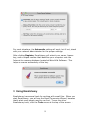
Register from Emailchemy’s Help menu, and you’ll see the register
window.
7