Download BtmGlobal SYSTEM

Transcript
4. Conduit
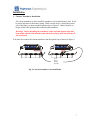
Run the plastic wiring duct along the battery rack rail with the outlets positioned at
each battery cell or use other means (cable ties) to bundle and hide the sensing
harness (wires).
5. Communication Path Installation
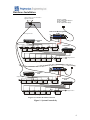
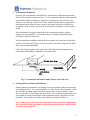
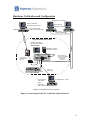
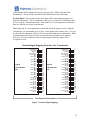
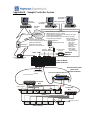
Layout the communication loop, and measure the distances between the connection
points. Run the twisted pair cable, if necessary, and the fiber optical cable next. The
devices are connected in a daisy chain format - from the Fiber Optics Output (White)
of one device and then connected to the Fiber Optics Input (black) of the next.
Warning: The fiber optical loop must be planned very carefully
before cutting the fiber optic cable because there are no way to join
cut pieces of fiber optic cable together without any extra equipment.
Also, neither the sequence nor the total length of the cable is
important. The only important aspect is the length of the longest
piece of the cable is. The longest fiber optic cable must not exceed 60
meters.
The Fiber Optics Output of the last Concentrator of the fiber optical link is connected
to the RS232/485 to Optical converter input (black). The Fiber Optics Output (white)
of the Optical Converter is connected to the closest device Fiber Optical Input. Plan
your connections of fiber optical cable to minimize the length of the longest fiber
optical cable run. If multiple strings are connected to the single optical loop, then
fiber-optical cable must connect across strings (sometimes in an other battery room).
Take care to keep the radius on all bends at least 2 inches or 40 mm. Fiber optic
cables cannot be joined. Care should be taken to run all lengths prior to cutting.
Terminating Fiber Optic Cables
The fiber optic cable from the concentrators should be terminated in the appropriate
socket in the RS-232 converter unit. The converter should be located close to the
computer and modem. Prepare the end of the fiber optic cable by cutting it at a right
angle with a sharp utility knife. The outer covering should then be stripped back for a
length of 0.15 inches or 3 mm. To smooth off the fiber optic for better light transfer,
heat the blade of the utility knife for a few seconds and then place it on the end of the
fiber cable for about 1 second. This will leave a shiny flat end on the cable. Position
the prepared end of the fiber optic cable in the input (or output) of the special fiber
optic’s connector, be sure the connector is loosened. Push the end of fiber optics cable
into the housing, tighten the connector with finger force as would be used to close a
toothpaste container.
10