1
4. Clip Reporter
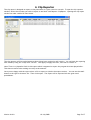
The clip report is designed to report on the placement of a given record or records. To open the clip reporter
window, select the record(s) you wish to report on and then click Reports->ClipReport. Opening the clip report
window can take a while for some items.
The clip reporter will list each placement these clip(s) have received or will receive. You can limit the reporting
time frame by using the “Plays from” section. Click apply to apply the filter, and clear to remove it.
Note: There is a 'playsafter' field in this report which is supposed to report the program this item played after.
This does not seem to be working correctly at the moment.
Once you are happy with the report select a file to export to (Under the export section). You can use the small
button to the right to choose a file. Then click export. The report will be exported into the given excel
spreadsheet.
Version 0.10.0
19-July-2008
Page 5 of 7