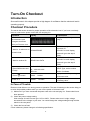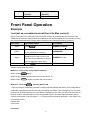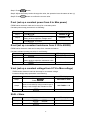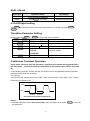
1
General Information
Document Orientation
This manual describes the operation of the IT Model 8500 electronic loads. Unless otherwise noted,
all units will be referred to by the description "electronic load" throughout this User's manual. The
following documents and software are shipped with your electronic load. This User's Guide (this
document), contains installation, checkout, front panel information and detailed programming
information.
The Getting Started Map will help you find the information you need to complete the specific task
that you want to accomplish. Refer to the table of contents or index of each guide for a complete list
of the information contained within.
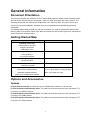
Getting Started Map
Task
Where to find information
Checking out the unit
User’s Guide
Verifying proper operation
Using the front panel
Calibrating the unit
User’s Guide
Using the front panel
Front panel keys
Front panel examples
User’s Guide
Using the programming interface
RS-232 interface
User’s Guide
Remote operation mode
Protocol information
Controller Program and Software driver:
CD-ROM
Power View PV8500 software
(If you’ve purchased the communication
Calibration PC8500 software
cable, you will get it for free)
Active driver PD8500 OCX software
Options and Accessories
Options
IT-E151 Rack mounts kit: for install one or two IT8500 series load on the 19 inch rack.
IT-E131 isolated communication cable: This cable converts the electronic load’s serial port (TTL
5V level) to PC RS232 interface.
IT-E132 isolated communication cable: This cable converts the electronic load’s serial port (TTL
5V level) to PC USB interface.
IT-E134 isolated communication cable: This cable converts the electronic load’s serial port (TTL
5V level) to PC GPIB interface.
11