1
10A
5A
TRG
TRG
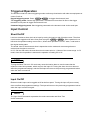
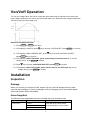
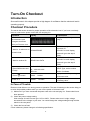
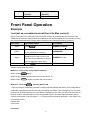
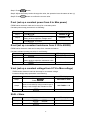
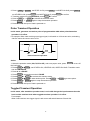
Toggled Transient Operation
Action
1. Press
2. Press
3. Press
4. Press
5. Press
Shift
+ S-Tran
+ Tran
Shift + Trigger
Shift + Trigger
Shift + Tran
Shift
, Setting LEVER A=5A, LEVER B=10A, transition mode is PULSE.
to activate the transient mode.
switch to the current value of 10A.
, switch between 5A and 10A.
again to stop the transient operation.
List Operation
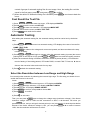
Users can use the front panel keypad or Power View 8500(PV8500) software to programming the
list sequence. Please refer to the software user’s guide.
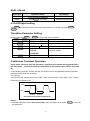
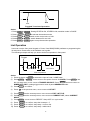
The following example will help you how to do the list operation in front panel.
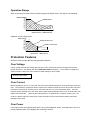
Trigger
0
1
2
3 4
5
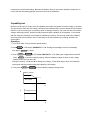
List count=1
List count=2
List sequence
Action
1)
2)
Press the button of On/Off , execute the input of Load I in OFF state.
Press Shift
+ Menu , move cursor to the option of menu of CONFIG, Press Enter into
the next step menu, move cursor to TRIGGER SOURCE. Press Enter and move cursor to
IMMEDIATE <DEF>, setting trigger source mode is panel IMMEDIATE mode.
3)
Press Enter
4)
Press
5)
6)
Press Enter into the next step menu .move cursor to EDIT LIST FILE.
Press Enter into the next step menu, move cursor to CURRENT LIST, select CURRENT
MODE.
7)
8)
9)
10)
Press Enter , move cursor to REPEAT. Setup LIST is in cycle mode.
Press Enter to confirm, setup the list steps = 5.
Press Enter to confirm, setup step 1 current =3A.
Press Enter to confirm, setup step 1 width=6mS.
Esc
to confirm.
to the previous menu, move cursor to LIST SET.
29