1
4-3
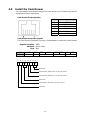
Install the Customer Display
②
①
1.
2.
3.
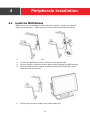
Use both hands to pull the top cover of the stand upwards.
Release the plastic plate from the top cover.
Put the top cover of the stand back to the position.
3.
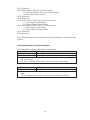
Connect the customer display cable (x1) to the connector on system side and
fasten the ground cable (x1) with a M3*4 screw.
Attach the customer display and fasten the M4 screws (x2).
Cover the screw holes by the rubber pads (x2).
4.
5.
12