1
SIMULATION REPORT
Page 49 of 106
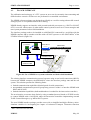
• When the TCP MANAGER receives a new message, the message itself is processed and then
written onto the appropriated file into the Log File System.
• The TCP MANAGER also reads the circular files HIPRY and LOPRY (two command files
that belong to the Log File System, see chapter 4.5) where NEMIS write the messages needed
by the external control functions.
• When a new message is written by NEMIS into a command file of the Log File System, the
TCP MANAGER, processes the message and then sends it out towards the appropriate SPOT
unit or to the appropriate external control function.
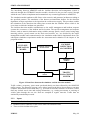
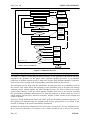
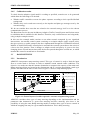
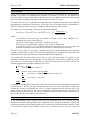
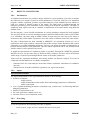
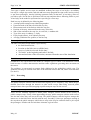
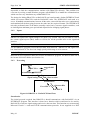
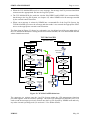
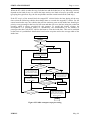
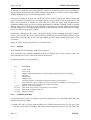
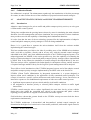
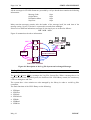
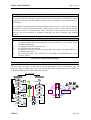
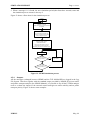
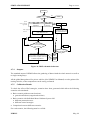
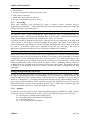
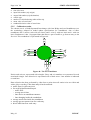
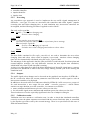
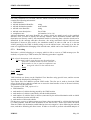
The flow chart in Figure 23, shows in a schematic way, the behaviour of the two main tasks of
the TCP MANAGER and the existing interaction between NEMIS, the TCP MANAGER and the
whole simulation network.
TCP MANAGER
parallel tasks
TASK 1
TASK 2
Nrm = counter of read messages
Set Nrm = 0
Read HIPRY. file
HIPRY
NEMIS
COMPUTER
Is Nrm < Nrm_MAX?
NO
YES
NO
Is there a new
messagge?
SIMULATED
NETWORK
Wait for a
new message
SIMULATED
NETWORK
YES
Is there a new
messagge?
NO
YES
Process the message
Process the message
Set Nrm = 0
Read LOPRY. file
Is the Log
required for this
messagge?
LOPRY
NO
YES
LOGIN
Is Nrm < Nrm_MAX?
NO
YES
NO
Is there a new
messagge?
SIMULATED
NETWORK
Write the message
onto the appropriated
Log file
Others
Log files
YES
Process the message
Figure 23: TCP MANAGER behaviour
The messages are written onto the Log File System using the LFS management functions
provided together with the interface package. The same LFS management functions have to be
used to read the messages previously written onto the Log File System by NEMIS itself and/or by
any other external operating tools (see section 4.5.3 for further details).
PUBLIC
May, 99