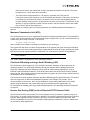
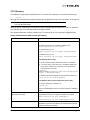
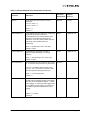
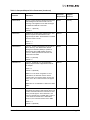
1
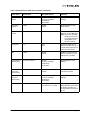
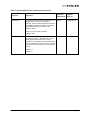
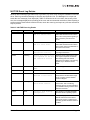
Table 28: iSCSI Event Log Entries (Continued)
Message Id
Message
Recommended Resolution
0x31640004
An internal API failed in be2iscsi driver
during initialization.
This failure may indicate a low memory
condition.
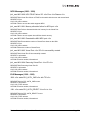
0x14831000
There was an Unrecoverable Error detected
by the be2iscsi driver. Following this error log
entry, the next 3 entries will indicate the error
codes.
This may be due to hardware errors or due to
unhandled exceptions in the hardware or
firmware.
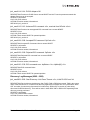
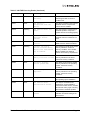
0x138e0103
The be2iscsi driver failed an IOCTL request
since the number of scatter gather elements
required for the IOCTL buffer exceeded the
BladeEngine's firmware limit. Following this
error log entry, the next entry will indicate the
IOCTL opcode and the payload length
requested.
This error may indicate an incorrect
configuration option for the be2iscsi driver. It
may also indicate a low memory condition.
0x138d0101
The be2iscsi driver detected an error during
offloading the iSCSI connection. The
operation will be retried again. Following this
error log entry, the next entry will indicate the
session handle and the BladeEngine
firmware error code.
This may indicate a target is in error or may
point to transient network connectivity issues. It
may also indicate a BladeEngine firmware
error.
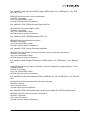
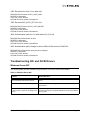
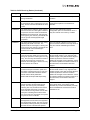
0x12990013
The be2iscsi driver did not receive an iSCSI
command window update up to 25 seconds
during I/O operations. Following this error log
entry, the next entry will indicate the session
handle where this error occurred. The
be2iscsi driver will trigger a session recovery
on the session and continue.
Check for any errors reported at the target. The
Emulex iSCSI Initiator is only supported with
certified Targets. Verify that the iSCSI Target is
certified by Microsoft. Check for software
updates at the target vendor's Web site. Check
for software updates at the Emulex' Web site. If
the above fails, contact Emulex technical
support.
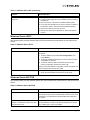
0x127b0012
The be2iscsi driver received an invalid iSCSI
Command Sequence Number update from
the target. Following this error log entry, the
next three entries will indicate the session
handle and the iSCSI parameters MaxCmdSN and ExpCmdSN respectively.
Check for any errors reported at the target. The
Emulex iSCSI Initiator is only supported with
certified Targets. Verify that the iSCSI Target is
certified by Microsoft. Check for software
updates at the target vendor's Web site. Check
for software updates at the Emulex' Web site. If
the above fails, contact Emulex technical
support.
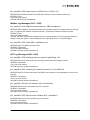
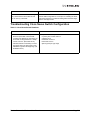
0x12790006
A connection to the target was lost for a
period exceeding the Extended Timeout
(ETO). The error log entry immediately
following this entry will indicate the session
ID of the target that lost the connection.
There will be event log entries from the disk
subsystem indicating that the drives were
lost. If any I/Os were in progress, the system
may see I/O errors or failures.
Check the connection to the target or the state
of the target device. If the target is made
available, any sessions that existed previously
will be reestablished and the devices will be
available for I/O.
0x11990007
The be2iscsi driver received a Task
Management Function that is not supported
and rejected this request. The error log entry
immediately following this entry will indicate
the TMF function code that was rejected.
The operating system version is not supported.
Emulex Drivers for Windows User Manual
Page 89