1
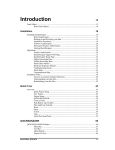
Contents
What's new in QuickDesigner 3.60
1
Introduction ............................................................................................................................... 1
Software support for the 7.4”, 10.5” and 12.1” TFT Quick Panels............................................ 1
Serial Communication ............................................................................................................... 1
Ethernet Connectivity ................................................................................................................ 2
Compact Flash Project Back Ups .............................................................................................. 2
Back Light burnout Detection.................................................................................................... 2
Keypads for 7.4” and 10.5” Displays........................................................................................ 2
Improvements over Quick Designer 3.51 .................................................................................. 3
Basic Requirements ................................................................................................................... 3
Software Authorization.............................................................................................................. 4
Product Authorization using Email ............................................................................. 5
Product Authorization via Web Site ............................................................................ 6
Completing Product Authorization.............................................................................. 8
Help Menu ................................................................................................................................. 9
Product Authorization ................................................................................................. 9
QuickDesigner Support Web Page .............................................................................. 9
QuickDesigner Home Page : ....................................................................................... 9
Online Knowledge Base ............................................................................................ 10
Knowledge Base........................................................................................................ 10
Panel Editor Manual .................................................................................................. 10
Hardware Reference Manual ..................................................................................... 10
Protocol Troubleshooter ............................................................................................ 10
Download Troubleshooter ......................................................................................... 10
QuickPanel Error Codes ............................................................................................ 10
Quick Help ................................................................................................................ 10
Communication Help................................................................................................. 10
System Requirements for Modem Setup........................................................................... 11
Downloading with a Modem ................................................................................................... 11
Running HyperTerminal............................................................................................ 12
Modem Setup ............................................................................................................ 12
Run QuickDesigner ................................................................................................... 13
Addendum
Contents • i