1
Supported Memory Cards
and File Formats
Supported memory cards
This unit supports the following types of memory cards.
• “Memory Stick”
• “Memory Stick PRO”
• “Memory Stick Duo”
• SmartMedia card
• CompactFlash card
• SD Card
• MultiMediaCard
• xD-Picture Card
Supported file formats
The unit supports the following file formats. The
maximum data size that can be read by the unit is 8,000 ×
6,000 pixels.
Notes on MagicGate™
“MagicGate” is the collective name of content protection
technologies developed by Sony.
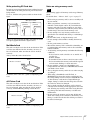
Write-protecting “Memory Stick” data
In order to protect important data from accidental erasure,
the “Memory Stick” has a write-protect switch. When the
switch is in the left-hand position, data can be written to or
deleted from the “Memory Stick”, and the “Memory
Stick” can be initialized. When the switch is in the righthand position, data in the “Memory Stick” can be read, but
cannot be written. When inserting a “Memory Stick” into
this unit in order to read data, slide the write-protect switch
to the protected state.
Contacts
Appendix
• JPEG
JFIF 4:4:4, 4:2:2, 4:2:0 (baseline JPEG)
Exif 2.2.1 compliant
DCF 2.0 compliant
• TIFF
Exif 2.2.1 compliant (RGB non-compressed)
• BMP
24-bit Windows format
(Some format versions may not be supported.)
Up to eight levels are supported for directories on a
memory card, and up to 9,999 files can be handled with a
single operation.
“Memory Stick” comes in two types: general purpose
“Memory Stick” and “Memory Stick” using the
MagicGate encryption technology to protect copyrighted
material, referred to as “MagicGate Memory Stick”. This
unit supports both types of “Memory Stick”. However,
because this unit does not support the MagicGate standard,
material recorded with this unit is not protected by
MagicGate.
In addition, you can also use “Memory Stick Duo” or
“Memory Stick PRO” with your unit.
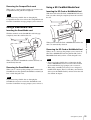
Write-protect switch
Not writeprotected
LOCK
Writeprotected
LOCK
Label area
Notes on Using Memory Cards
Note
Notes
• Sony bears no responsibility for damage to your memory
card or data while using this unit.
• Operation of “Memory Stick” (up to 32 GB) media on
this product is confirmed. However, proper operation on
all types of the “Memory Stick” media is not guaranteed.
• You cannot play back files that are 4 GB or larger in size
from “Memory Stick” media due to the specifications of
its file system.
The write-protect switch position and shape varies
depending on your type of “Memory Stick”.
Reinitializing (formatting) “Memory Stick”
Before using your “Memory Stick” for the first time, make
sure that you use your digital camera to format it.
Formatting the “Memory Stick” with a device other than
your digital camera may make data on the “Memory Stick”
unreadable for the system.
“Memory Stick” types
Notes on using “Memory Stick”
“Memory Stick” is a removable, compact data storage card
that can be used with digital still cameras and personal
computers. Still images stored in a “Memory Stick” can be
easily displayed, overwritten or deleted.
• To use a “Memory Stick” insert it directly into the
“Memory Stick” slot of the system. Do not insert the
“Memory Stick” into a CompactFlash type adapter, as
this may accidentally delete the data on the “Memory
Stick”.
Supported Memory Cards and File Formats
55