1
Multipla AC LCD
User manual
Page 2
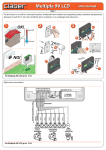
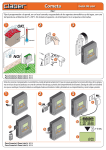
Remove the cover of the battery pocket from its seat, connect the battery and position it in the pocket, with a
light pressure. Use only a new 9 volt alkaline battery, type IEC 6LR61. When the battery is inserted, the message
OFF will be displayed.
1
2
3
a
3d
2d
4d
Y
7d
NC
UE
h
24
EQ
FR
h
12
20 30
8h
S
60
UR
T+
AR
ST
L
UA
AN
/M
ST
TE
...HO
10
20
30
15
T
60
5
10
SE
RE
20
30
15
60
5
10
20 30
15
60
9 Vne
li
ca
5
10
20
30
15
60
5
30
60
5
4d
NC
UE
h
24
EQ
FR
h
12
20
8h
URS
+ ...
10
20
30
15
L
UA
AN
/M
ST
TE
T
60
5
20
30
15
30
60
60
60
30
60
L
UA
5
4V
TE
A
5
15
20 30
IPL
30
60
5
60
5
20 30
15
30
60
5
click!
60
5
15
20
15
10
30
30
60
5
60
60
5
30
60
60
5
5
10
5
5
10
20
15
10
20
15
20
30
10
60
...H
T
SE
RE
10
LT
MU
AN
/M
ST
D
LC
0/2
23
AC
30
10
20
h
5
10
20
15
10
20
15
15
Y
NC
UE
EQ
8h
RS
10
20
15
30
60
...H
T
SE
RE
20 30
7d
FR
OU
T+
AR
ST
10
20
15
4d
12
5
5
10
UEN
EQ
FR
20 30
10
3d
2d
h
24
10
20
15
AN
/M
ST
TE
10
SE
RE
30
60
HO
ART
ST
L
UA
a
Y
7d
CY
7d
8h
RS
OU
T+
AR
ST
3d
4d
h
12
5
2d
3d
2d
h
24
Al
10
20
15
10
b
10
20
a
15
10
b
30
60
5
5
For Multipla AC 230/24V LCD (p/n): 8058
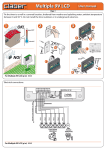
Refit the battery cover. Plug the voltage transformer into a 230 V AC mains power socket. The battery serves
purely to maintain the clock function, and therefore the timing of the selected programme, in the event of a
mains power failure.
1
3d
2d
4d
CY
7d
h
24
UEN
b
EQ
FR
h
12
20 30
8h
S
UR
60
O
T+
AR
ST
L
UA
T
AN
/M
T
ES
20
15
30
60
60
10
20
15
10
20
15
10
20 30
15
10
...H
T
SE
RE
5
30
60
5
30
60
5
a
5
10
20
15
30
60
5
10
5
For Multipla AC 230/24V LCD (p/n): 8058