1
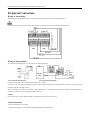
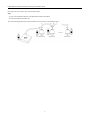
EZHD-TRF4/8/16 HD-TVI Real Time DVR Quick Installation Guide 2. Press and hold the orange part of the pluggable block; insert signal cables into slots and release the orange part. Ensure signal cables are in tight. 3. Connect pluggable block back into terminal block. RS-485 Connection 1. Disconnect pluggable block from the RS-485 terminal block. 2. Press and hold the orange part of the pluggable block; insert signal cables into slots and release the orange part. Ensure signal cables are in tight. 3. Connect A+ on PTZ to D+ on terminal block and B- on controller to D- on terminal block. Fasten stop screws. 4. Connect pluggable block back into terminal block. To connect PTZ to the DVR: 1. Disconnect pluggable block from the RS-485 terminal block. 2. Press and hold the orange part of the pluggable block; insert signal cables into slots and release the orange part. Ensure signal cables are in tight. 3. Connect A+ on PTZ to T+ on terminal block and B- on controller to T- on terminal block. Fasten stop screws. 4. Connect pluggable block back into terminal block. Make sure the DVR is grounded. Termination Switch Operation This function is applicable to certain models only. The termination switch is placed on the mainboard instead of the rear panel. Open the upper cover and turn on/off the SW switch if needed. Purpose: To connect the DVR with several speed domes, the multi-drop/bus topology can be used, which means multiple speed domes are connected with each other via the R+ and R- of RS-485 serial interface, for proper impedance and to reduce reflections, terminations should be in 8