1
C M L - 1 2 C 3 2
J U L Y
2 6 ,
2 0 0 4
and detects auto-start enabled operation. The MCU memory map is fixed under monitor operation.
AUTOSTART
The embedded Monitor supports Autostart to launch user application code at Reset. If the
NO_AUTO jumper is removed at power-on, the monitor executes program code located at
FLASH location $8000. If program code at $8000 fails to execute as expected, follow the troubleshooting tips above to debug. The following steps illustrate how to execute user code out of
RESET or at power-on.
1. Relocate application code to address $8000.
2. Remove the No_Auto jumper
3. Apply power or press the RESET button.
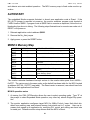
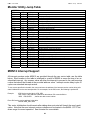
MON12 Memory Map
ADDRESS
$0000 $03FF
$0400 $07FF
$0800 $0DFF
$0E00 $0F8B
$0F8A $0FFF
$1000 $7FFF
$8000 $BFFF
$C000 $FFFF
TYPE MEMORY
MCU Registers
MEMORY APPLICATION
Monitor or User access to control registers.
External Memory
Expanded Mode Development Memory
Internal RAM
Internal RAM memory.
Internal RAM
Monitor reserved ram memory. Stacks and
variables.
Ram Interrupt Vector Table
Internal RAM
External RAM
FLASH EEPROM
FLASH EEPROM
Expanded Mode Data / Program Memory
Space
User Program Memory. User Autostart Program Memory Space
Protected Monitor Space
Size
1K
bytes
1K
bytes
1.5K
bytes
512
bytes
28K
bytes
16K
bytes
16K
bytes
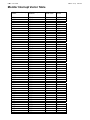
The monitor relocates hardware interrupt vectors in the monitor data space from 0x0F8A 0x0FFF. The vectors are in the same order as the default hardware table for the MCU located
at address 0xFF8A - 0XFFFF (see table). The Reset vector is reserved, user should use Auto
Start for to start applications from Reset.
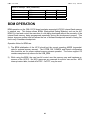
MON12 operation notes:
1. At startup, the CML-12C32monitor allows the user to select operating mode. Type “E” at
the prompt to select Expanded Mode operation, any other key selects Single-Chip operation.
2. The monitor application configures target MCU for 8MHz E-clock, lower flash block disabled from memory map, and external access clock stretch set to 3 cycles. User can increase clock speed in an application by modifying PLL control and setting new baud rate
for serial port. Defaults monitor setup returns when the MCU is Reset.
21