1
Chapter 8
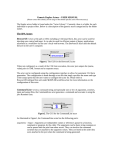
To see the list of globally defined constants, open Kepler's Expression Evaluator and type
constants() at the command prompt. Kepler will return a list of defined constants
and their values (Figure 8.2)
Figure 8.2: Use the constants() function to return globally defined constants and their values.
Predefined Strings
PTII
Meaning
The directory in which Ptolemy II is
installed (e.g., c:\tmp)
HOME
The user home directory (e.g.,
c:\Documents and Settings\you)
CWD
The current working directory (e.g., c:\ptII)
TMPDIR
The temporary directory (e.g.,
c:\Documents and Settings\
you\Local Settings\Temp)
KEPLER
The directory in which Kepler is installed
(e.g., c:\kepler)
Table 8.2: Predefined String Values in Kepler