1
Step2. Install IP device
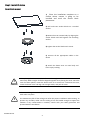
Semi-flush mount
Place the installation template on a
surface where camera is going to be
installed and mark the anchor block
placements.
1)
2) Drill and insert anchor blocks on a marked
surface.
3) Mount the main camera body by aligning the
anchor blocks and hold against the mounting
surface..
4) Tighten the anchor blocks with screws
5) Connect all the appropriate cables to the
device
6) Attach the dome cover on main body and
lock it up by rotating.
!
Caution
When placing the dome cover, look for carved triangle mark on both dome cover and
main body. Both triangles should be aligned together when placing the cover. Once the
cover has been placed, rotate the dome cover for a secure lock. To detach the cover,
rotate the dome cover and align two triangle marks, and pull the cover.
When assembling the main body of the camera and its dome cover, make sure they fit
each other into place.
!
Caution
EC2100 Ver1.0
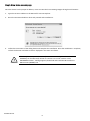
The camera may fall off the ceiling even after the proper installation and mounting. To
prevent any accident, make sure the ceiling is firm and stable enough to support the
camera. If any reinforcement is needed, consult with your safety personnel and
proceed with the installation.
2