1
3002180 12.12
1. Product Information
1.1Function................................................................................................3
1.2Shipping................................................................................................3
1.3Warranty................................................................................................3
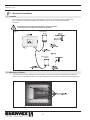
1.4 EBC 30 Control Components................................................................3
2. Specifications
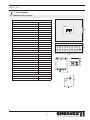
2.1 Dimensions & Capacities.......................................................................5
3. Mechanical Installation
3.1Location.................................................................................................6
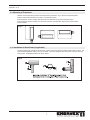
3.2 Mounting of Control...............................................................................6
3.3 Mounting of Transducer .......................................................................7
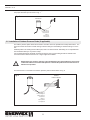
3.4 Installation of Stack Probe (if applicable) .............................................7
3.5 Installation of Outdoor Pressure Probe (if applicable)...........................8
4. Electrical Installation
4.1General.................................................................................................9
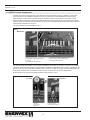
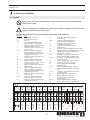
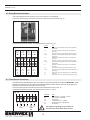
4.2 Relay Board Connections...................................................................10
4.3 Triac Board Connections.....................................................................10
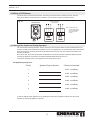
4.4 Wiring of XTP2 Sensor........................................................................ 11
4.5 Wiring of the Control for Priority Operation.......................................... 11
5. Startup and Configuration
5.1 Sequence of Operation.......................................................................12
5.2 Pre-Operation Inspection....................................................................13
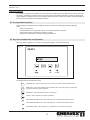
5.3 Key Panel Identification and Operation...............................................13
5.4 Initiation of Control..............................................................................14
5.5 Basic Control Set-up...........................................................................14
5.6 Detailed Control Programming............................................................16
5.7 Programming Sequence.....................................................................17
6. Maintenance and Troubleshooting
............................................................................................................18
Symbol Legend:
The following terms are used throughout this manual to bring attention
to the presence of potential hazards or to important information
concerning the product.
Caution: Indicates an imminent hazardous situation
which, if not avoided, may result in personal injury or
property damage.
Danger: Indicates an imminent hazardous situation
which, if not avoided, will result in death, serious injury or
substantial property damage.
TO REDUCE THE RISK OF FIRE, ELECTRICAL SHOCK OR INJURY TO PERSONS,
OBSERVE THE FOLLOWING:
How to use this manual
1. Use this unit in the manner intended by the manufacturer. If you have questions, contact the manufacturer at the address or telephone number listed on the front of the manual.
2. Before servicing or cleaning the unit, switch off at service panel and lock service panel to prevent power from being switched on accidentally.
3. Installation work and electrical wiring must be done by a qualified person(s) in accordance with applicable codes and standards.
4. Follow the appliance manufacturer’s guidelines and safety standards such as those published by the National Fire Protection Associations (NFPA), and the American Society for Heating, Refrigeration and Air Conditioning Engineers (ASHRAE), and the local code authorities.
5. This unit must be grounded.
This installation manual does not contain any system design
documentation.
System design documentation is available from
any authorized ENERVEX representative.
Accessories, fans and variable frequency drives are not covered by
this manual. Please refer to these component’s individual manuals.
2