1
Mini-map
Control Panel
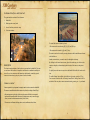
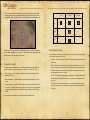
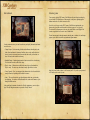
Mini-map — an integral part of any real-time strategy — gives a player the most
important information about the battlefield, its landscape, and main objects: obstacles,
bridges, dispositions (blue «birds»), allies (grey «birds») and enemy units (red birds»).
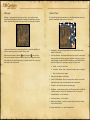
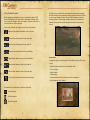
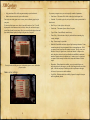
The Control Panel is the unit command center where all main functions are concentrated for controlling the chosen unit or the entire game.
1
2
3
4
5
6
7
9
10
9
7
8
Apart from the information, the mini-map also allows to control the battlefield: leftclick on a required point and your camera will move there.
and «Zoom out»
you can, respecWith control panel buttons «Zoom in»
tively, zoom in and out the map or an indicated object. Do not forget, however, that
when a unit leaves the perceived mini-map, it is possible that you will not see rear or
flank attacks of the enemy in time!
1.Menu Button – calls up the in-game menu. See more detailed information in
chapter: In-Game Menu.
2.Game Speed Buttons – three buttons which specify the speed of events in game.
Game speed does not influence your units’ capabilities; it only gives you more
time for figuring out solutions in difficult situations, or, on the other hand, can
reduce the waiting time for your army to regroup. The speed can be:
a. Normal – events occur in real time.
b. Accelerated – the flow of time is accelerated, causing events to occur quickly.
c. Pause – the flow of time is stopped.
3. Mini-map Zoom Buttons - see Mini-Map.
4.Cancel All Orders Button – allows you to stop units on the move or to cancel a
command to attack a target, but cannot pull the unit out of the battle.
5. Go Button – sets the unit movement at a marching pace.
6.Run Button – sets the unit movement at a run. The unit may refuse to fulfill this
order if the location or level of unit exhaustion does allow it to move fast.
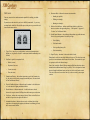
7. Formation Buttons – see Unit Formation.
8. Unit Density Buttons – see Unit Density.
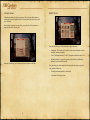
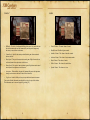
9.Behavior Mode Buttons – specifies a reaction of units to the enemy’s actions.
See Unit Behavior Mode.
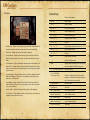
10. Army Formation Panel - see Army Formation Panel.
9
10