1
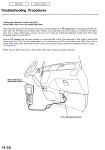
2007 Honda Element EX 2007-2008 ENGINE PERFORMANCE Fuel and Emissions Systems - Element 2. Connect the HDS to the data link connector (DLC) (A) located under the driver's side of the dashboard. Fig. 7: Identifying Data Link Connector (DLC) Courtesy of AMERICAN HONDA MOTOR CO., INC. 3. Make sure the HDS communicates with the ECM/PCM and other vehicle system. If it doesn't, go to the DLC circuit troubleshooting (see DLC CIRCUIT TROUBLESHOOTING ). If you are returning from the DLC circuit troubleshooting, skip step 4 and 5, then clean the throttle body after updating the ECM/PCM (see THROTTLE BODY CLEANING ). 4. Select the INSPECTION MENU with the HDS. 5. Select the ETCS TEST, then select the TP POSITION CHECK, and follow the screen prompts with the HDS. NOTE: If the TP POSITION CHECK indicates FAILED, continue this procedure. 6. Exit the HDS diagnostic system, then select the update mode, and follow the screen prompts to update the ECM/PCM. 7. If the software in the ECM/PCM is the latest, disconnect the HDS/HIM from the DLC, and go back to the procedure that you were doing. If the software in the ECM/PCM is not the latest, follow the instructions on the screen. If prompted to' choose the PGM-FI system or the A/T system, make sure you update both. NOTE: If the ECM/PCM update system requires you to cool the ECM/PCM, follow the instructions on screen. If you run into a problem (programming takes over 15 minutes, status bar goes over 100 %, D or immobilizer indicator flashes, HDS tablet freezes, etc.) during the update procedure, follow these steps to minimize the chance of damaging the ECM/PCM: Leave the ignition switch in the "ON (II)" position. Connect a jumper battery (do not connect a battery charger). Shut down the HDS. Disconnect the HDS from the DLC. Microsoft Saturday, August 22, 2009 8:36:23 AM Page 7 © 2005 Mitchell Repair Information Company, LLC.