1
On the Web
iGolf
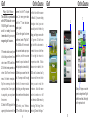
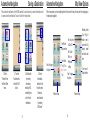
Syncing with iGolf
computer using the USB cable
available updates to the iGolf
Yo u w i l l n e e d t o s y n c y o u r
provided with your accessories.
software, or to sync any scores to
device with iGolf.com. Doing
3. Make sure your device is
the handicap tracker.
so will eliminate the 45 day
powered on.
countdown to register with
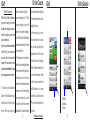
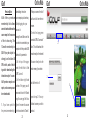
4. Select the “Sync Device” button
*Note: The iGolf website uses
iGolf. This will also update the
on the left hand portion of your
a Javascript application in order
preloaded courses and sync
profile page.
to sync information between the
saved scores to ensure that
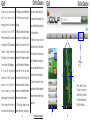
5. On the initial sync of the device
website and the device. You will
all GPS data on your device is
you will receive a large course
need to have a current version of
updated.
update, indicated by a status bar
Java installed on your computer.
and message reading “Updating
Java is available for download
1. Once logged into iGolf.com,
courses. Do not Disconnect. This
a t w w w. j a v a . c o m . F o r m o r e
select the “My Profile” link to
may take several minutes.”
information, please see item 1c.
navigate to your profile page.
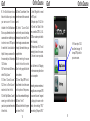
6. It is advisable to sync your
on page 26 (iGolf troubleshooting
2. Connect your device to your
device often to receive any
21
guide).
On the Web
iGolf
4.
22