1
3.0 Startup Sequence
The start up sequence occurs after applying power to the unit.
The sequence is: all segments lit “8.8.8.8.”; then “type”, followed
by “rtti”; then “ver”; followed by two numbers ddmm and yyyy
that represent the day, month, and year of the revision; and then
“run”. After the startup sequence is complete the detected
temperature is displayed and the unit is operational.
4.0 Configuration
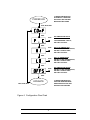
To enter the configuration mode press all three buttons while
powering up the unit or, while the d-RTTI is operational, press
and hold all three buttons for approximately five seconds. The
unit will enter the startup sequence by lighting all segments
“8.8.8.8.” and then displaying “COnF”. Pressing any button at
this point will produce the first Configuration Prompt on the list of
configurable operating parameters below.
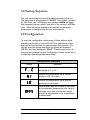
Configuration Parameters
Prompt
Operation
Selects whether the temperature will be
displayed in ºF or ºC
Selects the temperature value that will
produce a 20 mA output
Selects the temperature value that will
produce a 4 mA output
Adds a small amount of offset or zero shift
to the displayed temperature; this value is
normally set to zero but can be used to
make fine adjustments to the temperature
measurement
2