1
Arctic Modbus Gateway
Configuration Manual
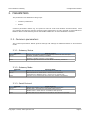
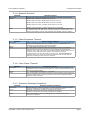
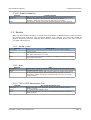
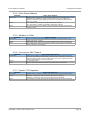
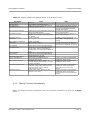
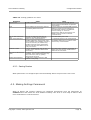
Table 3-1. Setting guideline for Network Master to Serial Slaves mode
Parameter
Gateway Status
Gateway Mode
Serial Protocol
Network Protocol
Value
Enabled
Network Master to Serial Slaves
Depends of connected Modbus slave
Depends of Master side
Slave response timeout
Depends of connected Modbus slave
Inter-frame timeout
Modbus RTU protocol has standard
timeout of 4 character time. Use value 0
for default.
Enable or Disable
Generate Gateway
exceptions
Pass Gateway exceptions
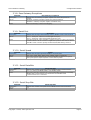
Serial Port
Enable or Disable
Select Port 1 or Port 2
Serial Speed
Serial Data Bits
Depends of connected Modbus slave
Depends of connected Modbus slave.
Use of “Auto” selects 8 data bits for
Modbus RTU and 7 data bits for Modbus
ASCII.
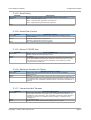
Depends of connected Modbus slave.
Depends of connected Modbus slave.
Select None, Even or Odd
Enable if require by slave
Default port for Modbus network
communication is 502
Serial Stop Bits
Serial Parity
Serial HW Handshaking
Server TCP/UDP Port
Max. Number of clients
Connection idle timeout
Enable keepalive
Normally use minimum value 2. If
multiple Masters are allowed to connect
increase the value.
Set about two times the polling interval
of Master. If the polling interval is very
long (over hour) use e.g. polling
interval+200 seconds
Enable if the polling interval or idle
timeout is very long.
Note
Prefer Modbus RTU when possible
If Viola Systems M2M tunneling is
used prefer UDP based Modbus
network messaging
Increase this value if problems on
serial communication
Increase this value if problems on
serial communication.
Enabling Gateway Exceptions can
help system debugging and
testing
If single serial port or RS-422/485
functionality is required use Port 2
If multiple Modbus Gateway
applications are running on same
Arctic the ports must be different
for each Gateway application. Use
e.g. ports 502 and 504.
If the network is wireless or
unreliable increase this value if
problems on connection forming.
3.2. Saving Parameters
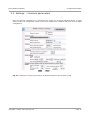
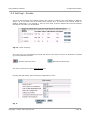
When settings are complete press the Apply button, permanently store the parameters by Commit
button and reboot the Arctic by pressing Reboot button. The Arctic is now ready to deliver data
from Network Masters to Serial Slaves.
Copyright © 2004, Viola Systems Ltd.
Page 14