1
Customize Workouts
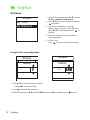
You can create a customize interval workouts with your Rider 30.
Interval
Warm up
18 ' 00"
10~15km/h
Work
km
120~ 135 bpm
Recovery
15 ' 00"
120~135bpm
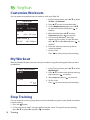
1. In the Training menu, press p/q to select
To Plan > Customize.
2. Press p/q to view the workout data.
3. On the Repeat time option, press p/q
to select time interval and press
to
confirm.
4. When finished, press p/q to select
Continue and press
to continue.
5. A “Save to My Workout?” message
appears on the screen. To save the data,
press p/q to select Yes and press
to
confirm.
6. Enter the workout name using the onscreen keyboard.
7. Go for a ride.
Press
to start training and record log.
My Workout
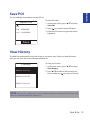
With My Workout feature, you can start your workout using the training plan that you have
saved earlier.
My Workout
Start
1. In the Training menu, press p/q to select
My Workout.
2. Press p/q to select your desired training
plan and press
to confirm.
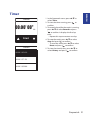
3. Select Start and press
Time
1.0
hr
to continue.
4. Go for a ride.
Press
to start training and record log.
Stop Training
You can stop the current training after you have reached your goal, or you decide to end the
current training.
1. Press the
button.
2. A “Do you want to stop?” message appears on the screen. To stop the current training,
press p/q to select Yes and press
to confirm.
16 Training