1
VII. Feature Detail: GPS
A. Connecting to the GPS device
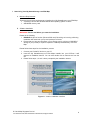
Please follow the instructions from your GPS device to connect to the PDA.
B. Setting the connection
To set the connection
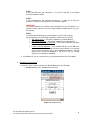
3. Go to the GPS feature window
4. Tap on Settings button.
5. Choose the COM port by which you connect your PDA to your GPS device. This com
port varies from one device to another.
6. Choose the speed type either in Knots Per Hour or Mile Per Hour.
7. Tap ok to confirm the setting.
To connect to the GPS device
1. Go to the GPS feature window.
2. Tap on Connect to GPS button
3. You will be able to see the time, longitude, latitude, and speed information from the
GPS location information area.
C. Self tracking feature
Self tracking feature is to show the location of the GPS device on the map.
To activate the self tracking feature, check the Self Tracking check box in the GPS feature
window.
Note: If you do not activate the self tracking feature, the map will not shift to the GPS’
current location.
VIII. Streetdirectory.com Hotline
If you have any enquiries or problems, please call our hotline at 6746 0300.
© Virtual Map Singapore Pte Ltd
215 Henderson Road, #03-06 Henderson Industrial Park, Singapore 159554
14