1
CMR and DM column by clicking and dragging the mouse, go to the Graph tab and select
Line graph.
The DM should be represented on the y axis and the CMR should be on the x axis. Fit an
equation to this line, and this will be your specific equation. To do this, ‘right click’ the data
points and click ‘Add trendline’ then ‘linear’. You will be able to see how well the equation
fits by visually examining the graph, as well as interpreting the R and R2 values. The closer
they are to 1, the better the equation fits the data and hence the more accurate the
GrassMaster Pro is in predicting the Dry Matter on that day. CWD data sets gathered in a
short space of time, on consistent paddocks, can be very tightly predicted by GrassMaster
quadrat averages as described above.
Background Conditions
Environmental Equation Only
Estimate Forage Dry Matter % (Affects DM Data)
When prompted for a Forage DM%, estimate this on a ten point scale that ranges from wet
to dry. If you do not wish to account for variation in DM%, just always leave this setting on
MEDIUM (5 or 6).
Background Soil Moisture (Affects DM Data)
For the first measurement of the day you will have to measure the background soil
moisture before paddock sampling (unless you are in GM2 mode, settable from the Main
Menu- Change Trigger Settings). It is also recommended that you take a new background
measurement whenever you suspect that the soil type or moisture has changed between
subsequent paddock measurements. Background soil moisture is measured by either
measuring over bare soil, trampling grass flat, or ripping out a patch of grass of about the
size of a dinner plate and measuring from this. Take at least 10 readings for more accuracy.
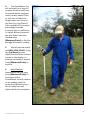
Example of a quadrat being probed
28
GrassMaster Pro User Guide