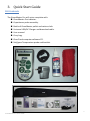
1
Taking Measurements
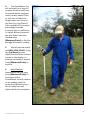
Always hold the GrassMaster probe by the black foam handle when taking measurements.
Turn on the GrassMaster Pro by holding down the [Power/Exit] button.
Upon initial start-up, the GrassMaster Pro will default to the Quadrat Estimate equation
type (See page 14, Selecting Equation types if you want to change this).
(Note that the computer software package GrassTrack allows you to easily setup the
GrassMaster Pro with your custom paddock names, areas, and forage types. See later
sections).
1.
Press [Measure/Enter] to begin.
2.
Select the paddock you want to measure using the [Up/Down] arrows and press
[Measure/Enter] to select.
3.
If this is the first time the instrument (for this forage type) has been accessed today,
the GrassMaster Pro will display:
- CREATING NEW EQUATION
followed by:
- LOW QUADRAT - PRESS Enter Press [Measure/Enter] and the
GrassMaster Pro will perform an air
reference reading. Hold the probe (by
the black grip) in the air, away from
any objects, while this process runs for
a few seconds. It will make a special
beep if all OK.
9
GrassMaster Pro User Guide