1
Make sure you are in the right application
Multiple administration applications are designed with the familiar look and feel of the ride matching
website so administrators can apply their know-how of one application to navigate easily through the
other applications. To make sure you are managing the right application for your vanpool program:
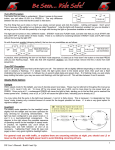
1. Check that the heading above the menu is for your regional network
2. Look for the vanpool menu in the menu bar
Figure – Check to make sure you are in the right administration application
Vanpool Program Configuration
You can configure multiple elements of your agency’s vanpool program through the administration
application. To view your current program configuration, Go to the Vanpool menu and click on the link
"View/Modify Vanpool Program Settings".
Decide the Minimum # for a Vanpool Interest Group
Your agency will want to decide how many people will need to link together in order to send in a
vanpool interest group. Commuters can still get started without this step by contacting your agency
directly. It is recommended that your agency chooses 2 or more for this number, so that you are not
receiving vanpool interest applications from individuals who are just looking for a ride match.
Choose the email address for Vanpool Interest Group notifications
You will want to choose an email address that is checked on a regular basis within your agency. Anytime
a user submits a vanpool interest application, the email will go to this email address.
Allow self service vanpool group maintenance
If this option is set to “Yes”, then the driver is able to: remove passengers from the van, assign pickup
and drop-off locations to the passengers in the van and change roles of those in the vanpool. The
primary driver role cannot be changed through the self-service option – an administrator must explicitly
change a primary driver.
Allow self service vanpool route change
If this option is set to “Yes”, then the driver is able to: view the route of the van along with all stop
information, change the order of the stops and add or remove stops.
Allow user to change profile information
If this option is set to “Yes”, the vanpool user can change the first name, last name, phone number,
email address, home address, work address and mailing address on file. If the option is set to ‘No’, only
administrators can edit this information on file via proxy access.
Participation guidelines link
Optionally, the vanpool administrator can provide a link to the vanpool program and policy. The vanpool
interest group driver can see this link before submitting the vanpool application.
Vanpool Administration - SmartRideshare
October 31, 2012
Page 3