1
Enquire: Librarian Training Notes
3. QuestionPoint software
3.1 Logging into QuestionPoint
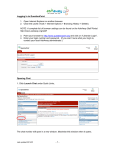
To log on to the librarian side of the software, go to: http://www.questionpoint.org
At the top of the screen, select the option: ‘Librarian Logon’.
To log in you will need the 6-digit User ID and password provided. This 6 digit User ID is emailed
when a new account is set up. Local Administrators will have a 9 digit User ID for setting new
accounts and running reports, this will start 100XXXXXX.
If you cannot remember your password, use the “Forgot your password? Click Here” option under
the Password cell, your login details will be emailed to you. If you still have problems, contact
Support4
The password will initially be the first 20 characters (including full stops and the ‘@’) of your email
address. When entering your password, you can either cut and paste your email address as
detailed in the User ID email, or just keep typing until the cursor stops; there is no need to count
the characters. The password is however case sensitive.
The first time you login, you will then be prompted to re-type the password and select your own
unique password.
4
[email protected] or tel +44 (0)114 267 7502 / 0845 267 7502
OCLC Ltd
Version 4. October 2015
Page 9 of 48