1
4.2
Touch screen display and function select
4.2.1 Initial display
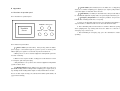
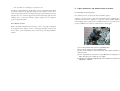
Press the power button, after power supply is on, a display is showed as below:
Note: When power is on, PLC default is Work 0, must select a Work number first, then
being able to operate as below.
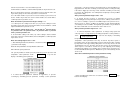
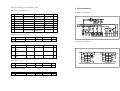
Display time at right column is counted time, a work goes at which pressure
level, which one begins to count down time. Above display shows the second
level remains 0.4 minute before it finishes.
4.2.3 Amend work parameter
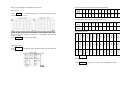
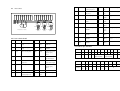
Work parameters include heat temperature, the number of pressure level,
pressure and holding time of each pressure level. Touch
, enter
Work-P
into the display of amend work parameter:
Touch Operation
display.
, the machine goes into a work status and gets a work
4.2.2 Work display
At first select work No. when amending parameters, work 1 is selected as
above display, then doing as below procedure:
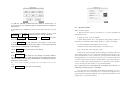
a. To amend temperature setting: touch temperature value(100.0), a number
key board is bounced as below:
Touch
Work 1
, goes into work 1 display
Work 1 display:
Touch relevant number, then touching ENT to confirm input, the number key
board is closed.
Note: temperature range is as 0.0 – 175.0
Operation of number key board:
Amend: CR, touch CR to delete number inputted.