1
Using your Dream Player LITE
the card as it considers this one the “original” and in most situations was likely written to
the card first, so it is safe to assume that this track was intended as track 1.
You can name your files anything you want. For your convenience, you can name the
files something sensible like “Mountain Day.wav” on your computer, and then rename
the file once it is on the SD Card. A good file name is something like “1-Mountain
Day.wav” which would be treated as Track-1 and would be started with The Trigger
Input on the Dream Player LITE. You may have 4 audio files on the card for use in
random mode. Note that the only time you will have the opportunity to have all four
tracks play is in Random mode.
During normal operation the LITE will only play track one when the on-board button is
pressed or is triggered from an outside source via the trigger inputs.
2.10
Loading the SD Card
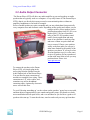
In order for the Dream Player to receive its files, they must be copied onto the mircoSD
Card. Any standard SD Card reader attached to any computer can be used. The Dream
Player will accept any brand of SD Card, in any capacity from 512MB up to 16GB.
Simply copy your wav files onto the root folder of the SD Card. The Dream Player will
not look in any sub-folders or sub-directories for its files, only the root folder. After you
copy files onto the SD Card, any file can be renamed at any time. Unlike previous Dream
Player‟s the LITE will accept fragmented cards, meaning you do not have to delete all
files off the card before loading your news ones on. For example if you had 4 tracks on
your card and you wanted to change track 2 you can simply delete the old track and put
the new one on the card, without having to delete and then rewrite ALL the files.
PRICOM Design
Page 6