1
MONITORING
This system is capable of transmitting alarms, troubles, and emergency information
over telephone lines to a monitoring station. If you inadvertently initiate an alarm,
immediately call the monitoring station to prevent an unnecessary response.
NOTE: The monitoring function must be enabled by the installer before it becomes
functional.
GENERAL SYSTEM OPERATION
Your security system is made up of a PC4000 and one or more LCD-4500 and
various detectors and sensors. The DSC control panel will be mounted out of the way
in a utility room or basement. The metal cabinet contains the system electronics,
fuses and stand-by battery. There is normally no reason for anyone but the installer or
service person to have access to the control panel. The LCD-4500 keypads have an
audible indicator, an alphanumeric LCD, (Liquid Crystal Display), and command
entry keys. The keypad is used to send commands to the system and to display the
current system status. The keypad(s) will be mounted in convenient locations inside
the protected premises close to the exit-entry doors.
The security system has several zones or areas of protection and each of these
zones will have one or more detection sensors connected to it (motion detectors,
glassbreak detectors, door contacts or shock sensors). When a sensor is in alarm,
the zone in alarm will be displayed on the LCD-4500.
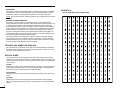
APPENDIX A
LIST OF AVAILABLE ASCII CHARACTERS
032
048
064
080
096
112
160
176
192
208
224
240
033
049
065
081
097
113
161
177
193
209
225
241
034
050
066
082
098
114
162
178
194
210
226
242
035
051
067
083
099
115
163
179
195
211
227
243
036
052
068
084
100
116
164
180
196
212
228
244
037
053
069
085
101
117
165
181
197
213
229
245
038
054
070
086
102
118
166
182
198
214
230
246
039
055
071
087
103
119
167
183
199
215
231
247
040
056
072
088
104
120
168
184
200
216
232
248
041
057
073
089
105
121
169
185
201
217
233
249
042
058
074
090
106
122
170
186
202
218
234
250
043
059
075
091
107
123
171
187
203
219
235
251
044
060
076
092
108
124
172
188
204
220
236
252
045
061
077
093
109
125
173
189
205
221
237
253
046
062
078
094
110
126
174
190
206
222
238
254
047
063
079
095
111
127
175
191
207
223
239
255
TROUBLE AND ARMED LED DISPLAYS
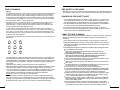
The LCD-4500 has a yellow LED on the right side of the keypad which represents
the trouble status of the panel. There is a red LED just below the yellow one which
represents the armed status of the panel.
KEYPAD ZONES
There are three keys on the keypad labeled [F] Fire, [A] Auxiliary and [P] Panic.
These keys are only functional if they have been programmed by the installer. The
installer should indicate which of these keys are active by placing a colored label
next to the key.
[F] FIRE
Holding this key down for two seconds will sound a fire alarm. The alarm will sound
pulsing and a transmission will be sent to the monitoring station. The keypad will
sound three beeps once the panel has accepted the alarm.
[A] AUXILIARY
Holding this key down for two seconds will send a transmission to the monitoring
station.
[P] PANIC
Holding this key down for two seconds will send a transmission to the monitoring
station. The installer can program this key to sound the alarm or to transmit the alarm
silently.
2